WhatsApp for iOS 26.8.75: what's new?
WhatsApp has released a new iOS update through the App Store, bringing the version up to 26.8.75.
What's new in this update? WhatsApp is widely rolling out a feature that suggests stickers as users type an emoji in their chats, and it's available to everyone!
| Key Points | Details |
|---|---|
| Name of the feature: | Sticker suggestions |
| Status: | Rolling out |
| Compatibility: | WhatsApp for iOS 26.8.75 has been designated as a compatible update. |
| Availability info: | Although WhatsApp has announced this feature, some users may receive it over the coming weeks, as mentioned in the official changelog on the App Store. |
| Previous news: | WhatsApp beta for Android 2.26.9.12: what's new? WhatsApp is working on a premium feature that offers a collection of new ringtones! |
WhatsApp launches suggestions to find and send new stickers
In the post about the WhatsApp beta for iOS 26.1.10.72 update, we announced a feature that proposes suggestions for new stickers. This functionality shows a new sticker whenever an emoji is entered into the chat bar. By tapping the emoji, users can view a selection of new stickers associated with it. Here, users can send the sticker instantly with a single tap.
When we shared the post in January, the feature was available to a limited number of users. Now, WhatsApp is expanding the rollout to all users, making it faster to everyone to find the most appropriate sticker. Following the release of the latest WhatsApp for iOS 26.8.75 update on the App Store, we discovered that WhatsApp is widely rolling out a feature that suggests stickers as users type an emoji in their chats.
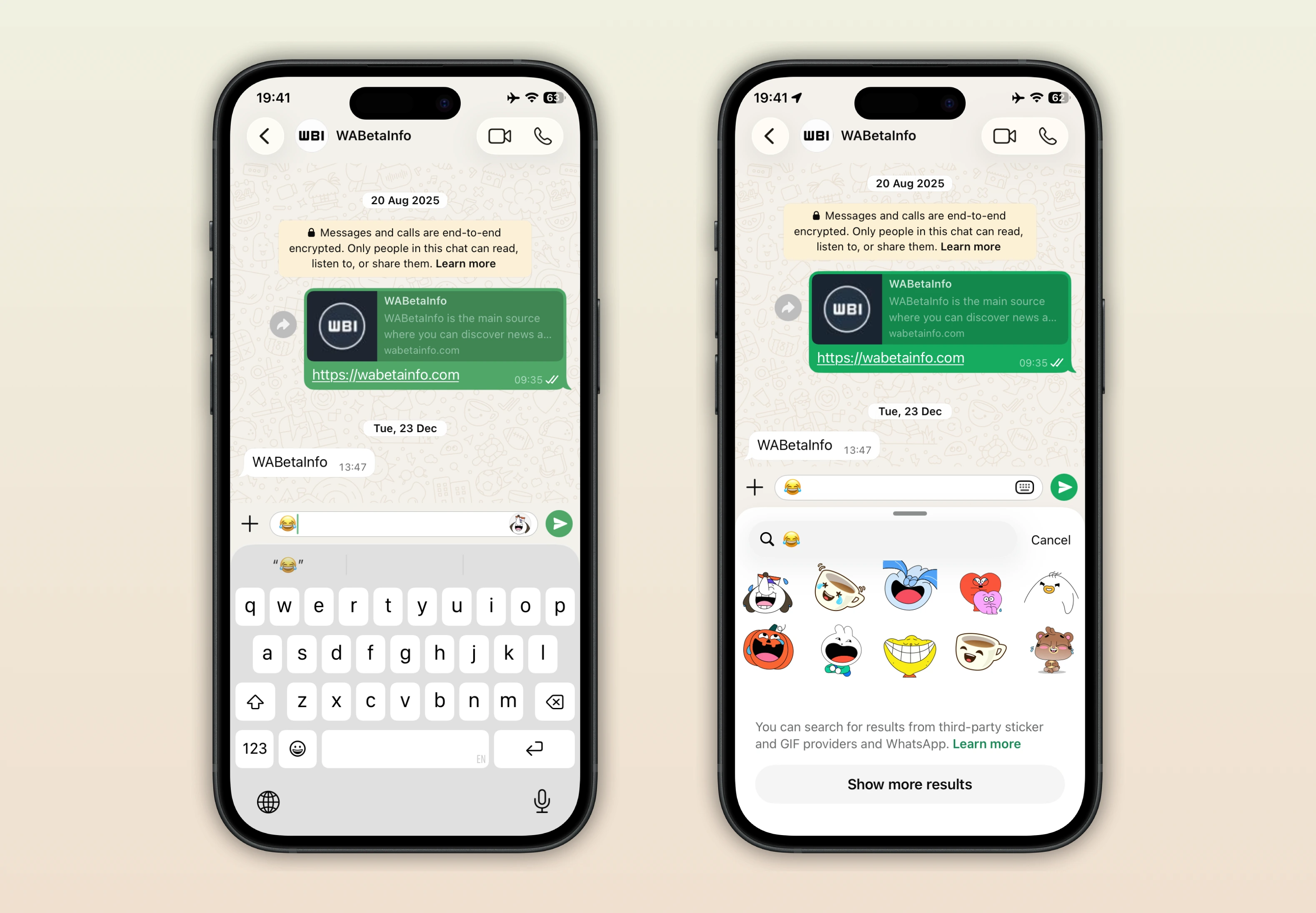
As you can see from the attached image, users who install the latest WhatsApp update from the App Store can get suggestions for new stickers as they type an emoji. In previous updates, users could already discover new stickers directly in the sticker keyboard. Here, users can tap the search icon and type what they want to find in the search bar. In the "More stickers" section, WhatsApp displays a wide selection of third-party stickers that users can pick and send in chats.
With the latest updates, WhatsApp makes it simpler for users to discover new stickers. After typing an emoji in the chat bar, WhatsApp shows a small preview of the first matching sticker. If users tap this preview, WhatsApp will display a limited number of third-party stickers from a sticker provider. If users want to view a higher number of stickers, they can tap on "See more results". Here, users can discover more than 100 new stickers, all updated regularly by the sticker provider to include trending designs.
As mentioned in the official changelog on the App Store, this feature allows users to quickly find the perfect sticker for any conversation or mood. For example, typing a laughing emoji will show stickers that match a humorous reaction. Entering a heart emoji can bring up stickers expressing love or affection. Emojis like the Party Popper are represented with themed stickers that appear in search results, such as celebrative stickers for occasions like Happy Diwali. This makes it easier than ever to find the ideal sticker to match any message, mood, or special occasion.
The feature that suggests stickers as users type an emoji in their chats is available to users who install the latest WhatsApp for iOS updates from the App Store. This feature was announced in the official changelog, so it is now generally available to everyone. However, there may still be cases where some users do not see the sticker suggestions in their chats. In such cases, just wait until the account is fully enabled for the feature. Once active, users will be able to enjoy automatic sticker suggestions for any emoji they type.
Stay Connected with WABetaInfo
Following WABetaInfo on X is the best way to stay informed about new features under development and those released to WhatsApp beta for Android, iOS, Web, and Desktop. We love hearing your feedback, so let us know what you think! You can also explore our dedicated page to discover all our services, or join our Discord Server to chat with others, get help and advice, and stay up to date with the latest WABetaInfo announcements.