WhatsApp for iOS 25.35.74: what's new?
WhatsApp has released a new iOS update through the App Store, bringing the version up to 25.35.74.
What's new in this update? WhatsApp is widely rolling out a feature that lets users leave voice and video messages for missed calls, along with a redesigned calls tab.
| Common questions | Answers |
|---|---|
| Changelog about? | New Calling Features and Design |
| Status? | Rolling out |
| Compatibility? | WhatsApp for iOS 25.35.74 is marked as a compatible update, but some users may experiment with the same feature by installing certain previous updates. |
| I have the same version but I don't have this feature. Why? | Although WhatsApp has officially announced this feature, some users may receive it over the coming weeks, as mentioned in the changelog on the App Store. |
| Previous news? | WhatsApp beta for Android 2.25.36.11: what's new? WhatsApp is working on a feature that introduces recent history sharing to new members who join a group chat! |
WhatsApp Expands Calls Tab Features with Unified Call Hub on iOS
In the article about the WhatsApp for iOS 25.27.73 update, we announced that a feature that improves accessibility and interaction within the Calls tab was available. This functionality enables users to navigate call options more efficiently, making it easier to connect with contacts without unnecessary steps. It also enhances visibility for key actions, ensuring that important features are always within reach. Additionally, it allows users to manage favorites and schedule calls directly from the hub, making communication faster and more convenient.
Although this feature was already highlighted in a previous update, the latest changelog now emphasizes it explicitly. This indicates that the functionality is being rolled out more broadly and it is reaching an increasing number of accounts. Following the release of the latest WhatsApp for iOS 25.35.74 update on the App Store, WhatsApp is rolling out new features for the Calls tab!
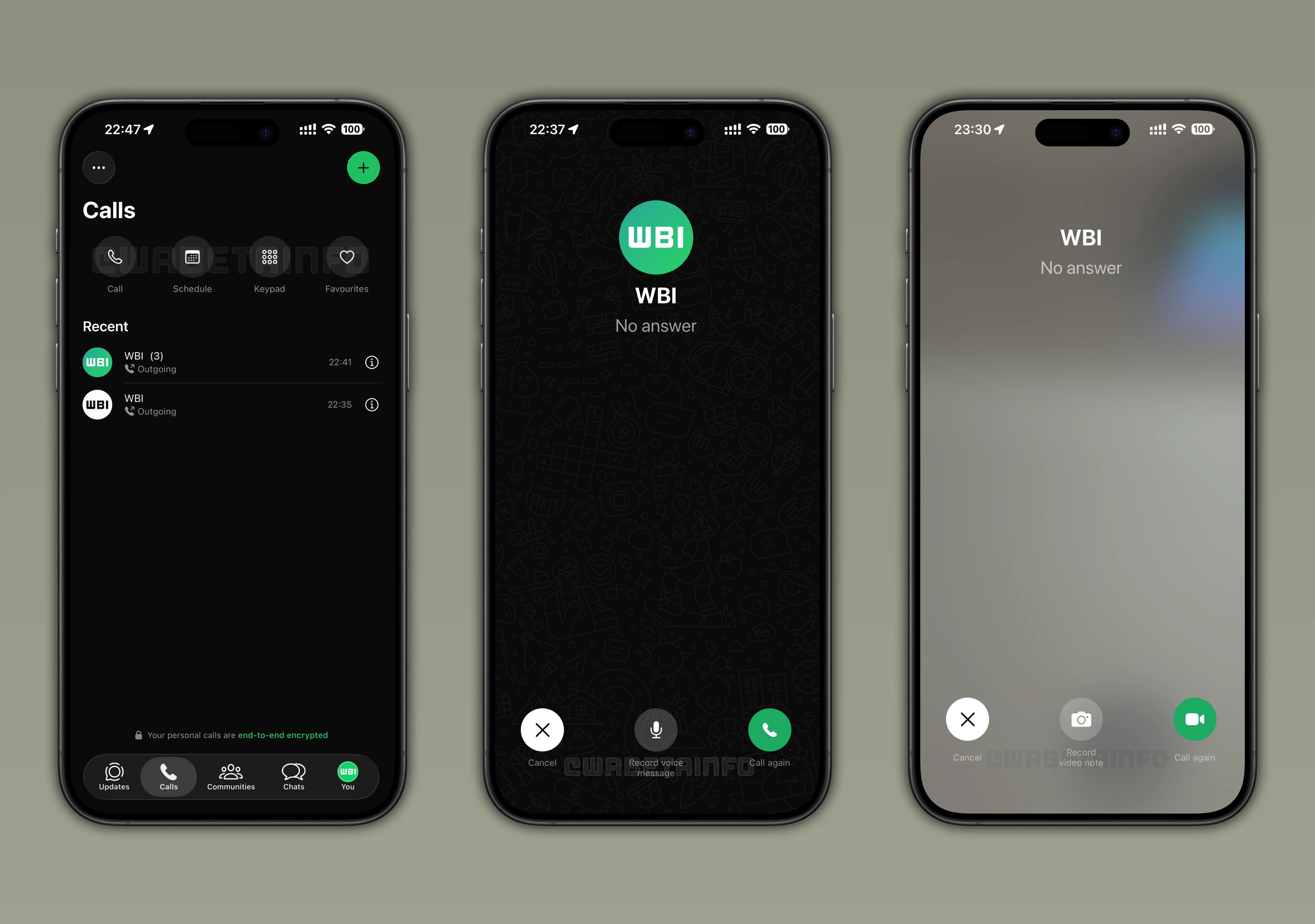
As you can see from the attached screenshot, the unified call hub presents a clean interface where all call-related actions are accessible in one place. The first element in the hub is the call button, which opens a complete list of contacts registered on WhatsApp. From this screen, users can start a one-on-one call or initiate a group call with up to 31 participants. The design ensures that contacts are easily searchable, with quick access to recent calls and suggested contacts based on previous interactions. This reduces the need to leave the Calls tab and improves the speed at which users can start conversations.
The schedule button allows users to plan calls in advance and share the event directly in a chat. When a call is scheduled, all participants receive a notification, which helps avoid missed meetings or misunderstandings. The scheduling feature can be used for both personal catch-ups and professional meetings, providing flexibility for different types of interactions. Users can also reschedule or cancel planned calls without leaving the hub, keeping all call management centralized.
The keypad button offers direct access to the dialer, enabling users to call any number linked to a WhatsApp account. Even if the contact is not saved in the address book, the system confirms whether the number is active on WhatsApp, providing an extra layer of verification. This feature simplifies reaching out to new contacts or businesses while maintaining confidence in the connection's authenticity. For verified business accounts, a checkmark appears next to their phone number, making it easier for users to distinguish official profiles from regular contacts.
Favorites are prominently displayed at the top of the Calls tab when set, allowing immediate access to frequently contacted users or groups. It is possible to initiate a voice or video call, send a message, or reorder their favorites with a few taps. The hub's design ensures that favorites remain visible and actionable, even when scrolling through the call history. This setup mirrors a speed-dial experience while giving users flexibility to organize their contacts according to personal preference.
The combination of scheduling, favorites, and dialer transforms the Calls tab into a true communication hub. It centralizes all actions in a single interface, making it simpler for users to locate and initiate any type of call. The design also enhances efficiency, as users can initiate or manage calls with fewer taps and less time. Each feature complements the others, offering a seamless experience for both casual and frequent users.
Beyond these structural UI improvements, WhatsApp now allows users to leave a voice message when a call is not answered. If a recipient misses a call, the caller can record and send a voice note, which is delivered directly to the recipient's chat alongside the missed call notification. This feature provides an alternative to text messaging, which can be slower or less personal. The voice message ensures that important information is communicated immediately, even if the other person is unavailable to take the call.
The process to leave a voice message is simple: after a missed call, a "Record voice message" option appears in the call interface. Users can record their message with a single tap and send it instantly, without the need to open the chat thread manually. Recipients are notified as soon as the message is sent, allowing them to listen and respond at their convenience. This reduces delays in communication, as important updates or instructions can be shared immediately, even when the recipient is unavailable to answer the call.
Although it is not mentioned in the official changelog, WhatsApp is also rolling out a feature that allows users to record video notes when a recipient does not answer a video call. This works as the counterpart to the missed call voice messages, providing a visual and more personal way to communicate. Users can quickly record a short video directly from the call interface and send it without needing to open the conversation manually. Recipients receive a notification along with the video note, ensuring they are aware of the missed interaction. This feature enhances the overall calling experience by offering an additional option to leave a message when a video call goes unanswered.
Currently, the unified call hub and voice message options are available to a wide number of users who have installed the latest WhatsApp for iOS updates from the App Store. WhatsApp continues to refine the hub to ensure that when a wider rollout occurs, more users can enjoy a stable, bug-free experience. As more accounts gain access, WhatsApp is monitoring performance and feedback to address any potential issues before expanding the release further.
Stay Connected with WABetaInfo
Following WABetaInfo on X is the best way to stay informed about new features under development and those released to WhatsApp beta for Android, iOS, Web, and Desktop. We love hearing your feedback, so let us know what you think! You can also explore our dedicated page to discover all our services, or join our Discord Server to chat with others, get help and advice, and stay up to date with the latest WABetaInfo announcements.