WhatsApp for iOS 25.31.75: what's new?
WhatsApp has released a new iOS update through the App Store, bringing the version up to 25.31.75.
What's new in this update? WhatsApp is rolling out a feature for creating and directly saving stickers to personal packs, and it's available to some users!
| Key Points | Details |
|---|---|
| Name of the feature: | Create and save sticker |
| Status: | Rolling out |
| Compatibility: | WhatsApp for iOS 25.31.75 has been designated as a compatible update, but some users can experiment with the same feature by installing certain previous updates. |
| Availability info: | This feature is available to some users, and it is rolling out to more people over the coming weeks. |
| Previous news: | WhatsApp beta for Android 2.25.32.7: what's new? WhatsApp is working on a feature that lets users create third-party groups to comply with European regulations! |
New WhatsApp Update Brings Improvements to Sticker Management
In the article about the WhatsApp beta for Android 2.25.24.23 update, we announced that a feature that allows users to create a sticker and store it immediately into their collection was available. This functionality introduces a more streamlined process for handling stickers after creation, letting users choose whether to save them directly instead of sending them right away. It simplifies sticker management by allowing quick organization and storage within personal collections, ensuring easier access later.
It appears that WhatsApp now intends to offer iOS users the same sticker creation functionality as it already does for the Android version, aiming to provide a consistent experience across both platforms. Following the release of the latest WhatsApp for iOS 25.31.75 update, which is available on the App Store, we discovered that WhatsApp is rolling out a feature that lets users create a sticker and store it directly into their packs!
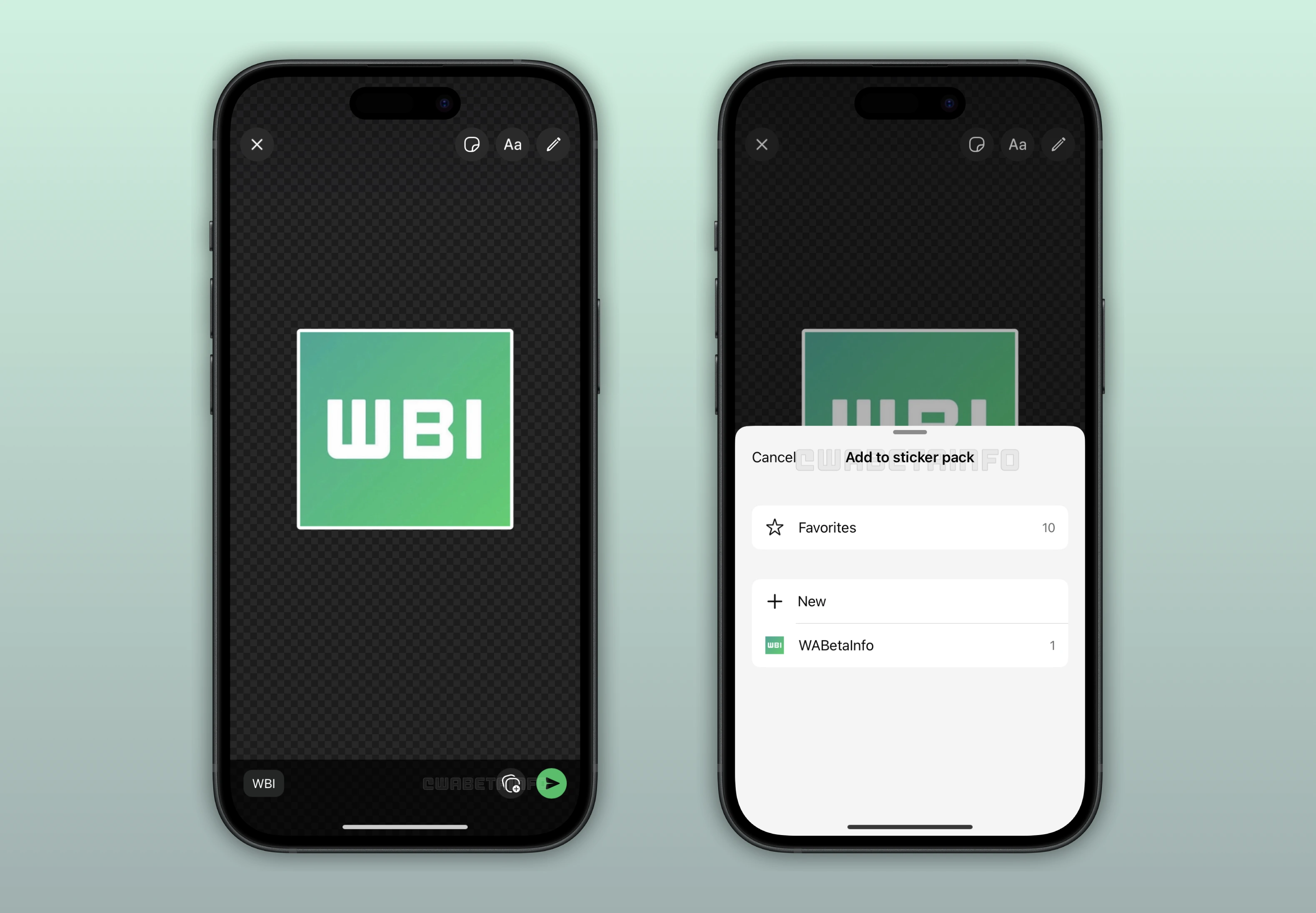
A New Way to Create and Manage Stickers on WhatsApp
With the latest updates, WhatsApp is introducing a new feature that allows users to create stickers and instantly save them to their personal collection. This addition simplifies the sticker creation process, giving users more control over how their stickers are organized. Instead of having to send a sticker immediately after making it, users can now store it for later use. The feature aims to make personalization more efficient and enjoyable for those who love customizing their chats with stickers.
How to Save a Sticker Directly to Your Collection
When creating a sticker, users will now notice a new button next to the "Send" option. By tapping it, a new section appears that allows them to decide whether to add the sticker to an existing pack or create a new one from scratch. This means that users can organize their stickers right away, without needing to send them in a chat first. The new process makes it easier to maintain a tidy collection while keeping everything accessible in one place.
The Convenience of Saving Stickers Directly on WhatsApp
Being able to save stickers without sending them first makes the creation process much smoother. Users can now focus on building their collections at their own pace, without interrupting ongoing chats. This freedom helps keep conversations flowing naturally while still giving room for creativity. Over time, it turns sticker management into a more accurate and enjoyable experience.
Better Control over Sticker Packs from the Start
With this new functionality, users can manage their sticker packs more efficiently from the moment they start creating them. It becomes easier to build collections gradually and to add new stickers to specific packs at any time. This organization also enhances sharing of sticker packs with others, ensuring everything stays consistent. Over time, users can curate complete sets that reflect their own style and preferences.
Feature to Save Stickers Directly is Rolling Out on iOS
The ability to save stickers directly into collections is rolling out to iOS users. Some users, including beta testers, may already have access to the feature through previous updates. However, since the rollout is gradual, not everyone with the latest version will see it right away. As always, availability may expand over the coming weeks as WhatsApp continues to test and refine the experience.
Following WABetaInfo on X is the best way to stay informed about new features under development and those released to WhatsApp beta for Android, iOS, Web, and Desktop. We love hearing your feedback, so let us know what you think! You can also explore our dedicated page to discover all our services, or join our Discord Server to chat with others, get help and advice, and stay up to date with the latest WABetaInfo announcements.