WhatsApp for iOS 25.23.82: what's new?
WhatsApp has released a new iOS update through the App Store, bringing the version up to 25.23.82.
What's new in this update? WhatsApp is rolling out a feature that replaces voice and video call buttons with one unified calling menu, and it's available to some users!
| Key points | Details |
|---|---|
| Name of the feature: | Unified call menu |
| Status: | Rolling out |
| Compatibility: | WhatsApp for iOS 25.23.82 has been designated as a compatible update. |
| Availability info: | This feature is available to some users and it's rolling out to more people over the coming weeks. |
| Thanks: | Thiago, Sc, Anon 4 Justice, A7mad, UnluckyTester, Hypogriff, and Traiti, for testing and reporting. |
| Previous news: | WhatsApp beta for iOS 25.23.10.81: what's new? WhatsApp is rolling out a feature that allows users to choose a chat theme on the business app! |
UNIFIED CALL MENU
In the article about the WhatsApp beta for Android 2.25.5.21 update, we announced that a new menu that organizes call options was available. This feature replaces the separate voice and video call buttons with a single call button that opens a menu, letting users choose between a voice call, video call, or other options. This redesign also helps users prevent accidental calls by requiring users to confirm their call choice before dialing. It appears that WhatsApp now intends to offer iOS users the same redesigned menu for calls as it already does for the Android version, aiming to provide a consistent experience across both platforms. Following the release of the latest WhatsApp for iOS 25.23.82 update, which is available on the App Store, we discovered that WhatsApp is rolling out a feature that replaces voice and video call buttons with one unified calling menu!
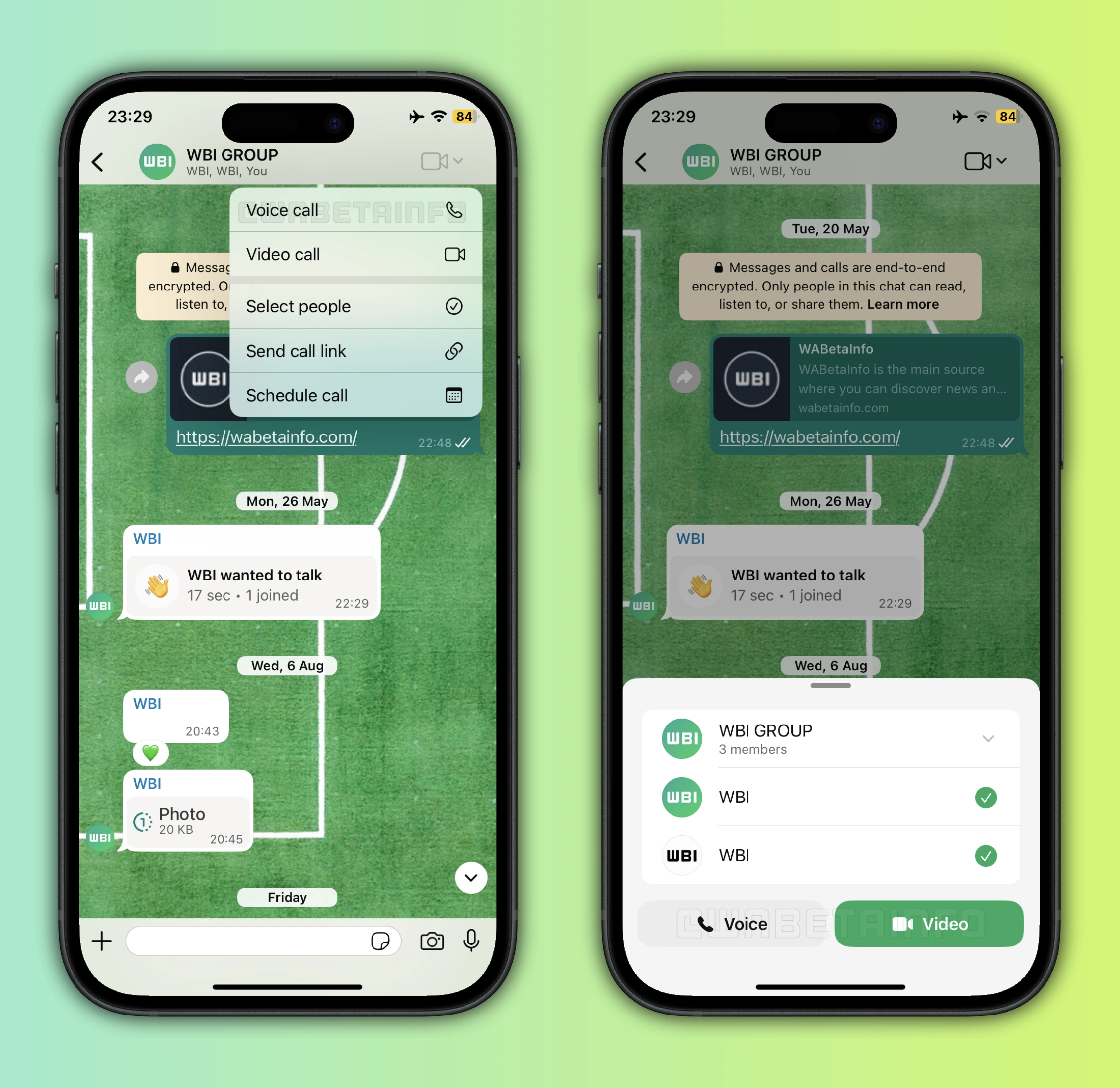
As you can see from the attached screenshot, some users can now explore a new feature that introduces a dedicated call menu in certain conversations. Specifically, this menu is available in chats with businesses, allowing users to quickly access all calling options without navigating through multiple buttons. It replaces the separate voice and video call buttons, which are now combined and accessible within the same menu. In these chats, the call button opens a menu that includes options to start a voice call, initiate a video call, create a call link directly from the conversation, or schedule a call for a later time. By consolidating these actions into one menu, WhatsApp makes it easier and faster for users to manage calls with businesses.
The same call menu is also available in group chats, but it offers additional functionality tailored to group interactions. In group chats, users still find the four standard actions: voice call, video call, creating a call link, and scheduling a call. On top of these, there is an extra option linked to the group members section. This option allows users to select specific members of the group with whom they want to start a call. Users can choose either a voice call or a video call for this subgroup, providing more control over who participates.
This feature is particularly useful for avoiding unnecessary calls to the entire group. For example, if a user wants to discuss a specific topic with a few members, they can now start a call only with those participants without the need to open the Calls tab. It prevents disruptions for the rest of the group and makes communication more focused and efficient. Selecting participants is intuitive: the menu displays all group members, and users can simply tap on the ones they want to include in the call. Once the selection is made, the user can choose whether to start a voice call or a video call.
The redesigned menu also reduces the risk of accidental calls, as users must first confirm which type of call they want to make. In group chats, this extra step ensures that calls only reach the intended participants. Creating a call link directly from the menu is another time-saving addition, allowing users to share a call link without opening the separate Calls tab. Scheduling a call adds further flexibility, making it easier for users to plan discussions in advance.
This new functionality aims to make calling options more organized and provide a more user-friendly experience. By centralizing all call-related actions in one menu, users have greater control and fewer chances of mistakes. Whether in chats with businesses or group conversations, the new call menu streamlines the process and enhances usability. It's worth noting that there are currently no plans to bring this new feature to individual chats outside of business conversations.
A feature that replaces voice and video call buttons with one unified calling menu is available to some users who install the latest versions of WhatsApp for iOS from the App Store, and it's rolling out to more people over the coming weeks.
Following WABetaInfo on X is the best way to stay informed about new features under development and those released to WhatsApp beta for Android, iOS, Web, and Desktop. We love hearing your feedback, so let us know what you think! You can also explore our dedicated page to discover all our services, or join our Discord Server to chat with others, get help and advice, and stay up to date with the latest WABetaInfo announcements.