WhatsApp for iOS 25.22.83: what's new?
WhatsApp has released a new iOS update through the App Store, bringing the version up to 25.22.83.
What's new in this update? WhatsApp is rolling out a feature to share status updates from other apps, and it's available to some users!
| Key points | Details |
|---|---|
| Name of the feature: | Share status update |
| Status: | Rolling out |
| Compatibility: | WhatsApp for iOS 25.22.83 has been designated as a compatible update, but some users may get the same feature by installing certain previous updates. |
| Availability info: | This feature is available to some users and it's rolling out to more people over the coming weeks. |
| Thanks: | Spencer and Thiago, for testing and reporting. |
| Previous news: | WhatsApp beta for Android allows users to verify their Instagram profile links! |
SHARE STATUS UPDATE
In the article about the WhatsApp beta for Android 2.25.20.3 update, we announced that a feature to create status updates from the share sheet was available. This feature allows users to share photos or videos directly as status updates from any app by selecting the "My Status" option in the Android share menu. It simplifies the process by routing the selected media straight to WhatsApp's status editor, where users can add text, emojis, drawings, or captions before posting. It appears that WhatsApp now intends to offer iOS users the same status sharing functionality as it already does for the Android version, aiming to provide a consistent experience across both platforms. Following the release of the latest WhatsApp for iOS 25.22.83 update, which is available on the App Store, we discovered that WhatsApp is rolling out a feature to share status updates from other apps!
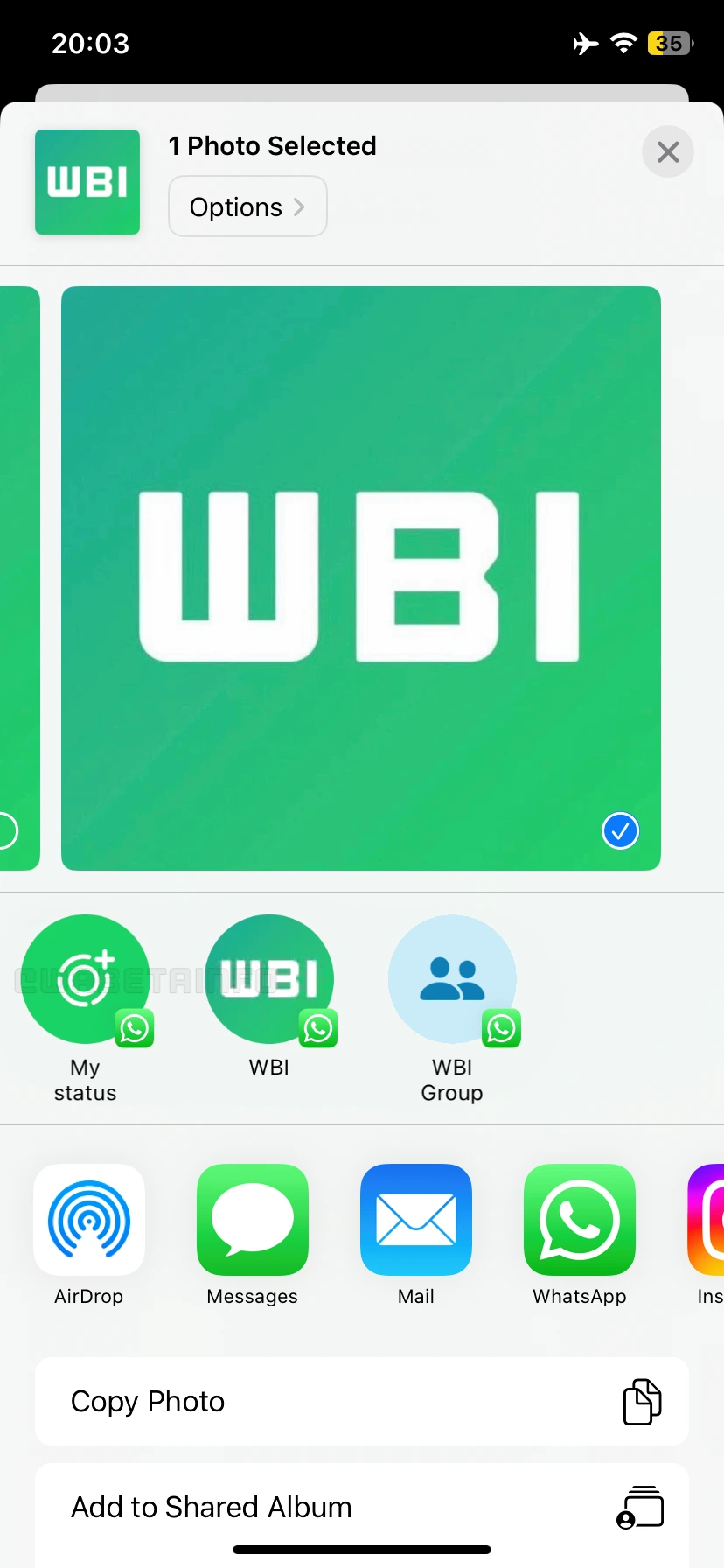
As you can see from the attached screenshot, some users can now explore a new feature that allows them to share media directly as a status update through the iOS share sheet. Every time the user wants to share a photo or video, they will now have the option to share it directly as a status update. The "My Status" option appears consistently in the iOS share sheet, regardless of which app the media is being shared from. Previously, to share a photo as a status update from another app, users had to select WhatsApp as the target app first. Here, users can select individual contacts or groups to share the item with, and the option to share the selected media as a status update is also available. However, this process requires navigating through an additional step before the content can be posted.
With the latest update, there is a dedicated "My Status" option directly within the iOS share sheet instead of navigating through WhatsApp's contact list. This new option saves users a step in the sharing process, making it faster and more convenient to post status updates. By removing the intermediate step of opening WhatsApp and selecting contacts, the flow becomes more streamlined since users can instantly share media as a status update directly from any app without extra navigation.
This enhancement is especially convenient because it allows users to share photos or videos as status updates directly through a dedicated shortcut. This means users can quickly post content with fewer taps and interruptions. The new flow reduces friction by letting users jump straight into editing their status, where they can add text, emojis, or drawings before publishing. As a result, sharing becomes faster and more intuitive, making it easier for users to capture and share moments in real-time without disrupting their current activity.
A feature to share status updates from other apps is available to some users who install the latest versions of WhatsApp for iOS from the App Store, and it's rolling out to more people over the coming weeks.
Following WABetaInfo on X is the best way to stay informed about new features under development and those released to WhatsApp beta for Android, iOS, Web, and Desktop. We love hearing your feedback, so let us know what you think! You can also explore our dedicated page to discover all our services, or join our Discord Server to chat with others, get help and advice, and stay up to date with the latest WABetaInfo announcements.