WhatsApp for iOS 25.18.85: what's new?
WhatsApp has released a new iOS update through the App Store, bringing the version up to 25.18.85.
What's new in this update? WhatsApp is rolling out a feature that allows users to add an avatar photo to their profile, and it's available to some users!
| Common questions | Answers |
|---|---|
| Name of the feature? | Avatar profile photo |
| Status? | Rolling out |
| Compatibility? | WhatsApp for iOS 25.18.85 has been designated as a compatible update. |
| I have the same version but I don't have this feature. Why? | This feature is available to some users and it's rolling out to more people over the coming days. |
| Thanks: | Akan, for testing and reporting. |
| Previous news? | WhatsApp beta for Android 2.25.19.15: what's new? WhatsApp is working on a feature to request an account report for status and channel ads! |
AVATAR PROFILE PHOTO
In the article about the WhatsApp beta for Android 2.25.18.14 update, we announced that a feature that allows users to add an avatar to their profile was available. This new feature enhances user personalization by allowing avatars to appear alongside the regular profile photo, giving users the option to showcase both a real image and a stylized version of themselves in a single and dynamic presentation. It appears that WhatsApp now intends to offer iOS users the same avatar functionality as it already does for the Android version, aiming to provide a consistent experience across both platforms. Following the release of the latest WhatsApp for iOS 25.18.85 update, which is available on the App Store, we discovered that WhatsApp is rolling out a feature that allows users to add an avatar photo to their profile!
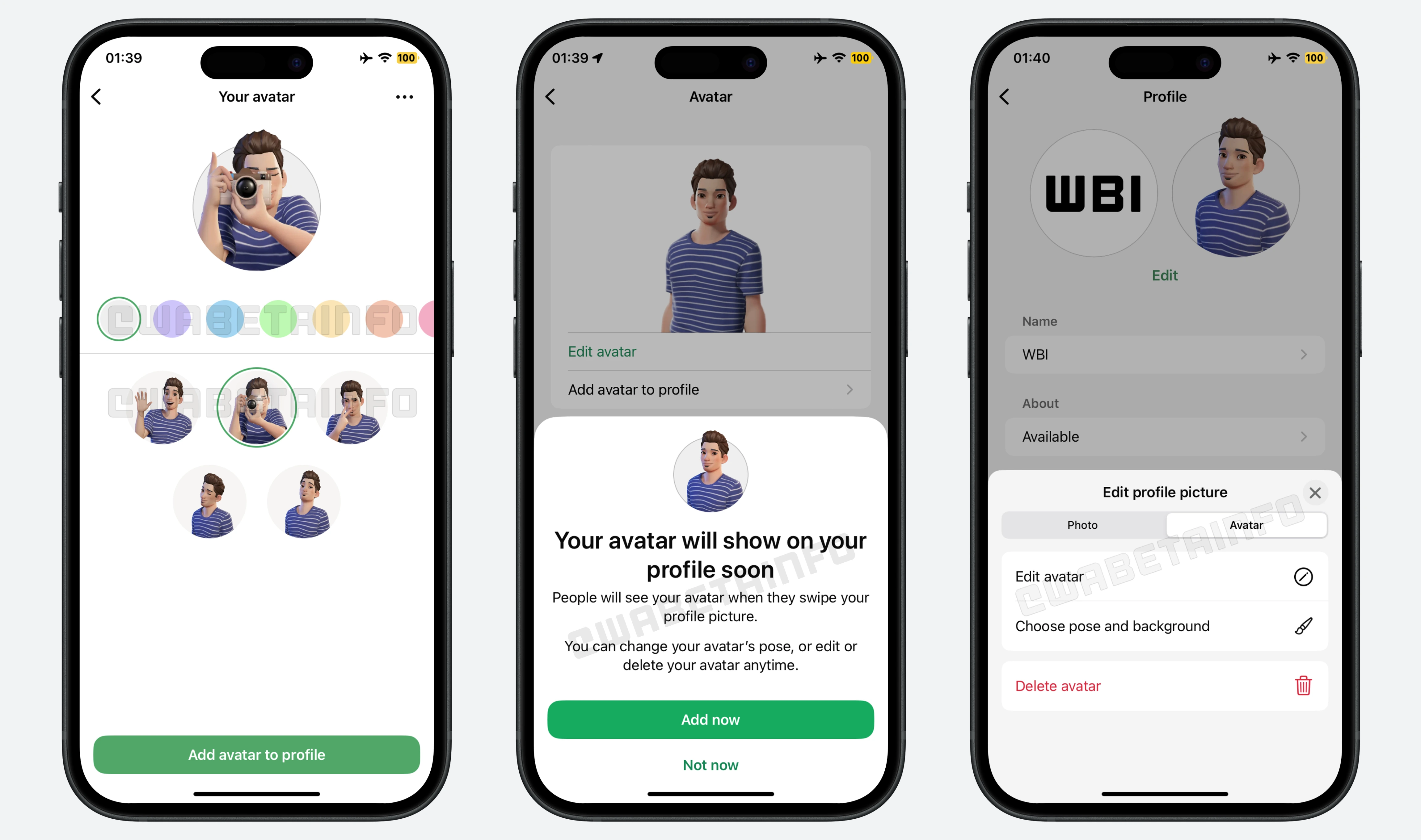
As you can see from the attached screenshot, some users can explore a new feature to personalize their profile even further through an avatar photo. Users who have already configured their avatar will find a new option within the avatar settings to add it directly to their profile. This option becomes visible only if an avatar has previously been created and customized, ensuring that the feature is only accessible to users who have completed the initial avatar setup. Once selected, the setting initiates the avatar photo creation process, where users are prompted to choose a background color that best represents their personality or current mood. Additionally, they can select one of five predefined animated poses for their avatar.
After the customization is complete, WhatsApp will automatically save the chosen configuration to ensure that the selected avatar, background color, and animated pose are consistently displayed on the user's profile. The avatar will then be displayed on the user's profile, right next to their regular profile picture. When other users open the chat info screen of a contact who has enabled this feature, they will see the custom avatar appear when they swipe the profile picture. This introduces a playful and engaging coin flip animation that transitions between the real photo and the avatar.
To verify that everything is set up correctly, users can return to their profile settings. From there, they will have the ability to modify the avatar, change the selected pose, or pick a different background color. This ensures that the avatar always reflects their latest preferences and style. It's important to note that users have full control over their avatar at all times, as they can easily remove it from their profile in just a few taps. This gives users the freedom to switch between a traditional profile photo and an avatar-enhanced version whenever they like.
A feature that allows users to add an avatar photo to their profile is available to some users who install the latest versions of WhatsApp for iOS from the App Store, and it's rolling out to more people over the coming days.
Stay up-to-date on WhatsApp news by following WABetaInfo on X where you can also discover other new features for WhatsApp beta for Android, iOS, Web/Desktop, and Windows.
Do you like this news? Please, let us know on X: we love hearing your feedback! If you're curious to know where you can find WABetaInfo, there is a dedicated page where you can discover our services.
In addition, we have set up a Discord Server where you can chat with other people, get help and advice, and stay up to date with the latest announcements from WABetaInfo.