WhatsApp beta is testing a new log out feature on Android
WhatsApp is working on a new feature that will guide users on how to log out of the app. The feature will introduce a new experience with clearer options, making it easier for users to manage their account sessions.
| Key Points | Details |
|---|---|
| Name of the feature: | Log out |
| Status: | Under development |
| Availability info: | This feature is currently in development and not yet available for beta testing. In the meantime, you can read this article for a sneak peek. |
| Previous news: | WhatsApp is rolling out guest chats on Android and iOS! |
WhatsApp is working on a new log out experience to make account management easier
In the post about the WhatsApp beta for Android 2.23.17.8 update, we announced that a multi-account feature was available to Android beta testers. This functionality allows users to add and manage multiple WhatsApp accounts within the same app. Each account keeps its own separate chat history, media, and notification settings. Users can easily switch between accounts from a dedicated menu in the app. This feature makes it convenient for those users who manage more than one profile.
The multi-account feature also supports logging out. However, this action removes the account from the app, and it requires users to restore their chat history. Today, WhatsApp is developing a new experience to make this process more user-friendly and seamless. Following the release of the latest WhatsApp beta for Android 2.26.11.5 update, which is available on the Google Play Store, we discovered that WhatsApp is working on a feature that guides users on how to log out of the app.
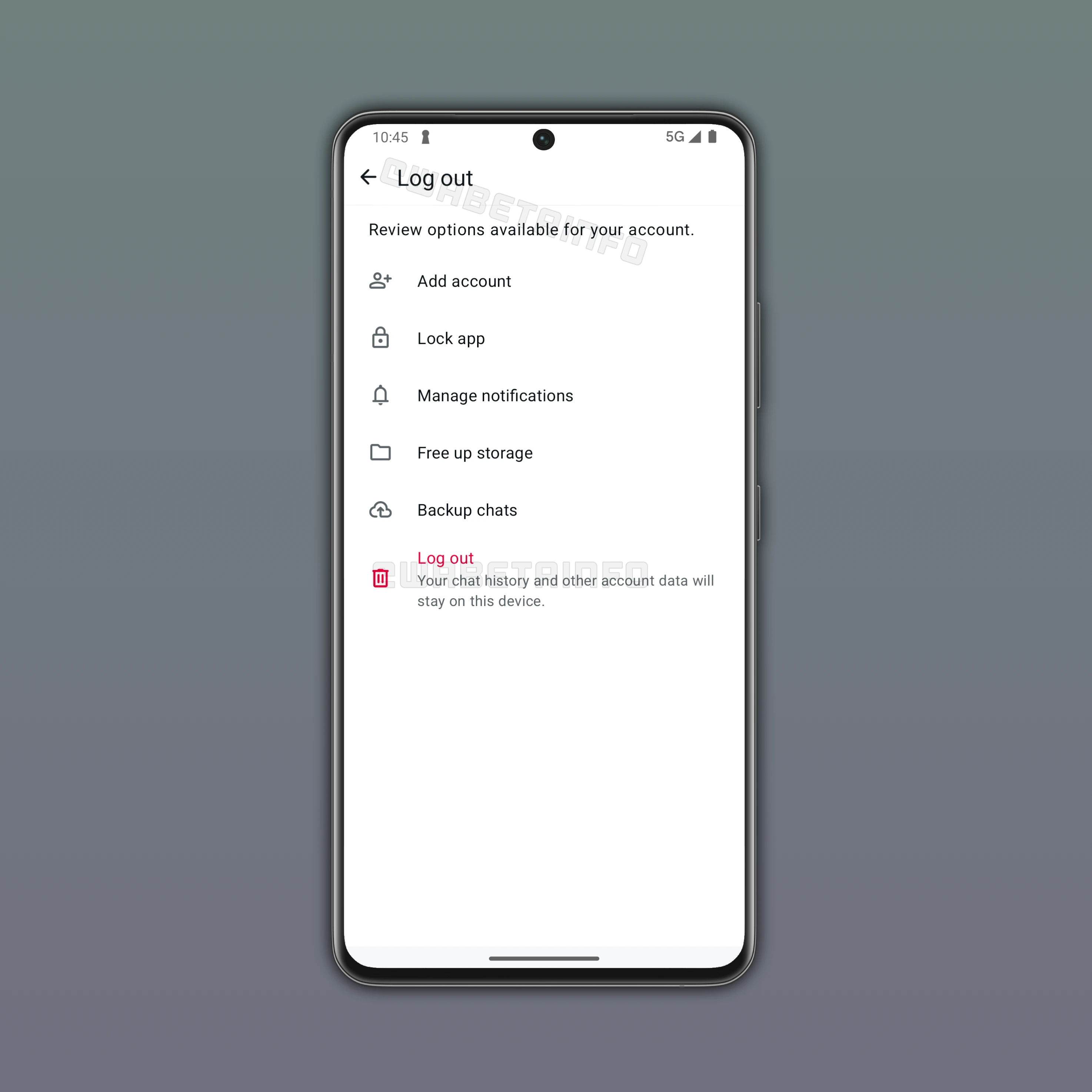
As you can see from the attached image, WhatsApp is exploring the implementation of a feature that would allow users to temporarily log out of an account without losing their chat history. This update is scheduled for release in the future, but it already promises to add a new layer of convenience to the user experience. Currently, users can remove any secondary accounts they have added to WhatsApp right within the app settings. However, the primary account cannot be removed through this process. As a result, users must uninstall the app entirely if they want to log out of their primary account.
With a future update, WhatsApp is making this process easier than ever. WhatsApp is working on a new dedicated log-out section that will allow users to review all available options before disconnecting from an account. Adding a new account will be the first option available in this section. Many users may not know that WhatsApp supports more than one account within the app. This means that some users might believe that they need to delete their primary account to use another profile. By highlighting the option to add another account, WhatsApp aims to prevent unnecessary deletion of the main account.
The log-out section will also suggest users to enable the app lock feature. This feature requires the user to authenticate when they open WhatsApp. Some users may want to log out specifically to prevent others from accessing the app on their device. With this suggestion, WhatsApp makes users aware of an alternative way to protect access to the app. The interface will also encourage users to manage their notifications. Some users may consider logging out because they receive too many notifications. However, this suggestion will help them understand that they can simply adjust their notification settings instead.
This feature will provide options to free up storage. This feature allows users to remove unnecessary media or old messages instead of logging out of their account in an attempt to clear space on their device. WhatsApp will also highlight the option to back up chats. This reminder can help users ensure their conversations are safely stored before making any changes to their account.
Users will be able to clearly see which actions are available and how they affect their accounts. If none of these options meet their needs, users will still be able to proceed with logging out, including from their primary account. Logging out will not remove the chat history from the device. However, creating a backup is still recommended to ensure conversations remain safely stored. With this feature, users can finally take a break from the app without losing their messages, since uninstalling WhatsApp directly will remove the local chat history from the device unless it has been previously backed up.
Note that this feature is currently in an early stage of development. For this reason, we cannot guarantee that it will be released. WhatsApp often develops many features and evaluates them before deciding whether they are suitable for users. If the evaluation is positive, the feature may be rolled out to a limited number of beta testers. Any final decision regarding its availability will be made at a later stage.
The feature that guides users on how to log out of the app is currently under development, and it is planned for release in a future update. At the moment, WhatsApp is refining how users can log out of the app. Once testing is complete, WhatsApp will evaluate whether the feature should be officially released to beta testers.
Stay Connected with WABetaInfo
Following WABetaInfo on X is the best way to stay informed about new features under development and those released to WhatsApp beta for Android, iOS, Web, and Desktop. We love hearing your feedback, so let us know what you think! You can also explore our dedicated page to discover all our services, or join our Discord Server to chat with others, get help and advice, and stay up to date with the latest WABetaInfo announcements.