WhatsApp beta for iOS 26.6.10.70: what's new?
WhatsApp has released a new iOS update through the TestFlight beta Program, bringing the version up to 26.6.10.70.
What's new in this update? WhatsApp is rolling out a feature that lets users filter the media gallery in their chats, and it's available to some beta testers!
| Key Points | Details |
|---|---|
| Name of the feature: | Filter media files in chats |
| Status: | Rolling out |
| Compatibility: | WhatsApp beta for iOS 26.6.10.70 has been designated as a compatible update, but some users may experiment with the same feature by installing certain previous updates. |
| Availability info: | This feature is available to some beta testers, and it is rolling out to more users over the coming weeks. |
| Thanks: | IgnacioAF, Thiago, and futurebound, for testing and reporting. |
| Previous news: | WhatsApp is rolling out Liquid Glass for the Business app on iOS! |
WhatsApp is rolling out media filters for the media gallery
In the post about the WhatsApp beta for Android 2.25.31.10 update, we announced a feature that allows users to filter their media files. This functionality lets Android users quickly view a focused overview of shared media within a conversation. WhatsApp has implemented new options that let users display only specific media files. These filters make it easier to locate important media files without scrolling through the entire gallery.
This functionality was available to some Android beta testers last year, but WhatsApp is now offering the same feature to some iOS users as well. Following the release of the latest WhatsApp beta for iOS 26.6.10.70 update, which is available on the TestFlight app, we discovered that WhatsApp is rolling out a feature that lets users filter the media gallery in their chats.
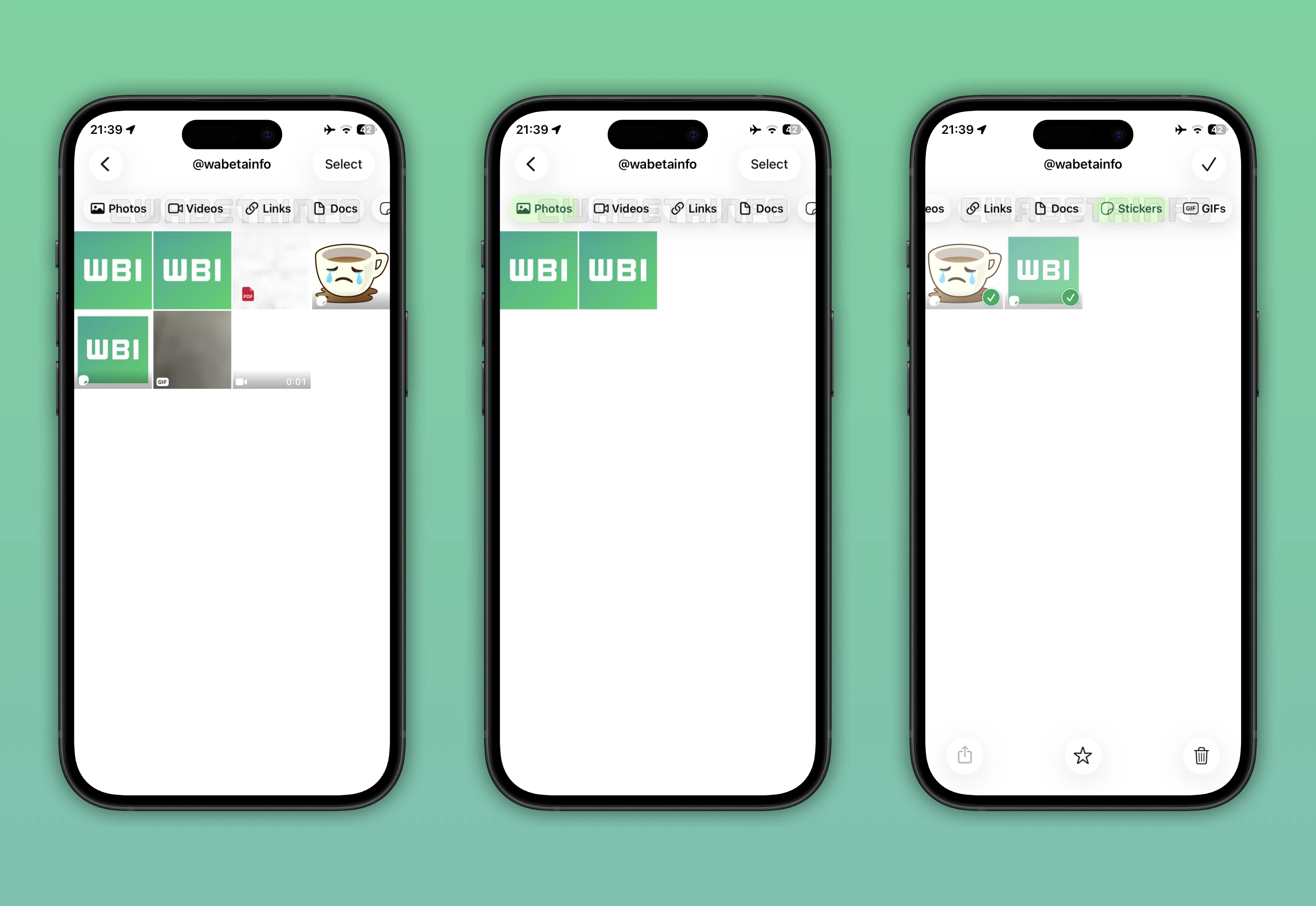
As you can see from the attached screenshot, WhatsApp is introducing a redesigned interface for the gallery. In the previous update, users could already filter this section by tapping "Media", "Links", "Documents". These options could generate a limited overview based on what users preferred to see. Instead, the new update provides additional options presented with a modern interface that enhances the gallery experience.
This feature adds the chat name to the section title. The title makes it easier for users to see which conversation they are viewing at a glance. It replaces the previous filter view, which is now located under the navigation bar. The new filters let users view only shared photos, videos, or GIFs instead of all media files. This addition helps users quickly find specific content, as filtering media files reduces the number of items displayed in the gallery.
Despite the updated interface and options, WhatsApp continues to provide controls for filtering documents and links. This means that users can still manage these items as they did in the previous version. It's worth noting that when users do not select a filter, WhatsApp will still display the full gallery without excluding any media files. This ensures that users can always access the complete set of shared content when needed.
Some users may also get a separate filter that displays only stickers shared in a conversation. The new sticker filter makes it easier for users to find specific stickers without scrolling through other media files. It is particularly helpful when users want to find a sticker that was shared a long time ago. Previously, searching for stickers was complicated because there was no way to filter stickers without recalling the exact date. Now, some users can quickly narrow down the gallery to just stickers. The filter also makes it simpler to quickly mark multiple stickers as favorites.
The feature that lets users filter the media gallery in their chats is available to some beta testers who install the latest WhatsApp beta for iOS update from TestFlight. This gradual rollout allows WhatsApp to monitor performance before the official release. As often happens, some users who install the latest version from the App Store may also gain access to the feature. Expanding availability for different groups of users allows WhatsApp to get feedback from a broader audience.
Stay Connected with WABetaInfo
Following WABetaInfo on X is the best way to stay informed about new features under development and those released to WhatsApp beta for Android, iOS, Web, and Desktop. We love hearing your feedback, so let us know what you think! You can also explore our dedicated page to discover all our services, or join our Discord Server to chat with others, get help and advice, and stay up to date with the latest WABetaInfo announcements.