WhatsApp beta for iOS 26.5.10.76: what's new?
WhatsApp has released a new iOS update through the TestFlight beta Program, bringing the version up to 26.5.10.76.
What's new in this update? WhatsApp is rolling out a feature that redesigns the settings page with a cover photo, and it's available to some beta testers!
| Key Points | Details |
|---|---|
| Name of the feature: | Redesigned settings page with cover photos |
| Status: | Rolling out |
| Compatibility: | WhatsApp beta for iOS 26.5.10.76 has been designated as a compatible update. |
| Availability info: | This feature is available to some beta testers, and it is rolling out to more users over the coming weeks. |
| Thanks: | IgnacioAF and Subii Fizzy, for testing and reporting. |
| Previous news: | WhatsApp beta for Android 2.26.6.4: what's new? WhatsApp is rolling out a feature that adds a settings tab to the interface! |
WhatsApp is rolling out a redesigned settings page with cover photos
In the post about the WhatsApp beta for Android 2.26.6.4 update, we announced a feature that adds a settings tab to the interface. This functionality allows Android users to quickly open the settings page through one of the new entry points available. The first entry point is placed in the top app bar, next to the overflow menu. The second entry point is located in the bottom navigation bar as a tab, and it's called "You". Both entry points show a profile icon, making it simpler for users to understand that they open the app settings.
Now, WhatsApp is introducing a similar feature to a select group of iOS users, bringing a revamped interface to the settings screen. This aligns the experience across both mobile platforms and it allows more users to access the same functionality. Following the release of the latest WhatsApp beta for iOS 26.5.10.76 update, which is available on the TestFlight app, we discovered that WhatsApp is rolling out a feature that redesigns the settings page with a cover photo.
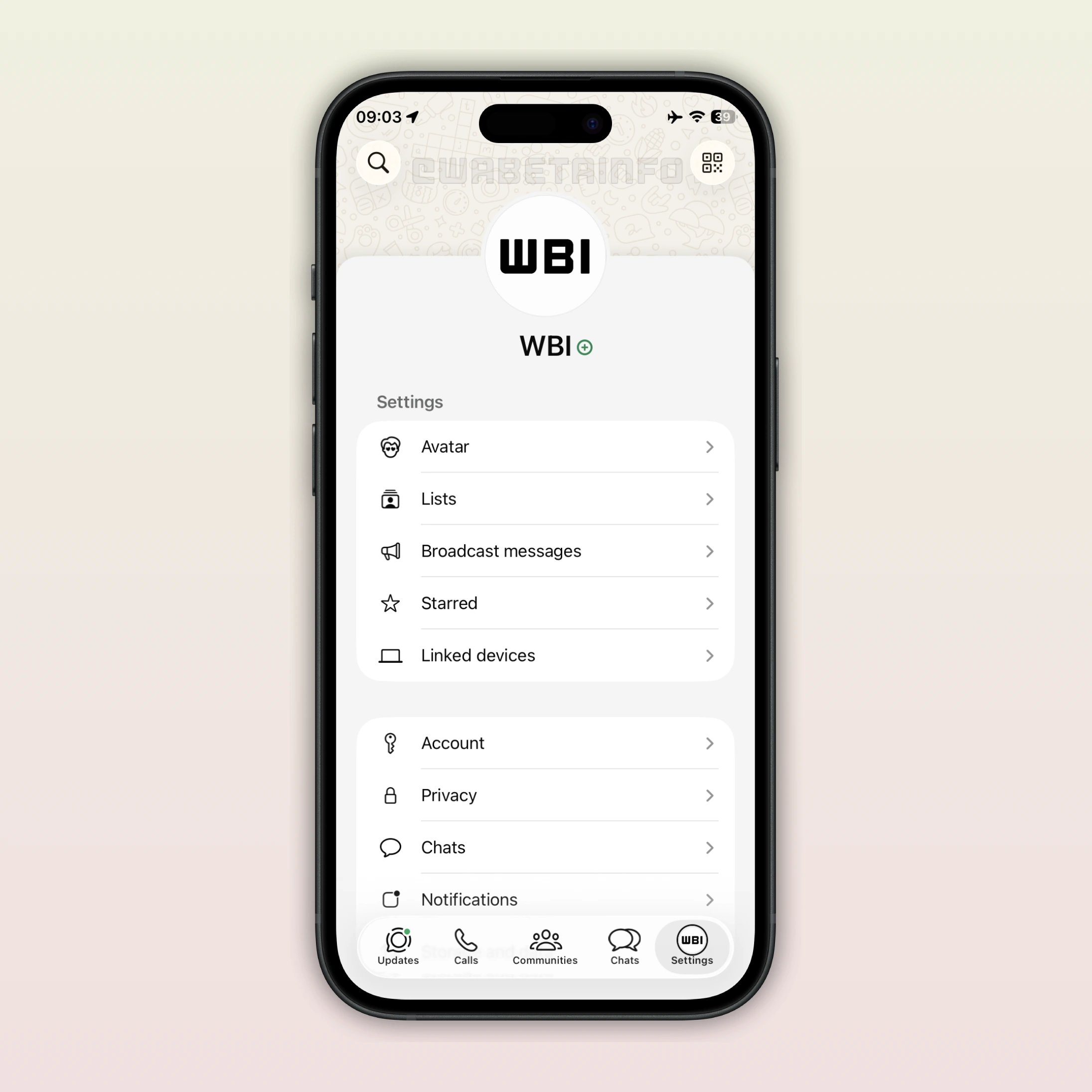
As you can see from the attached screenshot, some beta testers can explore a feature that introduces a redesigned interface for the settings page. As reported in the post about the WhatsApp beta for iOS 26.1.10.71 update, WhatsApp is developing cover photos. Cover photos are large header images displayed at the top of a profile, allowing users to personalize their account with a wider visual element in addition to their profile picture. Cover photos will also be shown in the chat info screen, where they appear as a prominent banner at the top of the interface.
Cover photos are not available yet. However, WhatsApp now displays a default cover photo at the top of the settings tab. This suggests that WhatsApp is preparing users for the upcoming feature, helping them become familiar with the new layout. We believe that WhatsApp may be smoothing the transition ahead of the official launch by introducing a default header image in advance. As a result, the feature could be gradually rolled out to some beta testers over the next few weeks.
It's worth noting that WhatsApp is not only adding cover photos to the top of the Settings page, but the Settings tab is also being updated with additional refinements. Specifically, WhatsApp now displays the profile photo centered on the screen instead of placing it in a dedicated cell within the table view. Some users may also see their profile picture icon directly in the tab bar. While certain accounts will continue to display "Settings" as the tab name, others may notice that it has been renamed to "You". Similar to what happened on Android, WhatsApp had already tested these changes on iOS with some users last year and WhatsApp is now gradually bringing them back for another rollout.
Even on iOS, the profile icon directly in the tab bar helps users understand which account is currently active. WhatsApp is gradually rolling out a feature that allows users to manage multiple accounts from the same app. This means users can use two WhatsApp accounts without having to rely on WhatsApp Business or another device to use their second profile. WhatsApp updates the profile icon in the tab bar when users switch to the other account. This action makes it clearer for users which account they're using. Note that these changes apply regardless of whether the Liquid Glass interface is enabled.
The feature that redesigns the settings page with a cover photo is available to some beta testers who install the latest WhatsApp beta for iOS update from TestFlight. This gradual rollout allows WhatsApp to monitor performance and address any potential issues before the official release. As often happens, some users who install the latest version from the App Store may also gain access to the feature. Expanding availability in this way allows WhatsApp to gather feedback from a broader audience.
Stay Connected with WABetaInfo
Following WABetaInfo on X is the best way to stay informed about new features under development and those released to WhatsApp beta for Android, iOS, Web, and Desktop. We love hearing your feedback, so let us know what you think! You can also explore our dedicated page to discover all our services, or join our Discord Server to chat with others, get help and advice, and stay up to date with the latest WABetaInfo announcements.