WhatsApp beta for iOS 26.5.10.73: what's new?
WhatsApp has released a new iOS update through the TestFlight beta Program, bringing the version up to 26.5.10.73.
What's new in this update? WhatsApp is rolling out a feature that allows users to save photo and video drafts, and it's available to some beta testers!
| Key Points | Details |
|---|---|
| Name of the feature: | Save photo and video drafts |
| Status: | Rolling out |
| Compatibility: | WhatsApp beta for iOS 26.5.10.73 has been designated as a compatible update. |
| Availability info: | This feature is available to some beta testers, and it is rolling out to more users over the coming weeks. |
| Previous news: | WhatsApp beta for Android 2.26.5.13: what's new? WhatsApp is working on a feature that allows users to choose close friends for status updates! |
WhatsApp is rolling out photo and video drafts on iOS
In the post about the WhatsApp beta for Android 2.25.37.1 update, we announced a feature that lets users save drafts for their status updates. This functionality allows Android users to save any progress they have made while creating an update. When users start making a status with text, drawings, or stickers, they may want to finish it later instead of posting it right away. In these cases, the new saving tool helps users keep all their changes, so they do not have to start over.
This feature isn't currently available for the iOS app yet. However, WhatsApp is now launching a similar tool for chats and groups, making it easier for iOS users to manage their media drafts. Following the release of the latest WhatsApp beta for iOS 26.5.10.73 update, which is available on the TestFlight app, we discovered that WhatsApp is rolling out a feature that allows users to save photo and video drafts.
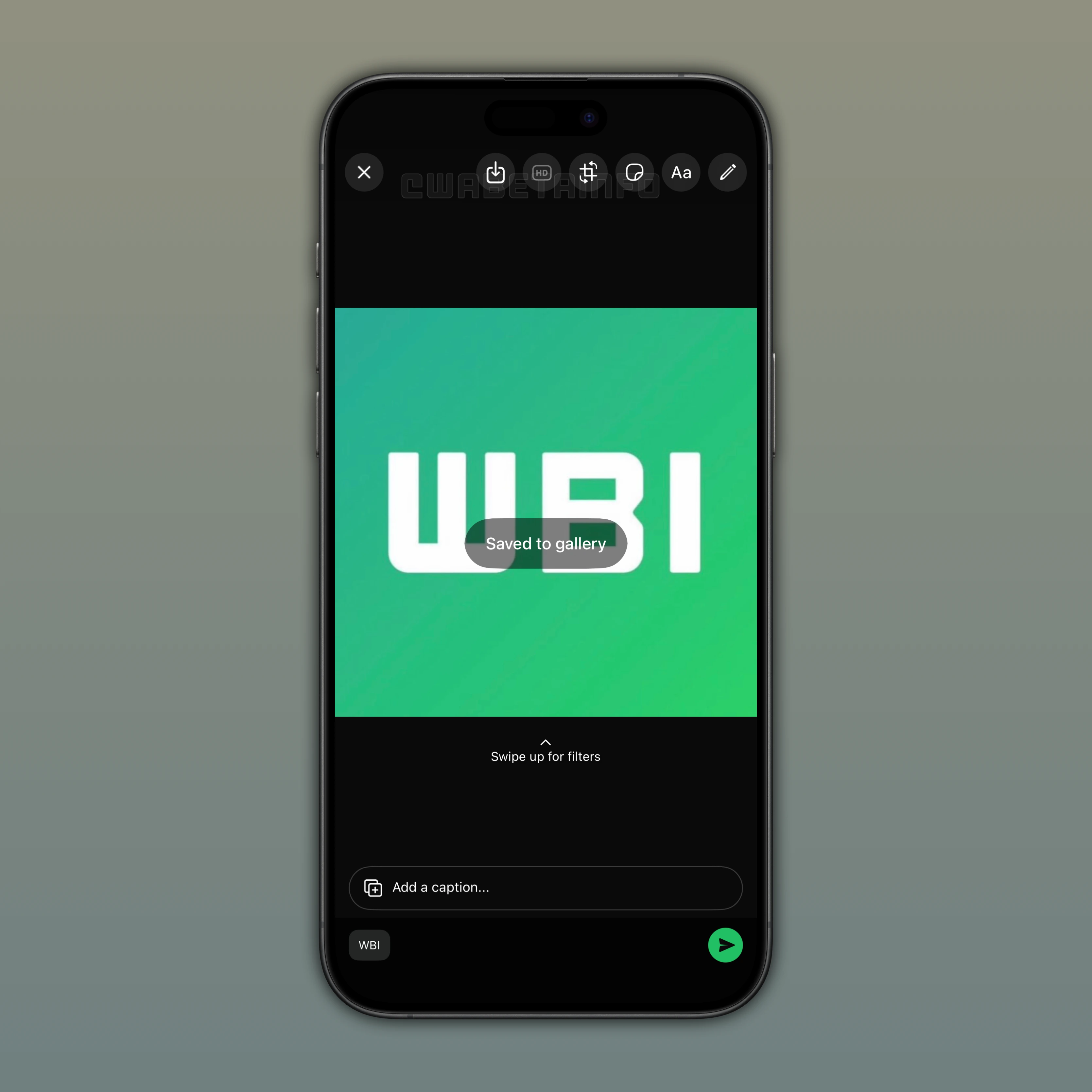
As you can see from the attached screenshot, some beta testers can explore a feature that lets them quickly save their photo and video drafts. The option to save photos and videos currently loaded in the drawing editor appears at the top of the screen, next to the button that lets users choose whether to send media in high quality. When the user taps this option, a message appears in the center of the screen to confirm that the item was saved. The saved photo or video then appears in the Photos app among the most recent items.
This feature is helpful when users edit a photo or video and they want to send it later. For example, the photo may have been cropped or the video trimmed. Users can also add drawings and stickers to their media. Instead of deleting the item when unsure about sending it, users can use the Save button to store it in their library and then exit the drawing editor. As a result, users can keep their edits as drafts and return to them whenever they are ready to share.
Before this feature was released, users had to either send the item or lose their edits. Any drawings, filters, or stickers added to a photo or video would need to be applied again the next time the media was selected. For photos, users could take a screenshot to save their edits if they did not want to delete them, but this method reduced image quality. Finally, this feature aims to solve all these inconveniences by allowing users to immediately save the photo and video with the applied edits and in high quality.
The feature that allows users to save photo and video drafts is available to some beta testers who install the latest WhatsApp beta for iOS update from TestFlight. This gradual rollout allows WhatsApp to evaluate performance and resolve issues ahead of the official release. As often happens, some users who install the latest update from the App Store may also have access to this feature. This extended test helps WhatsApp collect feedback from a wider group of users.
Stay Connected with WABetaInfo
Following WABetaInfo on X is the best way to stay informed about new features under development and those released to WhatsApp beta for Android, iOS, Web, and Desktop. We love hearing your feedback, so let us know what you think! You can also explore our dedicated page to discover all our services, or join our Discord Server to chat with others, get help and advice, and stay up to date with the latest WABetaInfo announcements.