WhatsApp beta for iOS 26.3.10.70: what's new?
WhatsApp has released a new iOS update through the TestFlight beta Program, bringing the version up to 26.3.10.70.
What's new in this update? WhatsApp is rolling out a feature that shows the privacy settings applied to a status update, and it's available to some beta testers!
| Key Points | Details |
|---|---|
| Name of the feature: | Status privacy info |
| Status: | Rolling out |
| Compatibility: | WhatsApp beta for iOS 26.3.10.70 has been designated as a compatible update. |
| Availability info: | This feature is available to some beta testers, and it is rolling out to more users over the coming weeks. |
| Previous news: | WhatsApp beta for Android 2.26.3.6: what's new? WhatsApp is working on a feature that lets parents configure a secondary account with limited functionality! |
WhatsApp is rolling out a status privacy info feature on iOS beta
In the post about the WhatsApp beta for Android 2.26.2.9 update, we announced a feature that lets users review the privacy settings applied to a status update. This functionality allows Android users to check whether their status updates are being delivered to the right audience. Instead of deleting the status update for everyone when unsure, users can now view a summary showing who is expected to receive it. This convenience is especially useful when sharing several status updates intended for different audiences.
Now, WhatsApp is expanding this feature to a wider audience, making it finally available for the iOS app as well. This aligns the experience across both mobile platforms and allows more users to access the same functionality. Following the release of the latest WhatsApp beta for iOS 26.3.10.70 update, which is available on the TestFlight app, we discovered that WhatsApp is rolling out a feature that shows the privacy settings applied to a status update.
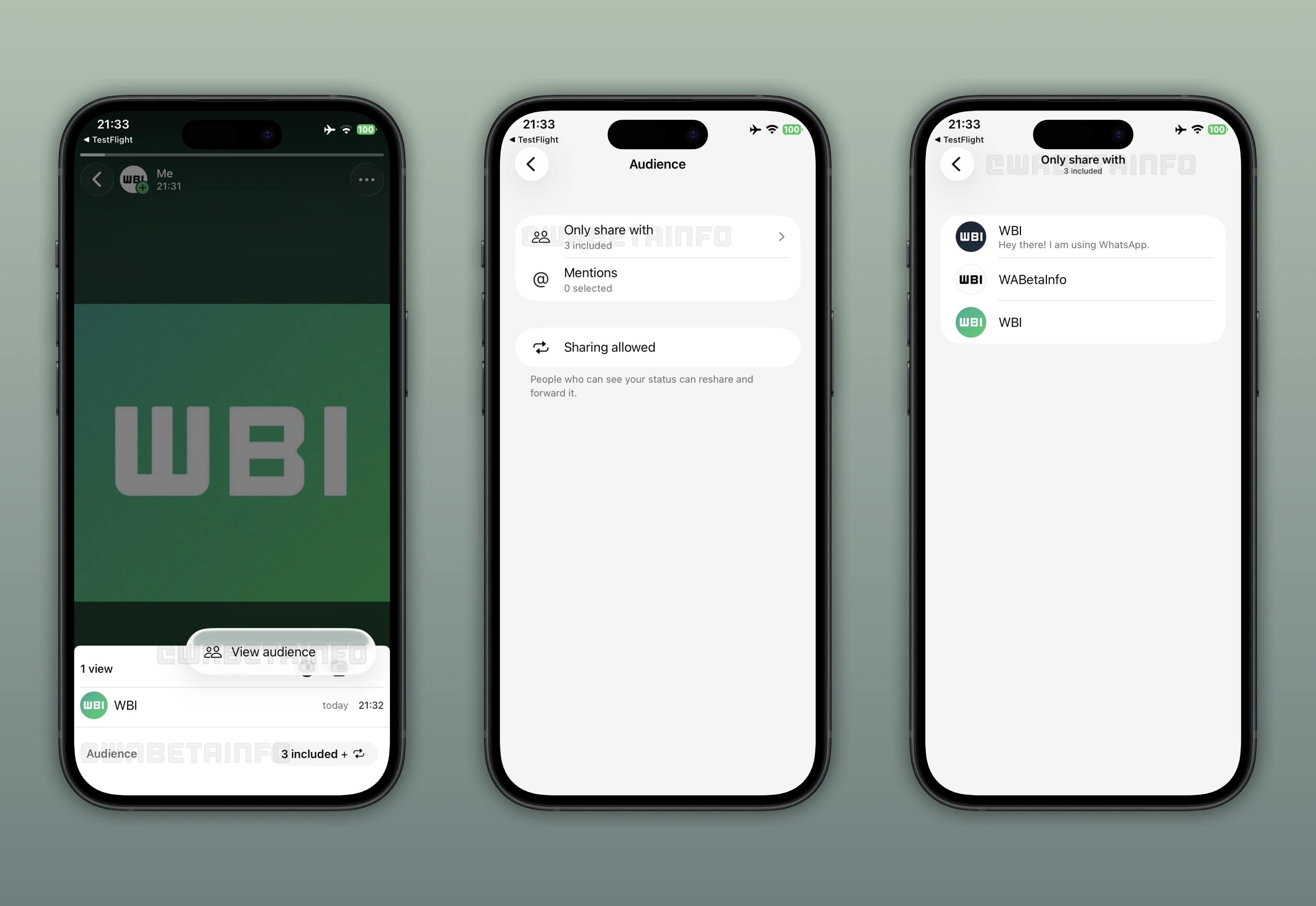
As you can see from the attached screenshot, some beta testers can explore a new feature that helps them check which audience a status update has been shared with. It's possible to check whether this feature is enabled directly on the status update viewing screen. Users need to open the status update viewers' sheet where the list displays everyone who has seen the update. If the feature is available, users may find the "Audience" option at the bottom of the screen or in the overflow menu. If either option is available, users can select this option and this action will open a menu that summarizes the status update's privacy settings.
The first option in the "Audience" section lets users understand which contacts can view the status update. If no exclusions are applied, it shows "My contacts". When users have excluded certain contacts from viewing their status updates, this option will display "My contacts except", which opens a section listing the contacts who will not receive the status update. If the update is shared with a limited group, users will see "Only share with", which reveals the list of selected contacts.
The second option in this section helps users confirm whether they have mentioned the correct contacts in their status update. Status updates support mentions, which notify tagged contacts when the update is shared. Being able to see who has been mentioned directly in this section gives users a complete overview of everyone involved in the status update. This also helps users decide whether they should delete the status update if the wrong contact was mentioned.
The final option in this section allows users to determine whether other contacts can share their status update with their audience, regardless of whether they have been mentioned or not. It's worth noting that the option to allow status sharing is always disabled by default. However, users may choose to enable it for certain status updates. If they are unsure whether sharing was enabled for a status update that has already been posted, they can check the Audience section to confirm.
The feature that shows the privacy settings applied to a status update is available to some beta testers who install the latest WhatsApp beta for iOS update from TestFlight. This gradual rollout allows WhatsApp to evaluate performance and resolve issues ahead of the official release. Once these tests are conducted, WhatsApp will finally release this feature to a wider audience, allowing more users to review their privacy settings after sharing a status update.
Stay Connected with WABetaInfo
Following WABetaInfo on X is the best way to stay informed about new features under development and those released to WhatsApp beta for Android, iOS, Web, and Desktop. We love hearing your feedback, so let us know what you think! You can also explore our dedicated page to discover all our services, or join our Discord Server to chat with others, get help and advice, and stay up to date with the latest WABetaInfo announcements.