WhatsApp beta for iOS 25.5.10.72: what's new?
WhatsApp has released a new iOS update through the TestFlight beta Program, bringing the version up to 25.5.10.72.
What's new in this update? WhatsApp is rolling out a notification count feature for chat filters, and it's available to some beta testers!
| Common questions | Answers |
|---|---|
| Name of the feature? | Notification count for chat filters |
| Status? | Rolling out |
| Compatibility? | WhatsApp beta for iOS 25.5.10.72 has been designated as a compatible update, but some users may get the same feature by installing certain previous updates. |
| I have the same version but I don't have this feature, why? | This feature is available to some beta testers and it's rolling out to more people over the coming days. |
| Thanks: | Thiago and Akan, for testing and reporting. |
| Previous news? | WhatsApp beta for Android 2.25.5.21: what's new? WhatsApp is rolling out a new call menu feature for chats and groups! |
NOTIFICATION COUNT - CHAT FILTERS
In the article about the WhatsApp beta for Android 2.25.2.4 update, we announced that a badge count feature for chat filters was available to some beta testers. This update introduces a small numerical badge within each chat filter, allowing Android users to see the number of unread messages in specific lists such as personal chats, group chats, or custom categories they have created. It appears that WhatsApp now intends to offer iOS users the same experience with chat lists as it already does for the Android version, aiming to provide a consistent experience across both platforms. Thanks to the latest WhatsApp beta for iOS 25.5.10.72 update, which is available on TestFlight, we discovered that WhatsApp is rolling out a notification count feature for chat filters!
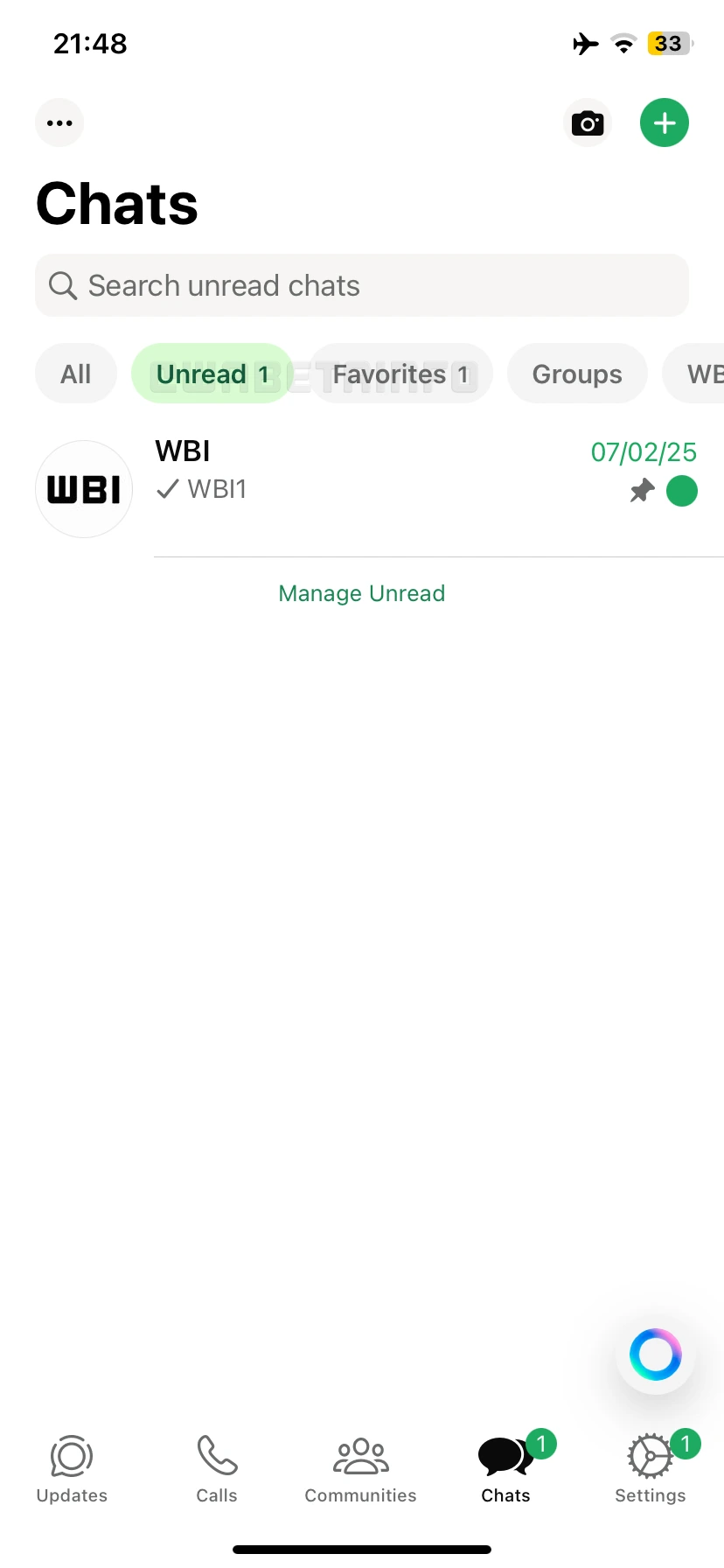
As you can see from the attached screenshot, some beta testers can explore a feature that adds a small numeric badge on each chat filter, providing a quick glance at how many unread messages are in a specific category. This badge represents the number of unread chats within each filter, meaning if users have five unread chats, the list containing these chats will show the number "5". The badge count also works for any custom filters that users create, whether it's for personal, professional, or other categories they prefer. This provides users with an instant overview of unread messages, even when they have multiple filters in use. The badge also ensures that users don't miss important conversations in any category, whether it's work-related or personal.
The feature is designed to help users stay on top of their chats and prioritize their responses. For example, if a user has a custom filter for "Family" and another for "Work", the badge count will display the number of unread messages in each category. Finally, users can decide which conversations need immediate attention and which can wait, all without having to open each filter individually. In addition, users who manage various types of groups and individual chats will find this feature incredibly valuable. It provides a visual cue that makes it easier to manage conversations across multiple categories, from professional communications to social chats. Users are no longer required to manually check each chat group or filter to see if there are any unread messages—this information is always available at a glance.
This feature becomes particularly useful for businesses, as they often manage large volumes of messages in specific categories like "Orders", "Support", or "Inquiries". A badge count next to these filters allows companies to easily track how many unread customer messages they have, ensuring that urgent requests are addressed promptly. This can significantly enhance customer service and response times. For example, if a business has manually configured a filter for "Orders", the badge will immediately show how many new orders or inquiries are waiting for a response, preventing potential delays in fulfilling customer needs.
A notification count feature for chat filters is available to some beta testers who install the latest version of WhatsApp beta for iOS from the TestFlight app, and it's rolling out to more people over the coming days.
Stay up-to-date on WhatsApp news by following WABetaInfo on X where you can also discover other new features for WhatsApp beta for Android, iOS, Web/Desktop, and Windows.
Do you like this news? Please, let us know on X: we love hearing your feedback! If you're curious to see where you can find WABetaInfo, there is a dedicated page where you can discover our services.
In addition, we have set up a Discord Server where you can chat with other people, get help and advice, and stay up to date with the latest announcements from WABetaInfo.