WhatsApp beta for iOS 25.37.10.72: what's new?
WhatsApp has released a new iOS update through the TestFlight beta Program, bringing the version up to 25.37.10.72.
What's new in this update? WhatsApp is rolling out a feature to clear chat storage with options for deleting messages or specific media categories, and it's available to some beta testers!
| Key Points | Details |
|---|---|
| Name of the feature: | Advanced chat clearing tool |
| Status: | Rolling out |
| Compatibility: | WhatsApp beta for iOS 25.37.10.72 has been designated as a compatible update. |
| Availability info: | This feature is available to some beta testers, and it is rolling out to more users over the coming weeks. |
| Thanks: | Thiago, for testing and reporting. |
| Previous news: | WhatsApp beta for iOS 25.37.10.71: what's new? WhatsApp is rolling out a feature that allows users to monitor connected peripherals to their account! |
WhatsApp Expands Advanced Chat Clearing Tools to iOS Beta Testers on TestFlight
In the article about the WhatsApp beta for Android 2.25.34.5 update, we announced that a feature to clear storage with greater precision was available. With this functionality, Android users are guided through a step by step flow that lets them choose exactly what content to remove from a chat before confirming the action. The interface presents clear toggles for messages, starred items, and individual media categories, ensuring nothing is deleted unintentionally. As selections are made, the system calculates and displays the amount of storage that will be freed in real time. Once confirmed, the cleanup is applied instantly while preserving any data the user chose to keep.
It appears that WhatsApp now intends to offer iOS users the same advanced chat clearing tools that are already being tested on the Android version, aiming to provide a more consistent experience across both platforms. Following the release of the latest WhatsApp beta for iOS 25.37.10.72 update, which is available on the TestFlight app, we discovered that WhatsApp is rolling out a feature to clear chat storage with options for deleting messages or specific media categories!
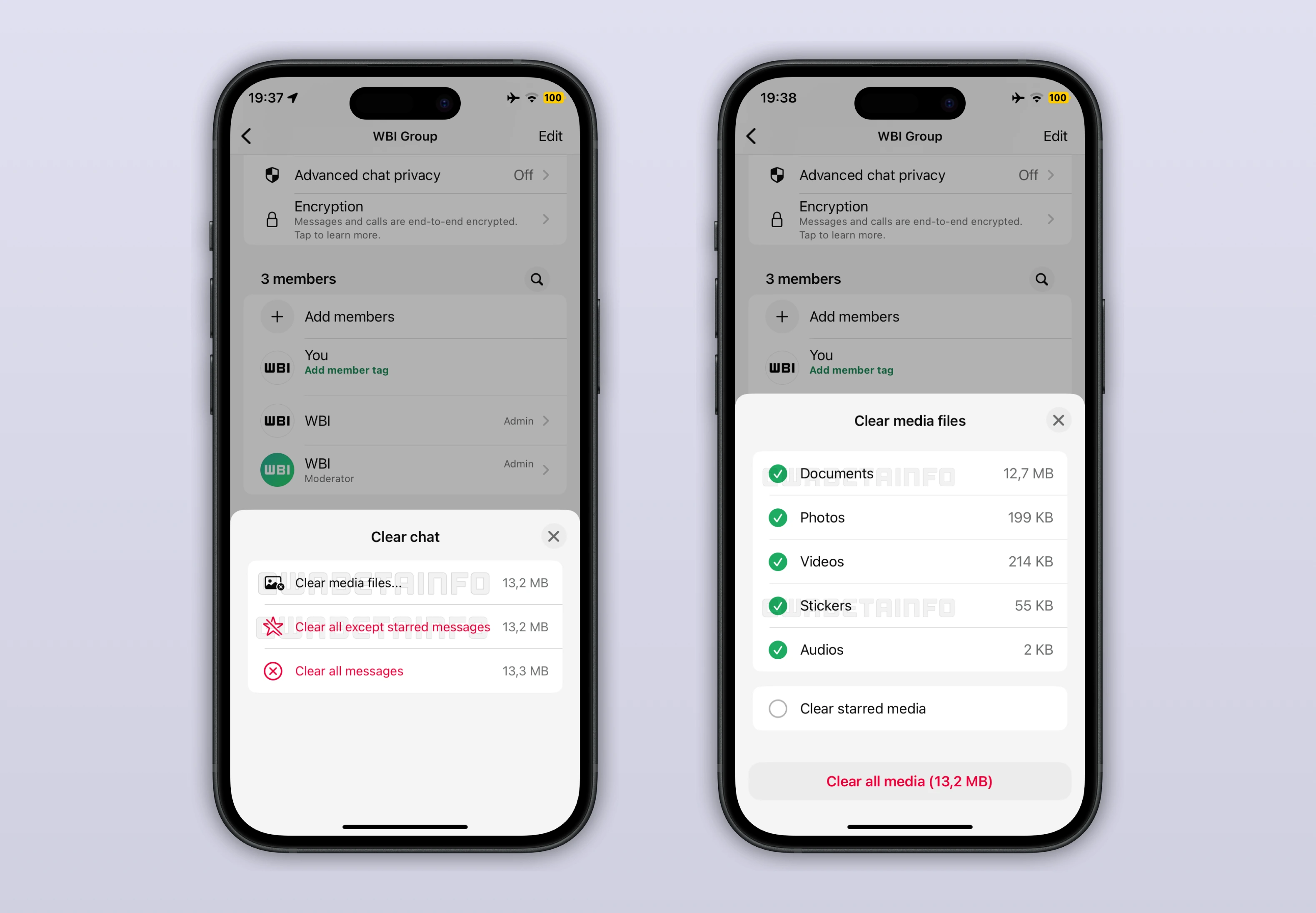
As you can see from the attached screenshot, some beta testers are presented with a redesigned clearing interface that closely mirrors the logic already seen on Android, while still fitting naturally within the iOS design language. When initiating the clear chat action, users are no longer limited to a single confirmation alert, but instead interact with a dedicated bottom sheet that explains what will be removed. This screen clearly distinguishes between messages, starred messages, and stored media, giving users a clearer understanding of the impact of their choice. The flow is designed to reduce mistakes by requiring users to actively review their selections before proceeding.
One of the most notable aspects of this feature is the added protection for starred messages, which many users rely on to keep track of important information. During the clearing process, WhatsApp explicitly asks whether these starred items should be included in the deletion or preserved. This approach helps users clean up long conversations without worrying about losing content they intentionally saved. The separation between regular messages and starred ones makes the entire process more predictable and easier to control.
In addition to message management, the feature also introduces more detailed options for handling media stored within chats. Users can now choose to remove only certain types of files, such as videos, images, documents, or audio messages, instead of wiping everything at once. Before confirming, WhatsApp shows an estimate of the storage space that will be recovered based on the selected categories. This information allows users to make informed decisions, especially when trying to free up space without sacrificing valuable content.
Another relevant aspect of this new tool is the ability to remove all stickers or voice messages shared within a chat without affecting text messages. Although these items usually require less storage compared to images and videos, many users still prefer to get rid of them to keep conversations cleaner. Stickers and voice notes tend to accumulate over time, especially in very active group chats, even when they are no longer useful. With this update, users can finally delete these specific types of content while preserving text messages that still matter.
The improved clearing tool can be accessed directly from the chat info screen, making it easier to find since this area is already a familiar place for managing conversation settings. This placement aligns the experience more closely with how similar actions are handled elsewhere in the app, which may feel more intuitive for all users. However, chats can also be cleared directly from the chats list by swiping on a conversation to reveal its available actions. From there, selecting the clear chat option opens the same detailed clearing interface with identical choices.
The feature to clear chat storage with options for deleting messages or specific media categories is currently available to some users who install the latest WhatsApp beta for iOS update via TestFlight. In certain cases, a small number of users on the App Store version may also have access to this enhanced clearing tool. Availability may vary, so not all users who install the beta or update the App Store version will see the feature immediately, with access gradually expanding over the coming weeks.
Stay Connected with WABetaInfo
Following WABetaInfo on X is the best way to stay informed about new features under development and those released to WhatsApp beta for Android, iOS, Web, and Desktop. We love hearing your feedback, so let us know what you think! You can also explore our dedicated page to discover all our services, or join our Discord Server to chat with others, get help and advice, and stay up to date with the latest WABetaInfo announcements.