WhatsApp beta for iOS 25.36.10.70: what's new?
WhatsApp has released a new iOS update through the TestFlight beta Program, bringing the version up to 25.36.10.70.
What's new in this update? WhatsApp is rolling out a feature that lets users apply strict security settings to their accounts, and it's available to some beta testers!
| Key Points | Details |
|---|---|
| Name of the feature: | Strict account security settings |
| Status: | Rolling out |
| Compatibility: | WhatsApp beta for iOS 25.36.10.70 has been designated as a compatible update. |
| Availability info: | This feature is available to some beta testers, and it is rolling out to more users over the coming weeks. |
| Previous news: | WhatsApp is Developing a Recent History Sharing Feature For Group Chats! |
WhatsApp Expands Strict Account Security Settings to iOS beta testers
In the article about the WhatsApp beta for Android 2.25.36.15 update, we announced that strict account security settings are available. With this feature, users can activate a single high level protection mode that applies the app's strongest privacy and security measures automatically. It blocks media from unknown senders, disables link previews, silences calls from unfamiliar numbers, restricts group invitations, enforces two step verification, limits profile visibility, and relays calls through WhatsApp servers to shield IP addresses. By consolidating these safeguards into one simple toggle on the primary device, the feature helps users reduce exposure to suspicious contacts and maintain a consistent security posture without managing multiple settings on their own.
It appears that WhatsApp now intends to offer iOS users the same strict account security settings that are already available on the Android version, aiming to provide a consistent experience across both platforms. This update brings the same simple toggle to iOS, allowing users to enable advanced protections that automatically secure their account with automatic privacy controls. Following the release of the latest WhatsApp beta for iOS 25.36.10.70 update, which is available on the TestFlight app, we discovered that WhatsApp is rolling out a feature that lets users apply strict security settings to their accounts!
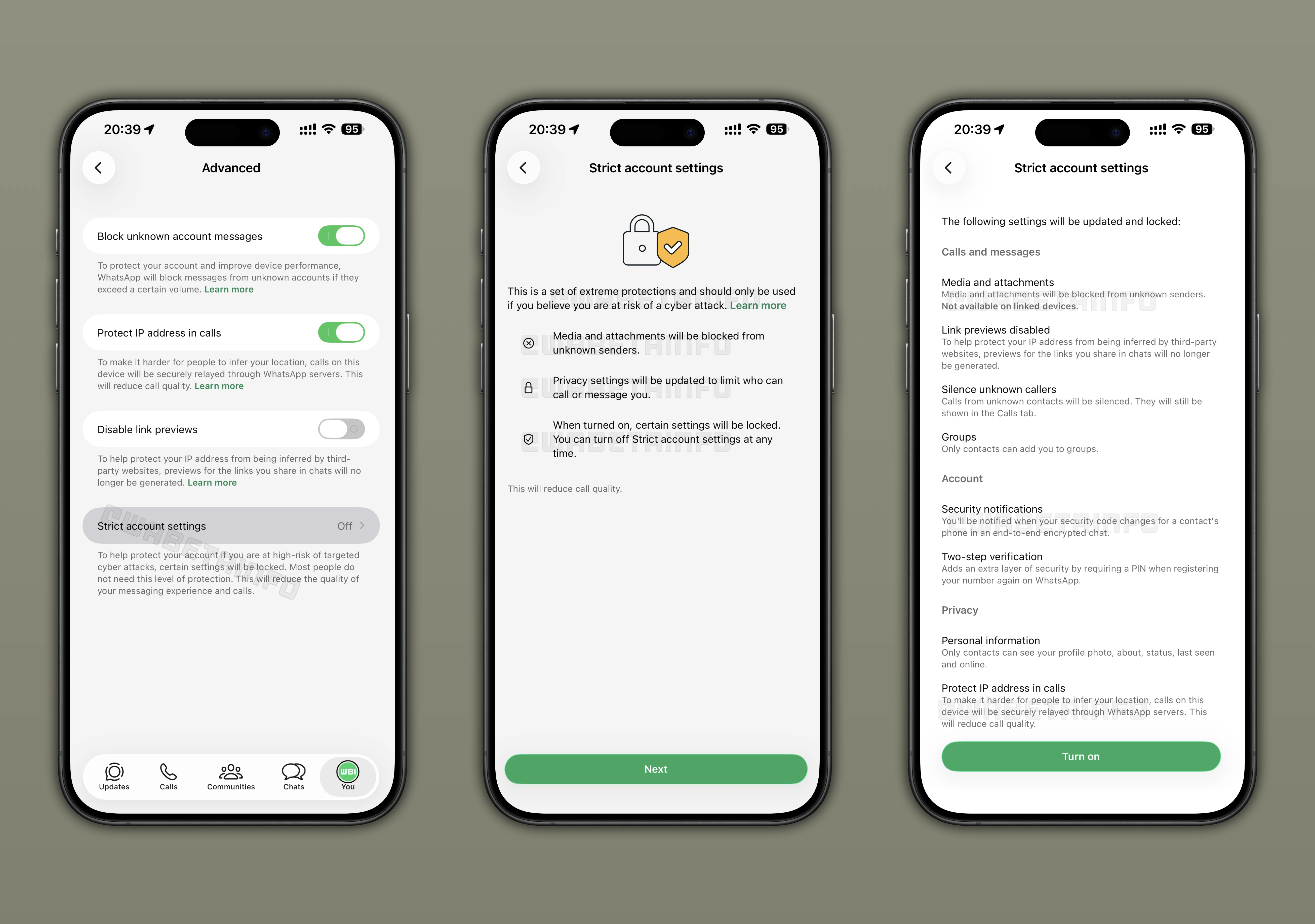
As you can see from the attached screenshot, some testers may have access to a new option that enable a higher level of protection against digital threats. Instead of adjusting several options one by one, this feature lets users switch on the strongest safeguards with a single control. To check if the feature is available, users can open WhatsApp, go to Settings, then Privacy, and select Advanced. If strict account settings appear in this section, it means the option can be activated on their account.
Once strict account settings are enabled, the app automatically applies its most advanced security measures without asking for any extra configuration. This action makes serious protection available to everyone, even to those who are not comfortable navigating technical settings, while also creating a safer environment for people who face an increased risk of targeted attacks. All relevant protections work together seamlessly, ensuring nothing is overlooked. Users can choose to turn off strict account mode at any time, but several key security measures, such as two-step verification, will remain active to maintain a baseline of protection.
When this setting is active, the app becomes much stricter about interactions from unknown contacts. Files sent by people who are not saved in the address book are blocked before they reach the device. Link previews are turned off to prevent the app from loading information that could reveal technical details about the phone. The silence unknown callers functionality is included in the bundle, so calls from unfamiliar numbers are muted.This helps prevent interruptions and keeps you safer from potential scams that could take advantage of device vulnerabilities.
The feature also tightens how users can be added to group chats. Only saved contacts can place someone into a new group, which keeps random numbers from creating unwanted conversations. If a contact's encryption code changes, the app adds a security notification directly into the conversation so the user can confirm that the chat is still secure. This helps people feel confident that they are talking to the right person and not a hijacked account.
Two step verification becomes mandatory the moment strict mode is enabled, giving the account an extra layer of defense against takeover attempts. Details such as profile photo visibility, about, and last seen information are restricted to contacts only, which makes it harder for strangers to gather information that could be misused. All calls are routed through WhatsApp servers to hide the user's IP address and reduce the chance of location tracking. Together, these measures create a more controlled environment that limits what outsiders can learn about the user and how they might attempt to target the account.
Some settings are locked while strict mode is active to keep every protection working together smoothly. However, users can still turn the feature off whenever they want. It's very important to note that most people will not need this mode, since the app already includes solid privacy protections for normal use, but the option is available for anyone who feels exposed to more advanced threats. These points highlight that the feature is meant to strengthen security without taking control away from the user.
For everyday messaging and routine use, the default settings introduced by WhatsApp already provide strong safeguards. As a result, only users who face a higher risk of targeted attacks are likely to benefit from enabling strict mode. Users can achieve the same level of protection by manually turning on each option included in strict account security mode, though this requires navigating multiple sections. The main advantage of strict mode is convenience, allowing all these settings to be activated together in just a few steps. The only additional protection it provides beyond manual configuration is blocking attachments from unknown contacts, a feature not normally offered because it can affect the overall user experience.
To keep control firmly in the hands of the account owner, the feature can only be turned on or off from the main device linked to the account. After enabling it, users can look through a list of everything that the mode has secured automatically. This list can be found by opening the app settings, then Privacy, then Advanced, and finally Strict Account Settings. Inside this section, choosing View locked settings shows all protections currently in place, making it easier for users to understand how the account is being safeguarded.
Bringing all these protections together under one switch is meant to simplify something that would otherwise require several steps spread across different sections. It offers a clear way to raise security without needing to remember which settings need to be changed. Even people who rarely adjust privacy features get a simple path to stronger protection, while those who need it most gain a consistent set of defenses applied in one action. This unified approach ensures that every safeguard works in harmony, making it simpler for users to maintain a high level of security without extra effort.
The feature that lets users apply strict security settings to their accounts available to some users who have installed the latest WhatsApp beta for iOS update from TestFlight. Since it is still in the testing phase, WhatsApp is fine tuning the feature to make sure it behaves reliably. The ongoing rollout allows the team to find and fix issues before the feature reaches a wider group of users in the coming weeks.
Stay Connected with WABetaInfo
Following WABetaInfo on X is the best way to stay informed about new features under development and those released to WhatsApp beta for Android, iOS, Web, and Desktop. We love hearing your feedback, so let us know what you think! You can also explore our dedicated page to discover all our services, or join our Discord Server to chat with others, get help and advice, and stay up to date with the latest WABetaInfo announcements.