WhatsApp beta for iOS 25.35.10.70: what's new?
WhatsApp has released a new iOS update through the TestFlight beta Program, bringing the version up to 25.35.10.70.
What's new in this update? WhatsApp is rolling out a feature that lets users react to status updates using a reaction sticker, and it's available to some beta testers!
| Key Points | Details |
|---|---|
| Name of the feature: | Reaction sticker for status updates |
| Status: | Rolling out |
| Compatibility: | WhatsApp beta for iOS 25.35.10.70 has been designated as a compatible update, but some users may get the same feature by installing certain previous updates. |
| Availability info: | This feature is available to some beta testers, and it is rolling out to more users over the coming weeks. |
| Thanks: | Akan and Radu Oncescu, for testing and reporting. |
| Previous news: | WhatsApp beta for Android 2.25.36.6: what's new? WhatsApp is rolling out a feature that allows users to react to status updates using a reaction sticker! |
Reaction Sticker Feature Expands from Android to iOS
In the article about the WhatsApp beta for Android 2.25.36.6 update, we announced that a feature to react to status updates using a reaction sticker is available. This feature lets the user choose an emoji, place it on the status image or video, and publish it so viewers immediately see where to tap. When someone opens the status, the sticker functions as an interactive button that sends a reaction instantly with no extra menus. After the tap, the reaction is delivered directly to the author, creating a quick and seamless feedback flow.
It appears that WhatsApp now intends to offer iOS users the same reaction sticker feature that is already available on the Android version, aiming to provide a consistent experience across both platforms. This update brings the same tap to react workflow to iOS, allowing users to send instant feedback directly from a sticker placed on a status image or video. Following the release of the latest WhatsApp beta for iOS 25.35.10.70 update, which is available on the TestFlight app, we discovered that WhatsApp is rolling out a feature that lets users react to status updates using a reaction sticker!
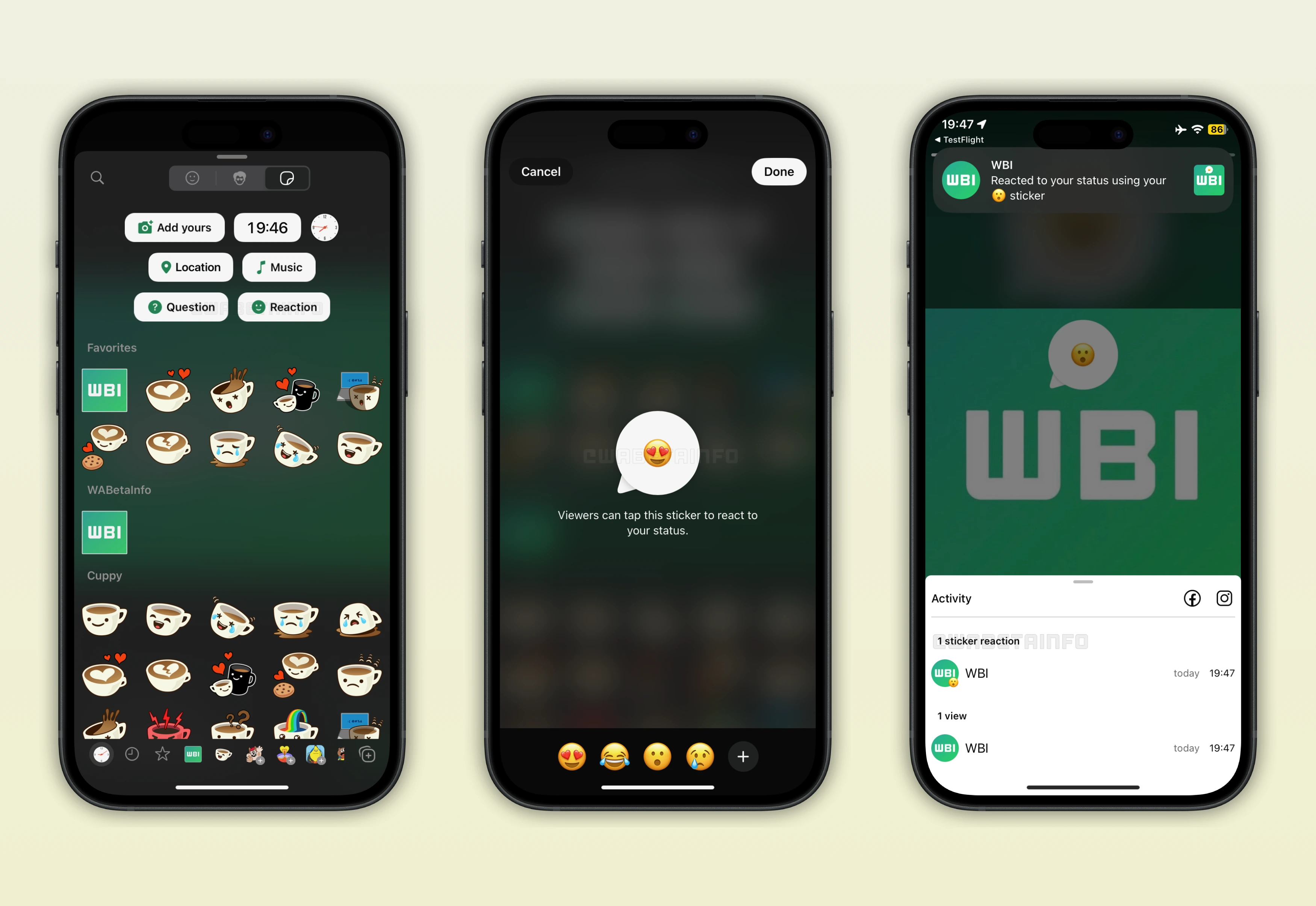
WhatsApp Enhances Status Updates with Reaction Stickers
After installing the latest updates of WhatsApp for iOS, some users can now add a reaction sticker to their status updates. This creates a more immediate and visually engaging way to invite interaction, as the sticker sits directly on the image or video and indicates exactly where viewers can tap to respond. This feature closely reflects the approach used by Instagram Stories, where creators place an emoji sticker directly on top of the shared content to guide viewer responses. With this functionality, WhatsApp allows users to initiate reactions without requiring viewers to rely on a secondary gesture.
Since the sticker appears directly on the image or video, it makes the call to interact immediately clear and impossible to miss. Instagram uses a similar mechanic to boost engagement, and WhatsApp brings that simplicity into its own ecosystem without altering the core behavior users already recognize. The resemblance helps new adopters understand the feature instantly, especially those accustomed to Instagram's expressive tools.
Emoji Customization Options for the Reaction Sticker
The reaction sticker uses the Smiling Face with Heart Eyes Emoji as the default, but users are free to replace it with any emoji that better suits the mood of their update. This flexibility allows creators to choose symbols that match the visual tone of their image or video, giving each status a more personal and intentional feel. For example, selecting a laughing emoji for a humorous scene communicates a different emotional cue compared to choosing a fire emoji for something energetic or dramatic. By offering full emoji customization, WhatsApp enables creators to craft reactions that align with the atmosphere they want viewers to perceive.
What Viewers See When Opening a Status Update
When a viewer opens a status update that includes a reaction sticker, the emoji appears clearly on the shared image or video as an interactive element. This visual placement ensures that viewers immediately recognize where to tap if they wish to send a reaction. Once the sticker is tapped, the reaction is transmitted instantly to the author without requiring additional confirmations. It's important to note that this interaction is completely private, so only the creator of the status can view the feedback that has been sent.
The process feels smooth and effortless, letting users share their reactions with just a single tap, no need to open a separate reaction screen. Because the sticker is clearly visible on the image or video, it keeps the option to interact right in front of viewers at all times. This simple, obvious placement makes responding feel natural and easy. This approach encourages genuine engagement without any pressure, so viewers can react freely and spontaneously.
What Happens When the Author Receives a Reaction
When the author of the status update receives a reaction, a notification appears on their device to alert them that someone has interacted with their sticker. This notification operates similarly to other WhatsApp activity alerts, but it highlights the reaction and the emoji used as a distinct form of engagement. Inside the status activity sheet, creators will find a dedicated section that separates sticker reactions from regular views, making it easier to distinguish between passive and active forms of interaction. This organizational structure helps users interpret feedback more effectively, since reactions indicate sentiment while views simply reflect reach.
The separated layout ensures that creators do not confuse quick reactions with standard status analytics. Users can open the reactions section to browse individual responses and gain a clearer sense of how their content resonated. The clean categorization supports better insight into audience behavior without adding complexity to the interface. This arrangement enhances clarity and empowers status creators to understand who reacted to their updates with minimal effort.
Why Reaction Stickers May Increase Engagement
The reaction sticker has strong potential to boost engagement because it is always visible on the screen, encouraging immediate interaction. Traditional reactions require viewers to swipe up to reveal eight emojis, which adds an extra step that many may skip unless strongly motivated. With the sticker placed directly on the content, viewers understand instantly that a simple tap is enough to express a reaction. This accessibility lowers the barrier to participation and increases the likelihood of spontaneous feedback.
The visual prominence of the sticker also keeps the concept of reacting present throughout the entire viewing experience. This presence can inspire responses even from users who rarely engage with status updates. Since the interaction feels quick and effortless, many viewers may respond more frequently than before. Over time, this process can make status updates feel more dynamic, creating a stronger sense of connection between creators and their audience.
Reaction Sticker Feature is Rolling out on iOS Beta
The reaction sticker is now rolling out to selected testers on iOS, extending the feature beyond its original Android availability. Some users running the stable version of the app may also place and see the same reaction sticker, which suggests that WhatsApp is testing it with a broader audience. This wider distribution allows WhatsApp to observe real world usage patterns and gather feedback from a more varied user base. By expanding access beyond the beta group, WhatsApp moves closer to a full release that could reach all iOS users in the near future.
Stay Connected with WABetaInfo
Following WABetaInfo on X is the best way to stay informed about new features under development and those released to WhatsApp beta for Android, iOS, Web, and Desktop. We love hearing your feedback, so let us know what you think! You can also explore our dedicated page to discover all our services, or join our Discord Server to chat with others, get help and advice, and stay up to date with the latest WABetaInfo announcements.