WhatsApp beta for iOS 25.34.10.71: what's new?
WhatsApp has released a new iOS update through the TestFlight beta Program, bringing the version up to 25.34.10.71.
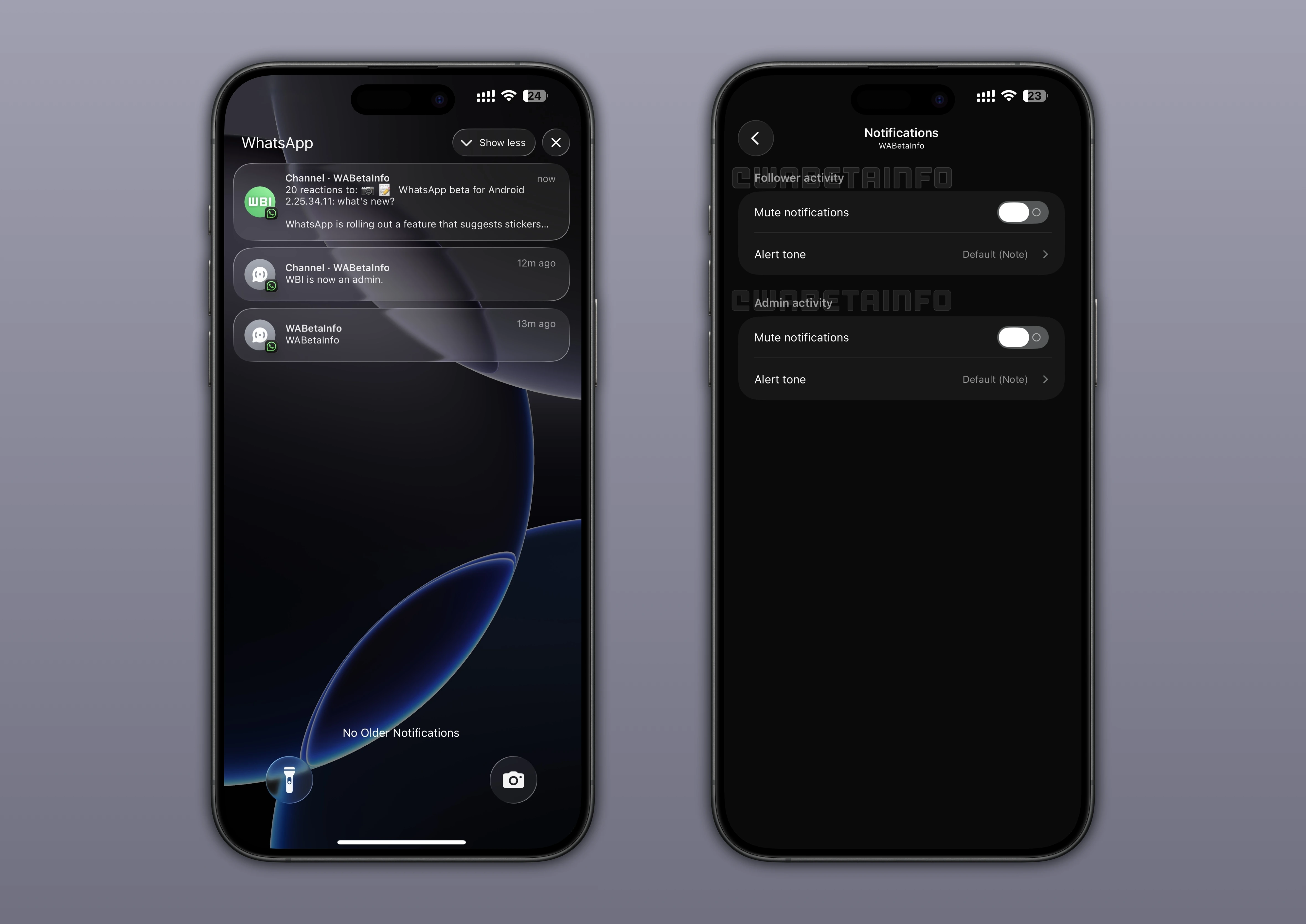
What's new in this update? WhatsApp is rolling out a feature that allows channel admins to manage activity notification settings, and it's available to some beta testers!
| Key Points | Details |
|---|---|
| Name of the feature: | Channel activity notification settings |
| Status: | Rolling out |
| Compatibility: | WhatsApp beta for iOS 25.34.10.71 has been designated as a compatible update. |
| Availability info: | This feature is available to some beta testers, and it is rolling out to more users over the coming weeks. |
| Previous news: | WhatsApp Is Developing a New Username Lookup Feature to Help Identify Unknown Phone Numbers! |
WhatsApp Introduces New Tools To Track Channel Activity
In the article about the WhatsApp beta for iOS 24.20.10.71 update, we announced that a feature that brings analytics to channels was available. This functionality enables channel owners to gain deeper insights into their channel's performance by accessing detailed metrics such as unique viewer counts, geographical audience distribution, and follower growth over the past 30 days. With these analytics, admins can refine their content strategies, tailor their messaging to specific regions, and make more informed decisions to boost engagement and improve follower retention.
It seems that WhatsApp aims to offer channel owners another tool to stay informed about their channels' activity, giving them clearer visibility into how their audience evolves over time. This approach allows admins to analyze performance without needing to constantly monitor their channels manually. Following the release of the latest WhatsApp beta for iOS 25.34.10.71 update, which is available on the TestFlight app, we discovered that WhatsApp is rolling out a feature that allows channel admins to manage activity notification settings!
Introducing Activity Notification Management for Channel Owners
With the latest update, some channel admins can finally access a dedicated section designed for managing their channel-related notifications. In this reserved section, they have full control over two distinct notification categories: follower activity and admin activity. Each category offers flexible options that allow admins to decide whether to enable or disable notifications. Channel admins can also customize the tone of these alerts, ensuring a more personalized and suitable experience.
Understanding Follower Activity Notifications
Follower activity notifications allow channel admins to stay updated whenever new users start following their channel. WhatsApp will also send alerts when the channel receives a reaction or a streak of reactions. These notifications can help admins stay aware of how their audience is engaging with their updates. They also allow channel owners to quickly identify moments of increased interest or support.
With this feature, admins can monitor the growth of their community more effectively. It can also help them understand which types of updates resonate the most. Receiving follower activity notifications provides valuable insights for shaping future content. As a result, it helps admins maintain a closer connection with their audience.
Understanding Admin Activity Notifications
Admin activity notifications keep channel owners informed about actions performed by other administrators. When enabled, WhatsApp will send alerts whenever another admin shares a new update within the channel. It will also notify the channel owner when an admin reacts to an update that they have posted. These notifications ensure that channel owners remain aware of collaboration dynamics in multi-admin environments.
This activity notification system help admins track contributions made by their teammates. This can be useful for maintaining consistent content planning and coordination. By staying informed about admin activity, channel owners can manage their channels more efficiently. This helps strengthen teamwork and keeps administrators aligned with each other.
WhatsApp Sends Smart Notifications Based on Channel Size
WhatsApp uses a smart notification system that adapts to the size of each channel. For larger channels, WhatsApp will not send alerts for every single reaction received on an update. Instead, it will notify channel owners only when an update gathers a significant number of reactions or when a reaction streak is reached, such as 20, 50, or 100 reactions.
This system ensures that admins are not overwhelmed by excessive alerts. Smart notifications also help maintain a balanced flow of information without disrupting the user's experience. They also allow admins to focus only on meaningful engagement signals. This smart approach enhances usability and keeps notifications relevant.
Activity Notifications Are Exclusive to Channel Owners
This functionality is exclusively available to channel owners and their co-admins. Followers are only notified when a channel posts a new update. They do not receive insights or alerts related to detailed activity within the channel. This means that all advanced notification insights remain strictly reserved for administrators.
Admins Can Disable Notifications at Any Time
Channel owners can disable these notifications at any moment by visiting the channel info screen and selecting the notifications section. Although WhatsApp has designed a smart system to minimize unnecessary alerts, some admins may still find them intrusive. In certain cases, they might consider these notifications overwhelming or not particularly useful. For this reason, having the option to turn them off remains helpful.
Feature to Receive Channel Activity Notifications is Rolling out on iOS Beta
The feature that allows channel admins to manage activity notification settings is available to some beta testers who install the latest update of WhatsApp beta for iOS from TestFlight, and it's rolling out to more users over the coming weeks. This gradual rollout allows WhatsApp to test stability and performance before full deployment. As updates continue, more iOS users will see the option appear in their account settings.
Stay Connected with WABetaInfo
Following WABetaInfo on X is the best way to stay informed about new features under development and those released to WhatsApp beta for Android, iOS, Web, and Desktop. We love hearing your feedback, so let us know what you think! You can also explore our dedicated page to discover all our services, or join our Discord Server to chat with others, get help and advice, and stay up to date with the latest WABetaInfo announcements.