WhatsApp beta for iOS 25.33.10.70: what's new?
WhatsApp has released a new iOS update through the TestFlight beta Program, bringing the version up to 25.33.10.70.
What's new in this update? WhatsApp is working on a feature that lets users apply strict security settings to their accounts, and it will be available in a future update!
| Key Points | Details |
|---|---|
| Name of the feature: | Strict account security settings |
| Status: | Under development |
| Availability info: | This feature is currently in development and not yet available for beta testing. In the meantime, you can read this article for a sneak peek. |
| Previous news: | WhatsApp beta for iOS 25.32.10.72: what's new? WhatsApp is rolling out a feature that enables third-party chats in order to comply with European regulations! |
WhatsApp Explores New Features to Enhance Security
In the article about the WhatsApp beta for Android 2.25.33.4 update, we announced that a feature to apply strict security settings to user accounts is under development. This functionality will allow users to quickly enable a collection of advanced privacy and protection options designed to safeguard their accounts from potential threats and unwanted interactions. It will not be intended for all users, but rather for those who believe they may be at higher risk or wish to maintain stricter control over their security settings.
The feature is currently in development for WhatsApp on Android. However, WhatsApp is also working to bring it to iOS in a future update, ensuring consistency and parity between both platforms. Following the release of the latest WhatsApp beta for iOS 25.33.10.70 update, which is available on the TestFlight app, we discovered that WhatsApp is working on a feature that lets users apply strict security settings to their accounts!
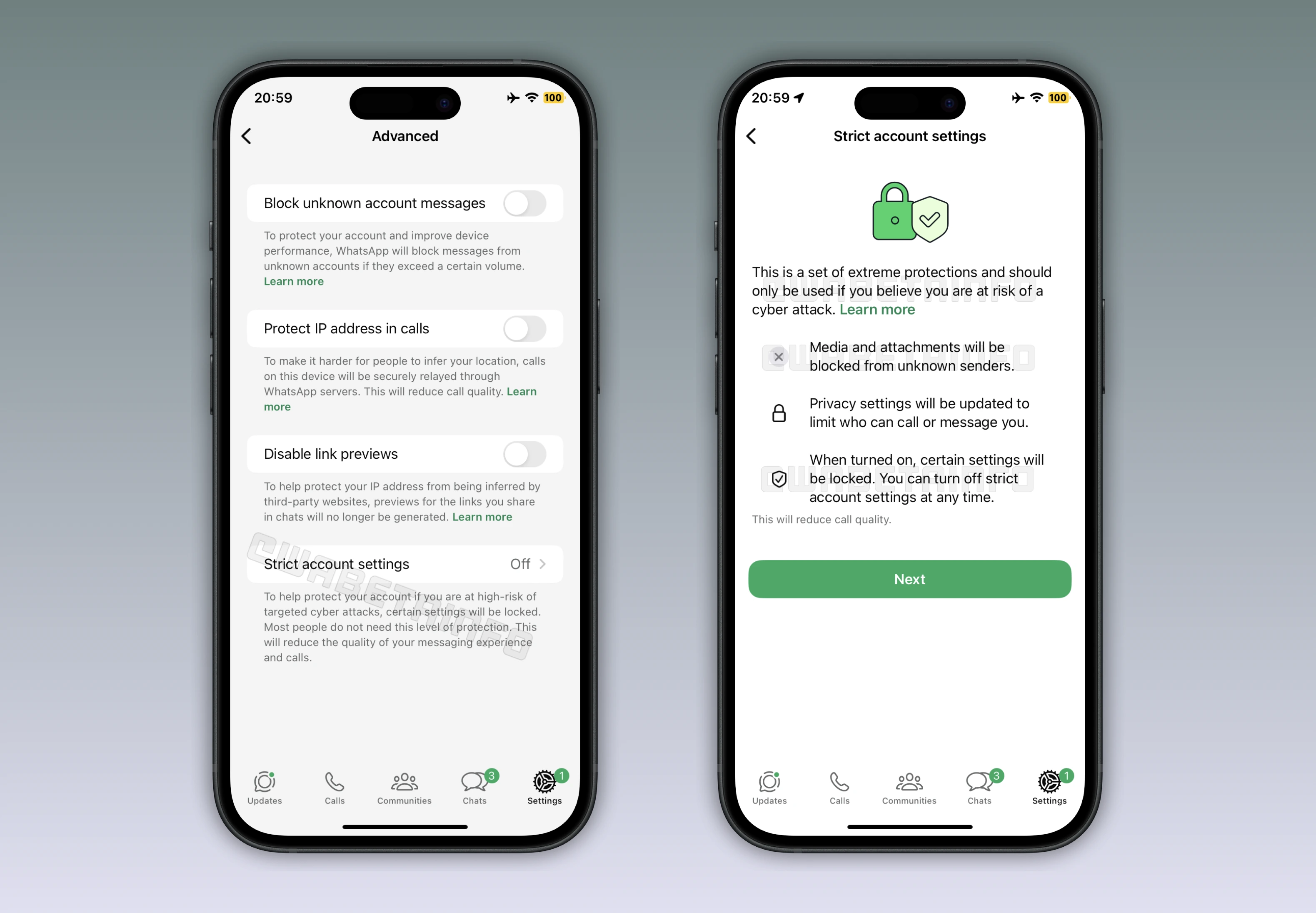
WhatsApp Working on New Security Feature for Users at Risk of Cyber Attacks
WhatsApp is exploring the implementation of a new feature aimed at helping users who believe they could be targets of cyber attacks, which is expected to become available in a future update. While the name of the feature may change before the official release, its functionality is already well documented. This feature adjusts several existing privacy settings to stricter defaults and works as a comprehensive security check-up. After enabling this new security feature, users will be able to strengthen their protection against potential threats in just one step, without manually changing multiple settings. With one simple switch, the feature will bring together all your vital security and privacy protections for effortless control and peace of mind.
WhatsApp will simplify access to advanced security features, so every user can stay protected regardless of their tech background. This option automatically applies the strongest privacy and security configurations available on the platform. However, WhatsApp is adding a few new protections focused on managing communication from unknown or potentially suspicious accounts. These improvements will directly address the situations that tend to cause the most concern among users who feel exposed to targeted activity.
Blocking Media and Attachments from Unknown Senders
The ability to block media and attachments from unknown senders is one of the key security enhancements being developed for WhatsApp, giving users greater control over what type of content can reach their device. When users decide to enable strict account settings, this feature stops photos, videos, documents, and voice messages from being automatically downloaded if they come from unsaved contacts. This helps users avoid files that might contain malicious content or harmful code.
The feature ensures that chatting with unfamiliar accounts remain limited to plain text messages. WhatsApp designed this setting to help limit phishing attempts or malicious files that could appear disguised as regular content. The feature empowers users to manage what content is allowed onto their device. It acts as a preventive shield that stops unverified media from appearing in their conversations.
Disabling Link Previews for Safer Messaging
Users can already disable link previews in their conversations directly from the WhatsApp's privacy settings. Usually, when a user sends or receives a link, WhatsApp generates a preview containing an image and metadata by connecting to the external website. To protect users' IP addresses from being exposed to third-party domains, this feature stops those previews from being generated. This helps prevent bad actors from collecting information about a user's device or location through simple link sharing.
WhatsApp will now include it in the strict account settings to guarantee uniform protection for those more exposed to privacy risks. WhatsApp considers this a key security tool because it helps avoid indirect data leaks that could compromise user privacy. Removing automatic link previews gives users full control over what information is shared with external sites.
Silencing Unknown Callers to Block 0-Click Exploits
The silence unknown callers option allows users to automatically mute calls from numbers not saved in their contacts. These calls will still appear in the Calls tab, giving users the freedom to review them later if they wish. This helps reduce spam and scam interruptions and lowers the risk of receiving malicious calls. It's worth noting that this feature can be used as an additional barrier against 0-click exploits, which can occur without the user interacting with the call.
It's worth noting that WhatsApp continues refining its core protections to block these threats automatically on both iOS and Android. However, this option gives users a final level of control. Muting calls from unfamiliar numbers removes a direct channel that could be used by potential attackers. This feature is already available as an independent setting under call privacy preferences. Now, WhatsApp plans to include it in the strict account settings to ensure that high-risk users automatically benefit from stronger defenses without extra configuration.
Restricting Automatic Group Invites to Known Contacts
With strict account settings, WhatsApp plans to automatically adjust the group privacy by limiting who can add you to group chats. Once enabled, only saved contacts can invite you to join a group (unless you already use a more controlled setting, such as "My Contacts Except"). This prevents unwanted additions to spam groups or those created to spread malicious links. It keeps users in control of their group participation, as invitations from unknown numbers will always be sent privately, allowing them to decide whether to join.
WhatsApp helps reduce exposure to scams, spam, or coordinated harassment attempts by restricting group invitations to known contacts. This measure is especially useful for users who may be more frequently targeted by mass-invite campaigns. Although the setting already exists in WhatsApp's privacy controls, the app will enforce it when strict account settings are enabled. This ensures maximum safety for users who might otherwise overlook activating it manually.
Security Notifications for Encryption Code Changes
Security notifications inform users whenever a contact's security code changes in an end-to-end encrypted chat. These codes confirm that messages remain private between the same devices. If a code changes, it typically means the contact has reinstalled WhatsApp or switched to a new device. The notification allows users to confirm that they are still communicating securely with the correct contact.
This option has been available in the account settings since WhatsApp introduced end-to-end encryption. Including it in the strict account configuration ensures that high-risk users are notified of any changes to encryption in their chats and groups. It allows them to respond promptly by verifying contact details or pausing sensitive conversations until everything is confirmed. This precaution helps users maintain confidence in the authenticity and privacy of their communications, ensuring that encrypted chats remain secure.
Two-Step Verification for Strengthened Account Protection
Two-step verification introduces a PIN-based layer of protection whenever a user tries to register their WhatsApp number again. It prevents unauthorized access, even if someone gains temporary control over a SIM card or device. With a personal PIN, users ensure that only they can reactivate their account, blocking impersonation or account theft attempts. It remains one of the most effective tools against phishing and unauthorized logins.
WhatsApp has included this setting within the strict security account mode to help users maintain full control over their identity. It is especially helpful for people who believe they may be targeted by phishing campaigns. With two-step verification turned on, attackers cannot easily access or impersonate a user's account. Although this feature is already available separately, WhatsApp's integration ensures that those at higher risk have this extra safeguard automatically enabled.
Limiting Visibility of Personal Information
Users can already control who sees personal information such as their profile photo, status, about, last seen, and even their online presence. This privacy option helps minimize exposure to unknown people who might misuse that information. Restricting visibility ensures that private activity and account details are hidden from potential scammers or suspicious accounts.
When strict account settings are enabled, WhatsApp will automatically adjust these preferences so that personal information is visible only to saved contacts. The feature helps prevent misuse of personal data for tracking or impersonation.
Protecting IP Address in Calls
The option to protect your IP address during calls ensures that voice and video calls are securely routed through WhatsApp's servers. This makes it more complicated for others to infer a user's approximate location based on IP information. While call quality might slightly decrease, the trade-off provides a stronger layer of privacy for sensitive conversations. This option has existed for several years and it's used by those users who suspect they might be monitored or tracked.
Strict Account Mode: Locked Options for Unified Protection
When users turn on the new strict security mode, certain settings will become locked to ensure consistent protection. This measure prevents unintentional or unauthorized changes that could weaken the configured security setup. Locking key preferences guarantees that all protections remain aligned, offering reliable and stable defense against potential risks. However, users can deactivate the strict security mode at any time if they wish to regain full control over individual settings.
Deciding Whether to Enable Strict Account Mode
Activating strict account mode is entirely optional and meant for users seeking additional protection. Most people can continue using WhatsApp safely without it, as the app already provides strong built-in privacy and security measures. The new option is designed mainly for users who may be more exposed to sophisticated threats or prefer stricter privacy controls. Most users won't need to enable it since WhatsApp's default protections already offer comprehensive and sufficient security for everyday communication. Regardless of activation, all users remain protected by end-to-end encryption and regular security improvements.
Release Timeline for Strict Account Mode on WhatsApp for iOS
The feature that allows users to apply strict security settings to their accounts is under development and has not yet been released to beta testers. Currently, WhatsApp is working on integrating the feature into a future iOS update. Since it hasn't appeared in any beta version so far, there is no confirmed release timeline available yet. However, early references to this feature indicate that WhatsApp plans to test it in a future build before gradually expanding it to all iOS users.
Stay Connected with WABetaInfo
Following WABetaInfo on X is the best way to stay informed about new features under development and those released to WhatsApp beta for Android, iOS, Web, and Desktop. We love hearing your feedback, so let us know what you think! You can also explore our dedicated page to discover all our services, or join our Discord Server to chat with others, get help and advice, and stay up to date with the latest WABetaInfo announcements.