WhatsApp beta for iOS 25.31.10.70: what's new?
WhatsApp has released a new iOS update through the TestFlight beta Program, bringing the version up to 25.31.10.70.
What's new in this update? WhatsApp is rolling out a feature that lets users manage storage from the chat info screen, and it's available to some beta testers!
| Key Points | Details |
|---|---|
| Name of the feature: | Manage storage from the chat info screen |
| Status: | Rolling out |
| Compatibility: | WhatsApp beta for iOS 25.31.10.70 has been designated as a compatible update. |
| Availability info: | This feature is available to some beta testers, and it is rolling out to more users over the coming weeks. |
| Previous news: | WhatsApp beta for Android 2.25.31.13: what's new? WhatsApp is rolling out a feature to manage storage directly within the chat info screen! |
WhatsApp Adds a New In-Chat Shortcut for Easier Storage Management
In the article about the WhatsApp beta for Android 2.25.31.13 update, we announced that a feature to manage storage directly within the chat info screen was available. This feature is designed to give users quicker access to their shared media without having to navigate through the general storage settings. It allows them to view, sort, and delete large files on a per-chat basis, helping to free up space more efficiently. By integrating this functionality directly into the chat interface, WhatsApp simplifies storage management and encourages users to keep their conversations organized in real time.
It appears that WhatsApp now intends to offer iOS users the same control over chat storage as it already does for the Android version, aiming to provide a consistent experience across both platforms. This update also highlights WhatsApp's ongoing efforts to improve storage management, making it easier for users to monitor and clear media files without leaving a chat. Following the release of the latest WhatsApp beta for iOS 25.31.10.70 update, which is available on the TestFlight app, we discovered that WhatsApp is rolling out a feature that lets users manage storage from the chat info screen!
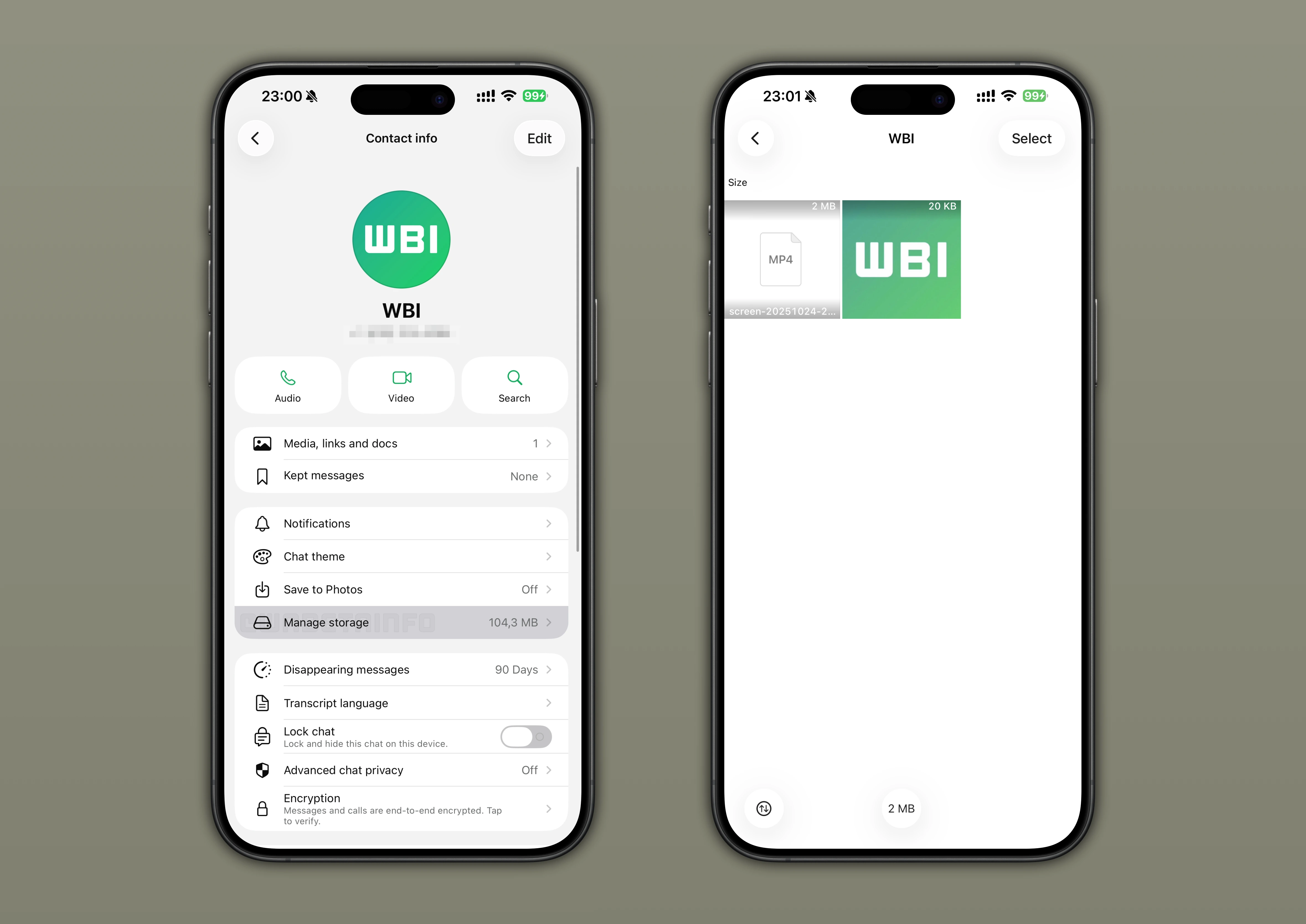
WhatsApp Introduces a New Entry Point for Storage Management
After installing the latest update from TestFlight, some beta testers can now explore a new entry point that lets them manage their storage directly from the chat info screen. This addition mirrors the existing "Manage Storage" feature already found in the app settings but places it in a more accessible location. Through this new entry point, WhatsApp makes it faster for users to review and delete large media files shared in a specific conversation. This shortcut saves time and simplifies the process of keeping chats organized without navigating through multiple sections.
Faster Access to the Same Manage Storage Functionality
The new section available from the chat info screen provides the same functionality as the traditional Manage Storage feature found in the app settings. Users can view a complete grid of all media shared within a chat, including photos, videos, and documents, neatly organized by file size. They can also switch between different sorting options such as "Newest", "Oldest", and "Largest" to quickly locate specific items. This makes it easier to identify which files take up the most memory within a conversation. Users can still perform bulk actions to delete multiple items at once, saving time during cleanup. The tool also allows marking multiple photos or videos as starred to locate them quickly within the chat whenever needed.
Enhanced Visibility for Storage Management in WhatsApp Chats
Previously, users could only access Manage Storage through the general app settings, a section many rarely open. As a result, few people regularly monitored how much media each conversation contained, and this often caused unnecessary buildup over time. By introducing a shortcut directly within the chat info screen, WhatsApp increases the visibility of media usage where users naturally spend more time.
Since this section is frequently opened to view chat details or shared files, the storage overview now appears more prominent and relevant. This design choice encourages users to manage their storage more proactively, reducing the risk of running out of capacity unexpectedly. It also allows users to identify and handle large files before they become an issue directly from the chat info screen. Essentially, WhatsApp aims to turn storage management into a simple, ongoing habit rather than an occasional chore. With this enhancement, users also gain better awareness and control without disrupting their everyday chat experience.
Manage Storage Shortcut in Chat Info is Rolling Out on iOS Beta
The feature that lets users manage storage from the chat info screen is currently available to a limited number of iOS beta testers. Access is expanding gradually, indicating that a broader rollout may follow as WhatsApp monitors stability and feedback. As with similar updates, the company is enabling the feature in waves to ensure a smooth experience before wider availability. Users enrolled in the beta can open the chat info screen and check if the new "Manage Storage" entry point is available.
Following WABetaInfo on X is the best way to stay informed about new features under development and those released to WhatsApp beta for Android, iOS, Web, and Desktop. We love hearing your feedback, so let us know what you think! You can also explore our dedicated page to discover all our services, or join our Discord Server to chat with others, get help and advice, and stay up to date with the latest WABetaInfo announcements.