WhatsApp beta for iOS 25.29.10.73: what's new?
WhatsApp has released a new iOS update through the TestFlight beta Program, bringing the version up to 25.29.10.73.
What's new in this update? WhatsApp is rolling out a feature that lets users manage animations for emojis, stickers, and GIFs, and it's available to some beta testers!
| Key Points | Details |
|---|---|
| Name of the feature: | Message animations |
| Status: | Rolling out |
| Compatibility: | WhatsApp beta for iOS 25.29.10.73 has been designated as a compatible update. |
| Availability info: | This feature is available to some beta testers, and it is rolling out to more users over the coming weeks. |
| Thanks: | Enrico Fregnan, Youssef Salem, Federico Trevisani, and Kerim, for testing and reporting. |
| Previous news: | WhatsApp beta for Android 2.25.30.2: what's new? WhatsApp is working on a feature that allows users to react to status updates using a reaction sticker! |
WhatsApp Brings New Customization Options for Animations
In the article about the WhatsApp beta for Android 2.25.11.10 update, we announced that a feature to manage chat message animations was available. This feature is designed to let users have greater control over their chat experience by allowing them to individually manage the animations of emojis, stickers, and GIFs. Through new options available in the app settings, Android users can decide whether these animated elements should automatically play or remain static.
It appears that WhatsApp now intends to offer iOS users the same control over message animations as it already does for the Android version, aiming to provide a consistent experience across both platforms. This update also underscores WhatsApp's focus on enhancing personalization and accessibility, allowing users to tailor their chat environments to their visual comfort and preferences. Following the release of the latest WhatsApp beta for iOS 25.29.10.73 update, which is available on the TestFlight app, we discovered that WhatsApp is rolling out a feature that lets users manage animations for emojis, stickers, and GIFs!
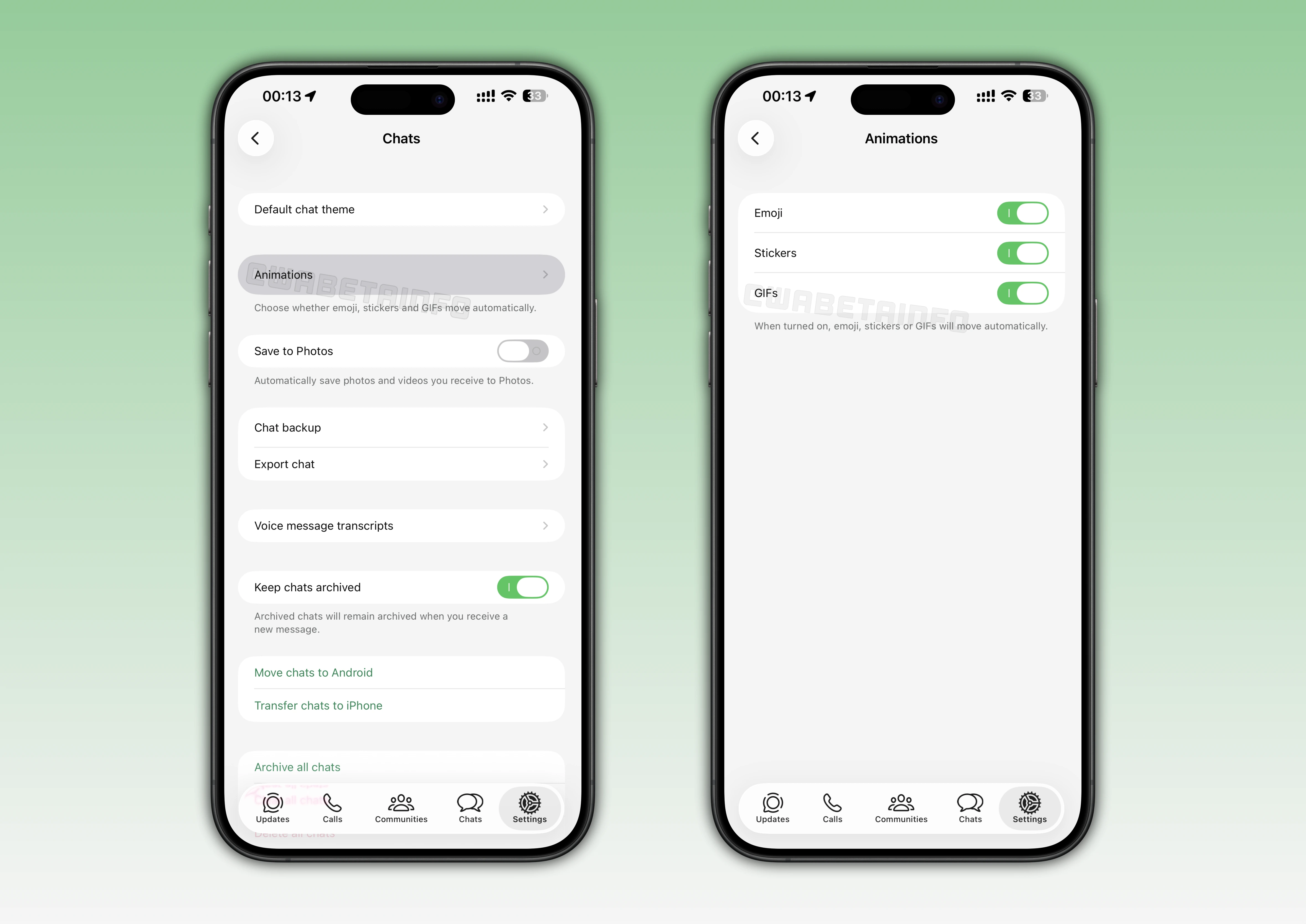
WhatsApp Beta Introduces Chat Animation Controls for Emojis, Stickers, and GIFs
With the latest update, some beta testers can now explore a new Animations section located under Settings > Chats. Within this menu, users can individually toggle animation settings for emojis, stickers, and GIFs, offering a more personalized messaging experience. This granular control allows users to decide which type of animated content plays automatically and which remains static. The feature is designed to give users more flexibility over how visual elements appear in chats, ensuring that each conversation feels tailored to their preferences.
Control Over Animated Emojis in WhatsApp Chats
WhatsApp's animated emojis are powered by the Lottie framework, making them smoother and more expressive than static ones. With the new animation controls, users can disable the automatic motion of these emojis if they prefer a cleaner and distraction-free chat view. When this option is disabled, animated emojis will appear as the standard Apple emojis, providing a static alternative to the animated versions. This gives users the choice to maintain a consistent look across their chats while reducing unnecessary movement on the screen.
Manage Animated Stickers for a Smoother Chat Experience
The new functionality also extend to animated stickers, allowing users to decide whether they should automatically play in chats. When the animation toggle for stickers is disabled, WhatsApp will display only the first frame of the sticker instead of looping the animation. This makes conversations less visually busy, especially when multiple stickers are sent in quick succession. Users who prefer a minimalist interface or reduced motion will likely find this option particularly helpful.
Even with sticker animations turned off, it's still possible to mark animated stickers as favorites. Any sticker saved as a favorite will retain its full animated form in the favorites section. This ensures that users can collect and access their preferred animated stickers without losing the motion. If users choose to re-enable sticker animations later, their new favorite stickers will immediately appear in full motion. This allows users to return to a dynamic chat experience without losing any of the saved animated content.
Turn Off GIF Animations for More Control
In addition to emojis and stickers, users can now manage how GIFs behave in their conversations. When the GIF animation option is disabled, GIFs will not automatically play and will instead appear as static previews. To view the animation, users will need to tap the GIF manually, giving them full control over when and how dynamic content plays. This adjustment helps prevent unexpected motion and saves both attention and data for those who prefer a quieter chat experience.
Accessibility and Personalization: A Step Toward Inclusive Design
These new animation controls are not just about personalization—they also represent an important step forward in accessibility. Users who are sensitive to motion or experience visual discomfort can now reduce or eliminate unnecessary animations in their chats. Disabling animated emojis helps prevent continuous movement that may cause distraction, while static stickers make conversations easier to follow. Similarly, turning off automatic GIF playback reduces screen motion and potential sensory overload, particularly in busy group chats.
Beyond accessibility, these controls cater to users who prefer a minimalist interface or wish to conserve device performance and battery life. The decision to separate each setting gives everyone the flexibility to adapt their experience according to personal comfort. The update introduces more detailed controls over motion, giving users new ways to personalize their chat experience. By letting users fine-tune how animations appear, WhatsApp creates a more comfortable and adaptable environment for everyone.
Control Over Message Animations is Rolling Out on iOS Beta
The feature that lets users control animations for emojis, stickers, and GIFs is currently available to a limited number of beta testers on iOS. Beta testers are gradually gaining access to the new animation settings, suggesting that a wider release may follow in the coming weeks. As always, WhatsApp tends to roll out such updates in stages to ensure stability and collect feedback before a wider release. Users enrolled in the beta can check their Chats settings to see if the new Animations option is already available.
Following WABetaInfo on X is the best way to stay informed about new features under development and those released to WhatsApp beta for Android, iOS, Web, and Desktop. We love hearing your feedback, so let us know what you think! You can also explore our dedicated page to discover all our services, or join our Discord Server to chat with others, get help and advice, and stay up to date with the latest WABetaInfo announcements.