WhatsApp beta for iOS 25.29.10.71: what's new?
WhatsApp has released a new iOS update through the TestFlight beta Program, bringing the version up to 25.29.10.71.
What's new in this update? WhatsApp is rolling out a feature that lets users choose the quality for downloaded photos and videos, and it's available to some beta testers!
| Key Points | Details |
|---|---|
| Name of the feature: | Quality for downloaded photos and videos |
| Status: | Rolling out |
| Compatibility: | WhatsApp beta for iOS 25.29.10.71 has been designated as a compatible update. |
| Availability info: | This feature is available to some beta testers, and it is rolling out to more users over the coming weeks. |
| Previous news: | WhatsApp beta for iOS 25.29.10.70: what's new? WhatsApp is rolling out a feature that allows users to add Facebook profile links! |
WhatsApp Beta Update Introduces Media Download Quality Control on iOS
In the article about the WhatsApp beta for Android 2.25.18.11 update, we announced that a feature to choose the quality for downloaded photos and videos was available. This feature is designed to give users greater control over their media experience by allowing them to manage how incoming media is automatically downloaded. With the addition of selectable quality settings, users can now prioritize either data efficiency or visual fidelity depending on their individual needs or network conditions.
It appears that WhatsApp now intends to offer iOS users the same control over media downloads as it already does for the Android version, aiming to provide a consistent experience across both platforms. This update also highlights WhatsApp's continued commitment to optimizing media management, ensuring users have more flexibility in balancing storage usage, data consumption, and viewing quality. Following the release of the latest WhatsApp beta for iOS 25.29.10.71 update, which is available on the TestFlight app, we discovered that WhatsApp is rolling out a feature that lets users choose the quality for downloaded photos and videos!
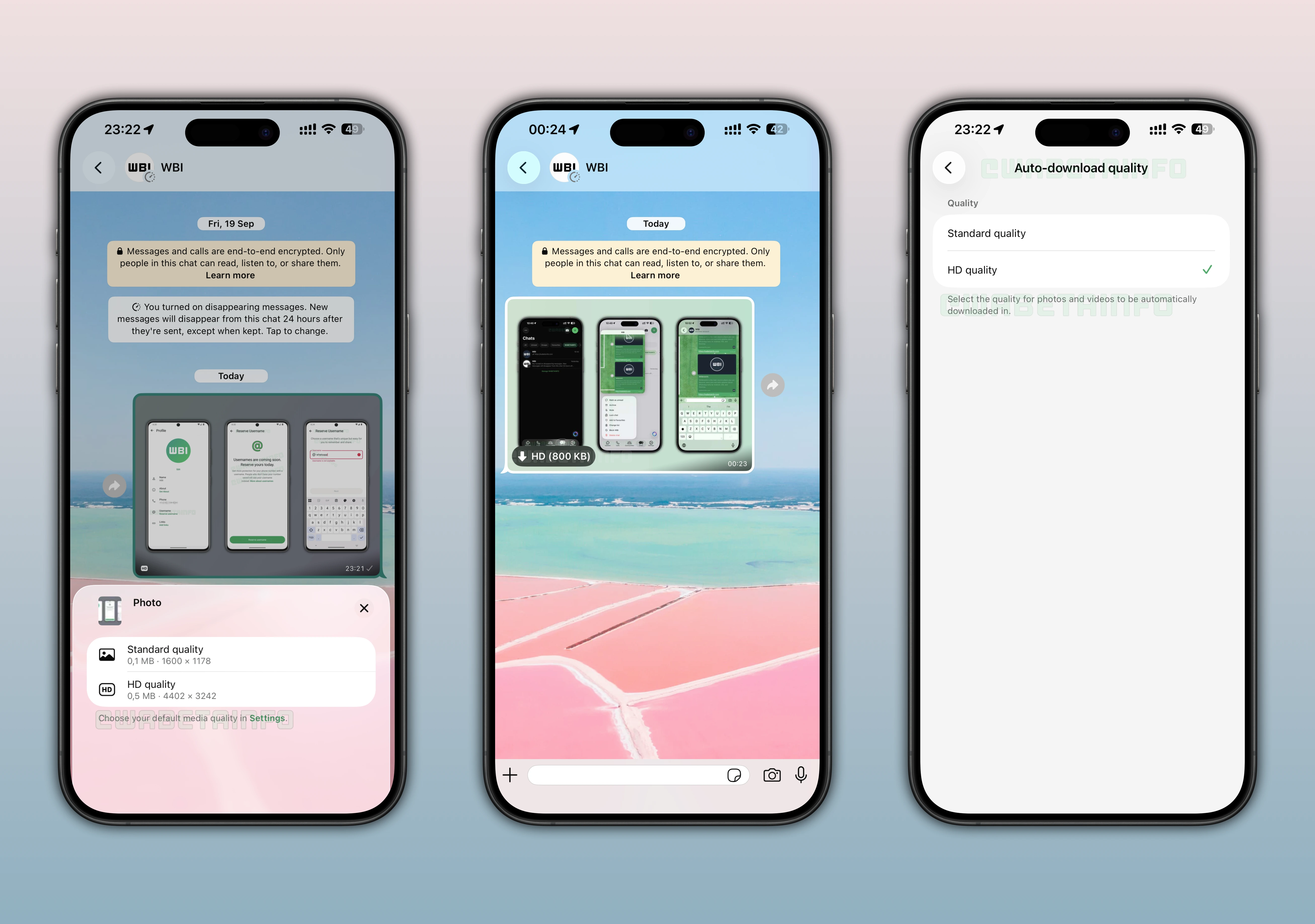
Media Auto-Download Quality Control Enhances Storage and Data
The new media download quality feature allows users to choose the quality level of automatically downloaded photos and videos. Instead of downloading all media at full resolution, users can now decide whether to prioritize file size or image clarity. This customization helps optimize both storage space and data usage. It's a thoughtful update designed to adapt WhatsApp's behavior to each user's personal preferences and network conditions.
It's worth noting that this functionality was first announced in the article covering the WhatsApp beta for iOS 25.18.10.81 update. However, it appears that a wider group of users can now test the feature starting today. This suggests that WhatsApp is gradually expanding access to gather feedback and fine-tune the functionality before a broader public release. Additionally, this rollout includes several enhancements and bug fixes compared to previous beta versions.
Accessing and Activating Media Download Quality Settings on iOS
The option to adjust media download quality is located under the "Storage and Data" section in the app settings. Once the feature is available, a new “Auto-download quality” option appears, giving users greater control over how incoming photos and videos are downloaded and managed. Within this section, users can select between two options: standard quality and HD quality. Standard quality reduces file size through compression, making downloads faster and lighter. HD quality, on the other hand, preserves sharper details and higher resolution for users who prefer the best visual experience.
How the Media Auto-Download Quality Control Feature Works
When the sender uploads a photo or video in HD, WhatsApp generates both a standard and an HD version of the same media file. Due to the platform's end-to-end encryption, the app cannot compress or modify files directly on the server, so both versions must be uploaded by the sender. The recipient's app then automatically downloads the version that matches their chosen setting. If a user has selected standard quality for auto-downloads, they will initially receive the smaller version of the file. However, if they later decide to view the image or video in higher quality, WhatsApp can fetch the HD version directly from the server by tapping on the HD icon.
This dual-system approach allows WhatsApp to maintain user privacy without compromising flexibility, as both media versions are managed securely under end-to-end encryption. By handling compression on the sender's device rather than on the server, WhatsApp ensures that no external system has access to modify or view the original content for compression reasons. At the same time, recipients can still decide which version to download based on their preferences and connectivity. This design also prevents unnecessary data usage, particularly in large group chats where numerous photos and videos are shared daily.
WhatsApp Now Shows Photo and Video File Sizes Directly in Chats
For the first time, WhatsApp is introducing a feature that displays the file size of shared photos and videos directly within the chat screen. When both versions of the same media (standard and HD) appear in a conversation, tapping the HD icon opens an overview showing the exact file size in megabytes for each version, along with their respective dimensions. This allows users to easily compare the data usage and resolution of each media file after it has been sent or received. By providing this information after sending or receiving media, WhatsApp helps users better understand and manage their data and storage usage.
Understanding WhatsApp's Media Download Quality Update
WhatsApp introduced this feature to solve a common issue faced by millions of users: excessive data and storage consumption from auto-downloaded media. With the growing number of photos and videos shared daily, not every file needs to be downloaded in full resolution. For example, the sender may share a photo in HD quality even if the recipient doesn't need it. With "standard quality" set as the default for auto-downloads, the recipient can opt to download only the standard version, skipping the HD file and conserving both data and storage.
By offering selectable quality levels, WhatsApp gives users greater control over how photos and videos are downloaded and stored. This empowers them to manage their data and storage more efficiently, avoiding unnecessary usage from large HD files. As a result, users can maintain a more consistent experience across different devices and network conditions.
Benefits of Choosing Media Download Quality on WhatsApp
For users with limited data plans or slower networks, the new control can significantly reduce unnecessary downloads. After choosing the standard quality for automatically downloaded media, WhatsApp prevents large HD media files from consuming valuable bandwidth or filling up storage. At the same time, users who prioritize high image quality can still opt to automatically receive HD content whenever possible. This flexibility ensures that everyone can tailor their usage to suit their preferences, regardless of their device or data plan.
Control Over Media Auto-Download Quality is Rolling Out on iOS Beta
The feature that lets users choose the quality for downloaded photos and videos is currently available to a limited number of beta testers on iOS. Beta testers are gradually gaining access to the new download quality settings, suggesting that a wider release may follow in the coming weeks. As always, WhatsApp tends to roll out such updates in stages to ensure stability and collect feedback before public deployment. Users enrolled in the beta can check their “Storage and Data” settings to see if the new option is already available.
Following WABetaInfo on X is the best way to stay informed about new features under development and those released to WhatsApp beta for Android, iOS, Web, and Desktop. We love hearing your feedback, so let us know what you think! You can also explore our dedicated page to discover all our services, or join our Discord Server to chat with others, get help and advice, and stay up to date with the latest WABetaInfo announcements.