WhatsApp beta for iOS 25.28.10.73: what's new?
WhatsApp has released a new iOS update through the TestFlight beta Program, bringing the version up to 25.28.10.73.
What's new in this update? WhatsApp is rolling out a feature that lets users add interactive question boxes to their status updates, and it's available to some beta testers!
| Key Points | Details |
|---|---|
| Name of the feature: | Status Questions |
| Status: | Rolling out |
| Compatibility: | WhatsApp beta for iOS 25.28.10.73 has been designated as a compatible update, but some users may get the same feature by installing the previous update. |
| Availability info: | This feature is available to some beta testers, and it is rolling out to more users over the coming weeks. |
| Thanks: | Akan, for testing and reporting. |
| Previous news: | WhatsApp beta for Android 2.25.29.12: what's new? WhatsApp is rolling out a feature that lets users share questions in their status updates! |
WhatsApp Beta Update Introduces Status Questions
In the article about the WhatsApp beta for Android 2.25.29.12 update, we announced that a feature that allows users to share questions in their status updates was available. This feature lets users add a customizable question box to their status, allowing their contacts to submit responses directly within the update. All replies are collected privately, so only the original poster can view and manage them.
It appears that WhatsApp now intends to offer iOS users the same status question functionality as it already does for the Android version, aiming to provide a consistent experience across both platforms. With this rollout, WhatsApp also seeks to boost user engagement by expanding its status interactive tools to a wider audience. Following the release of the latest WhatsApp beta for iOS 25.28.10.73 update, which is available on the TestFlight app, we discovered that WhatsApp is rolling out a feature that lets users add interactive question boxes to their status updates!
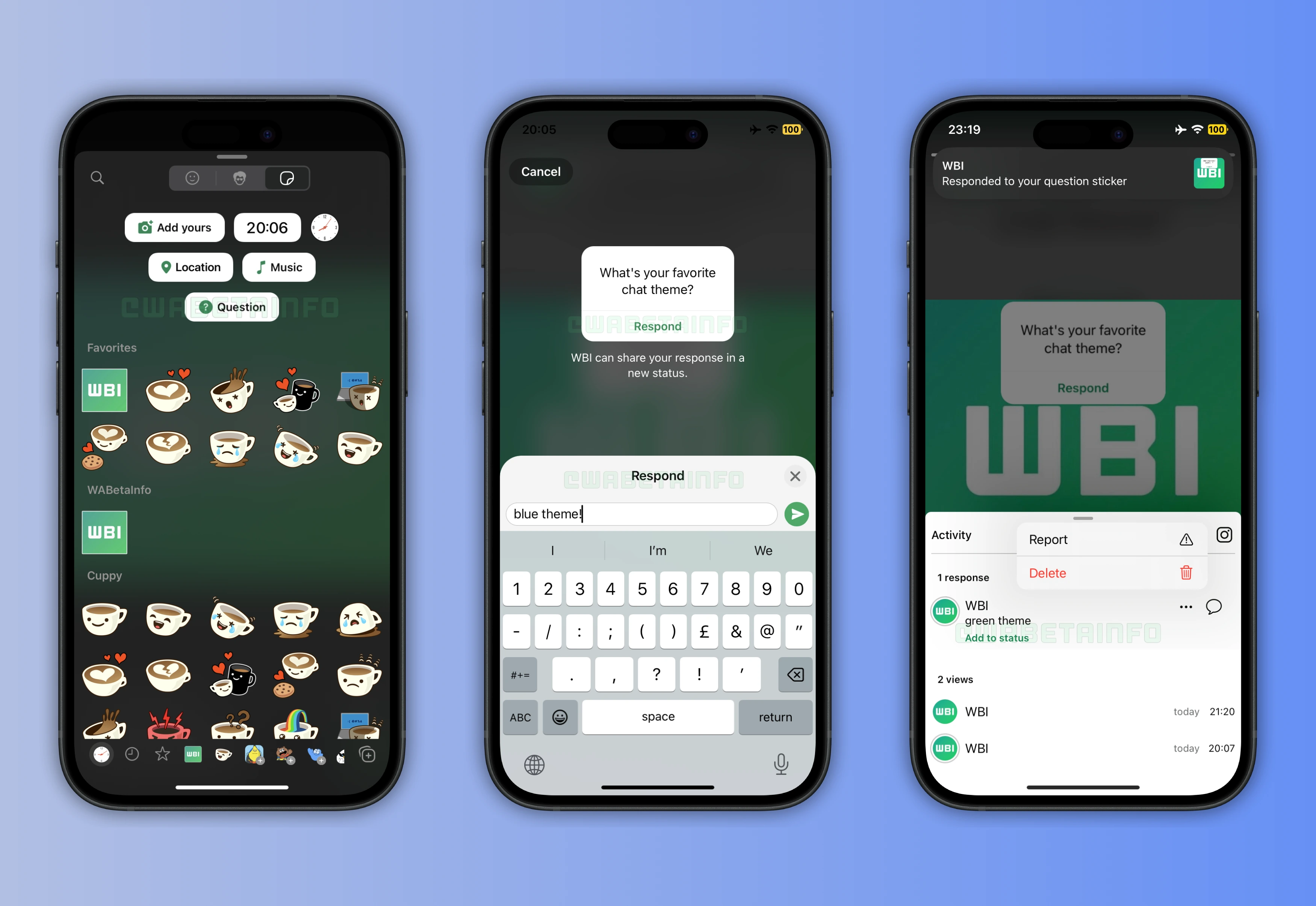
New Interactive Question Stickers Enhance WhatsApp Status Updates
Some beta testers can add the new question box to their status update through an interactive sticker placed over a photo or video when sharing a status update. This sticker allows users to write a question of their choice, inviting their contacts to reply directly from the status interface. It transforms static status updates into engaging opportunities for communication. By integrating interactive stickers, WhatsApp gives users a simple way to start conversations and gather input from their audience.
Responding to Question Stickers in WhatsApp Status Updates
When viewers see a status update that includes a question sticker, their experience depends on whether the feature is available for their account. If it is not yet supported, WhatsApp will display a message informing them that the update contains a new feature not currently accessible. When the feature is available, viewers can type their responses directly into the question box displayed on the photo or video. Each reply is sent privately to the author of the status, ensuring that only the original poster can see and manage the responses.
Notifications for Question Sticker Responses
Whenever someone responds to a question sticker, WhatsApp automatically sends a push notification to the author of the status. This ensures that users are immediately informed when their audience engages with their question. The notification includes a quick preview, allowing users to open the status and view the full response instantly. By introducing this alert system, WhatsApp helps users stay up to date with all interactions related to their shared content.
Reviewing and Managing Responses from the Activity Section
All responses submitted through a question sticker can be reviewed directly from the viewers list, which now features a new "Activity" section dedicated to this purpose. Within this section, users can easily browse all replies linked to their question and see who submitted each one. The interface is designed for convenience, giving users the ability to manage interactions efficiently without leaving the status view.
Users can choose to share a response in a new status update while keeping the author's identity hidden for privacy reasons. Users can also report inappropriate or spam responses to maintain a safe environment. Additionally, any unwanted replies can be deleted instantly from the activity feed. The layout is clean and organized, making it simple to keep track of engagement across multiple statuses.
Privacy and End-to-End Encryption for Responses
As with all WhatsApp communications, responses sent through question stickers are protected by end-to-end encryption. This means that only the sender and the author of the status can read the messages, keeping the interaction completely private. Even if a response is shared in a new status update, WhatsApp ensures that the name of the author remains hidden. This approach reinforces user trust and encourages people to participate without worrying about their privacy.
Status Questions Feature is Rolling Out on iOS Beta
The feature that lets users add interactive question boxes to their status updates is currently available to a limited number of beta testers on iOS. However, installing the latest WhatsApp beta from TestFlight does not automatically ensure access to the new question feature. WhatsApp is rolling out the update gradually, activating it for select accounts to monitor stability and collect valuable feedback. In some cases, the rollout might also extend to users on the public App Store version as part of a broader testing phase.
Following WABetaInfo on X is the best way to stay informed about new features under development and those released to WhatsApp beta for Android, iOS, Web, and Desktop. We love hearing your feedback, so let us know what you think! You can also explore our dedicated page to discover all our services, or join our Discord Server to chat with others, get help and advice, and stay up to date with the latest WABetaInfo announcements.