WhatsApp beta for iOS 25.28.10.70: what's new?
WhatsApp has released a new iOS update through the TestFlight beta Program, bringing the version up to 25.28.10.70.
What's new in this update? WhatsApp is rolling out a feature that swaps the positions of the Chats and Updates tabs, and it's available to some beta testers!
| Key Points | Details |
|---|---|
| Name of the feature: | Chats & Updates Tab Switch |
| Status: | Rolling out |
| Compatibility: | WhatsApp beta for iOS 25.28.10.70 has been designated as a compatible update. |
| Availability info: | This feature is available to some beta testers, and it is rolling out to more users over the coming weeks. |
| Thanks: | Akan and Luigi, for testing and reporting. |
| Previous news: | WhatsApp beta for Android 2.25.28.12: what's new? WhatsApp is working on a feature that will let users reserve their preferred username ahead of its official release! |
WhatsApp Highlights Improvements to Main Tabs
In the article about the WhatsApp for iOS 25.27.73 update, we announced that a new unified hub for the Calls tab was available. This feature centralizes all call-related actions, allowing users to start calls, schedule meetings, access the dialer, and manage favorite contacts from a single, streamlined interface. This convenient setup reduces the number of steps needed to manage calls, making everyday communication faster and easier.
It appears that WhatsApp continues to focus on improving the app's tabs, ensuring a more intuitive experience for all users. This update also highlights WhatsApp's continued commitment to enhancing overall navigation and usability within the app. Following the release of the latest WhatsApp beta for iOS 25.28.10.70 update, which is available on the TestFlight app, we discovered that WhatsApp is rolling out a feature that swaps the positions of the Chats and Updates tabs!
A New Tab Navigation Experience is Available
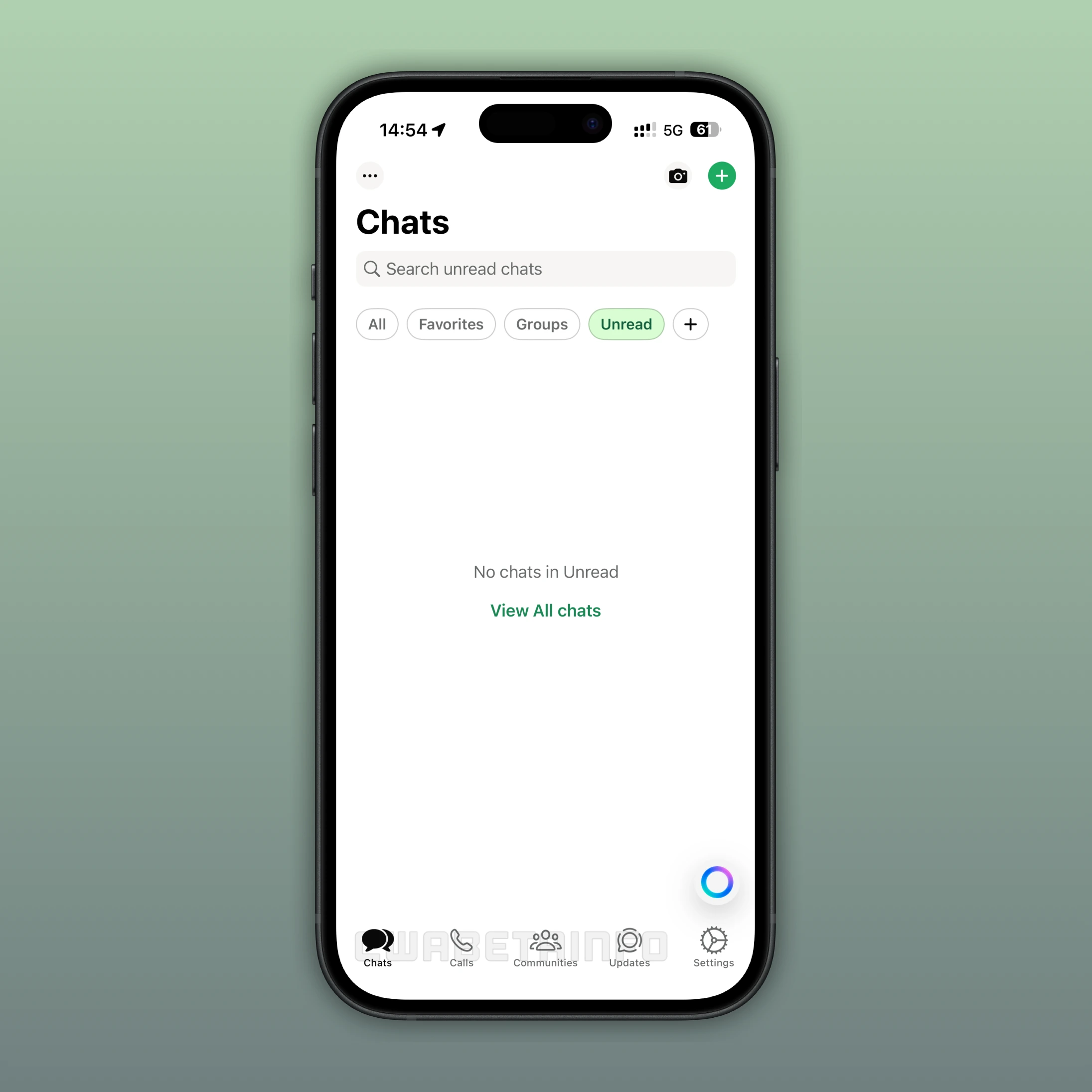
With the latest update, some beta testers may now experience a new way of navigating within WhatsApp. The main change involves swapping the Chats and Updates tabs, which affects their positions in the bottom navigation bar. As a result, the Chats tab is now located where Updates used to be, while Updates has moved to the former Chats position. This change modifies the familiar layout that many users have grown accustomed to over time.
Unclear Reasons Behind WhatsApp's Tab Update
The reasons behind this tab update remain unclear. WhatsApp has not provided any official explanation or statement regarding why the positions of the tabs were switched. It is likely that WhatsApp aims to improve overall navigation by placing the Chats tab at the beginning of the tab bar. However, there is no confirmation from the company. For now, users are left to adapt to the new layout while keeping an eye on upcoming updates.
How Users React to WhatsApp's Tab Changes
Some users have expressed frustration with this change, stating that it disrupts their muscle memory. Muscle memory refers to the subconscious habits users develop through repeated interaction with an interface, allowing them to navigate the app quickly without thinking. When the tabs are switched, these habits are interrupted, causing users to pause and adjust to the new layout.
Many users were used to tapping the fourth tab to view their list of chats. Now, that same tab shows the Updates section and channels instead. This initially creates confusion for some users, especially those who are not very experienced with using apps. Looking ahead, the next significant layout change will arrive with the upcoming Liquid Glass update, which introduces a redesigned bottom navigation bar.
Upcoming WhatsApp Navigation Changes in the Liquid Glass Update
The Liquid Glass update is expected to bring a redesigned bottom navigation bar, offering a more modern and streamlined interface. This change is separate from the current tab swap but it still represents another upcoming modification to the app's layout. It is worth noting that it is also possible that WhatsApp could revert this new tab configuration, depending on the feedback collected during this test. Only time will tell.
Reporting Feedback Using TestFlight
User feedback plays a crucial role in shaping updates and improvements in WhatsApp. When changes affect how people interact with the interface, developers rely on feedback to understand what works and what doesn't. If users find the new tab configuration inconvenient or confusing, they should report their experience directly to WhatsApp. Sharing feedback helps WhatsApp make informed decisions and ensures future updates better meet the needs of all users.
For iOS beta testers using the TestFlight app, sending feedback is straightforward. After installing the beta, users can open TestFlight, select WhatsApp from the list of active apps, and tap on the "Send Feedback" option. This allows them to describe the issue, attach screenshots if needed, and submit their comments directly to the developers. Using this built-in feedback system ensures that WhatsApp receives valuable insights from real user experiences.
Chats and Updates Tab Switch is Rolling Out
The feature that swaps the positions of the Chats and Updates tabs is currently available to a limited number of beta testers on iOS. However, even after installing the latest WhatsApp beta via the TestFlight app, access to the feature is not guaranteed. WhatsApp is rolling it out gradually, enabling it only for selected accounts for testing purposes. Occasionally, the test may also include users on the App Store version. This means that availability could expand over time, or the feature could even be removed if it doesn't align with user preferences.
Following WABetaInfo on X is the best way to stay informed about new features under development and those released to WhatsApp beta for Android, iOS, Web, and Desktop. We love hearing your feedback, so let us know what you think! You can also explore our dedicated page to discover all our services, or join our Discord Server to chat with others, get help and advice, and stay up to date with the latest WABetaInfo announcements.