WhatsApp beta for iOS 25.25.10.70: what's new?
WhatsApp has released a new iOS update through the TestFlight beta Program, bringing the version up to 25.25.10.70.
What's new in this update? WhatsApp is rolling out a feature that organizes message replies into structured threads, and it's available to some beta testers!
| Key Points | Details |
|---|---|
| Name of the feature: | Threaded message replies |
| Status: | Rolling out |
| Compatibility: | WhatsApp beta for iOS 25.25.10.70 has been designated as a compatible update. |
| Availability info: | This feature is available to some beta testers, and it is rolling out to more users over the coming weeks. |
| Previous news: | WhatsApp beta for Android 2.25.25.7: what's new? WhatsApp is rolling out a feature that organizes message replies into structured threads! |
THREADED MESSAGE REPLIES
In the article about the WhatsApp beta Android 2.25.25.7 update, we announced that a feature to organize message replies into structured conversations is available. This functionality enables users to follow responses more intuitively by grouping all replies to a specific message into a dedicated thread. Instead of scrolling through the main chat to find relevant replies, users can access the thread and view every related response in one place. It appears that WhatsApp now intends to offer iOS users the same redesigned reply system as it already does for the Android version, aiming to provide a consistent experience across both platforms. Following the release of the latest WhatsApp beta for iOS 25.25.10.70 update, which is available on the TestFlight app, we discovered that WhatsApp is rolling out a feature that organizes message replies into structured threads!
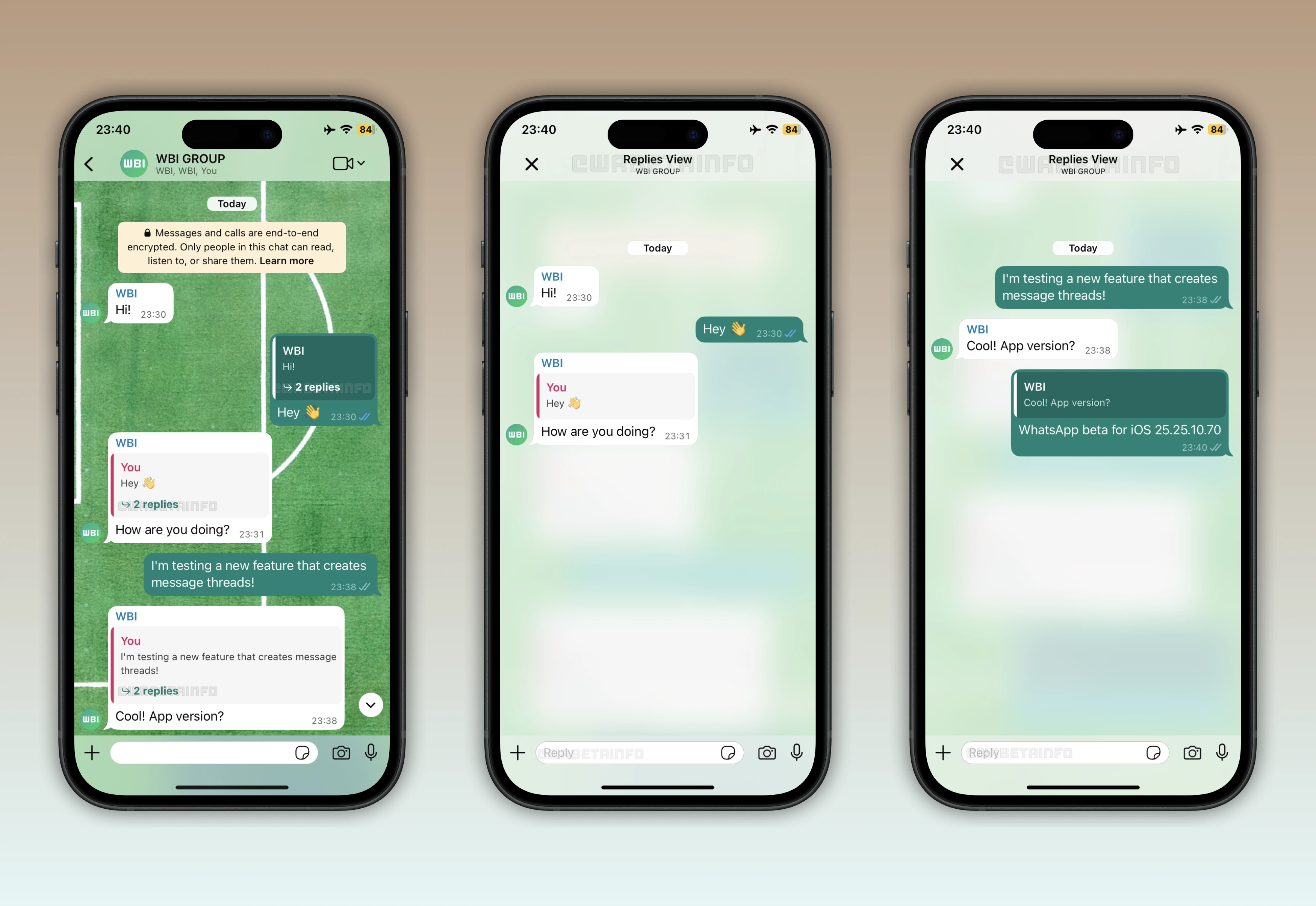
As you can see from the attached screenshot, some beta testers can now interact with a new reply indicator embedded directly in the message bubble. This indicator displays the number of replies linked to that message and opens the dedicated thread view when tapped. Inside the thread, users will see all related responses connected to the original message, displayed in chronological order for easy reading. Each reply added to the thread automatically remains part of the same conversation, with preserves context and clear organization.
When replying to a message inside a thread, users can either respond to the most recent message or select another message in the thread to reply to. In this case, the new response may appear with the label "Follow-up reply", indicating that it is addressing a previous reply rather than the original message. This labeling helps prevent confusion, especially in busy group chats where multiple topics are being discussed simultaneously. Users can also add new replies directly to the thread, and these replies are usually linked to the latest incoming message in the chain automatically.
Threads allow users to focus on a single discussion without being distracted by unrelated messages in the main chat. Instead of trying to track individual replies, users can access the thread to see the complete conversation in one view. This makes catching up on discussions faster and more convenient for anyone joining the chat late. Each thread effectively acts as a partial conversation associated with a specific message, keeping responses organized and coherent. However, threads are optional, and users can still tap the quoted message to view it in the main conversation.
The structured reply system is particularly useful in large group chats or community groups, where many replies can appear within minutes. By separating conversations into threads, users reduce the risk of messages getting lost or misunderstood. Threads also improve collaboration, as users can dedicate a thread to a specific topic or question, allowing everyone to follow that particular discussion independently from other ongoing conversations. Additionally, the reply indicator in the message bubble provides both a counter and an entry point to the thread. Users can see at a glance how many replies have been made and tap to open the thread immediately.
It's important to note that threads only work with new messages. This means that when the feature becomes available, WhatsApp will start generating threads only for replies sent after the feature is activated. Existing messages and replies sent before activation may not be organized into threads. Additionally, it is not necessary for recipients to have the feature enabled for a thread to be created for a reply, as the app locally organizes and links the responses to the original message regardless of the recipient's settings.
A feature that organizes message replies into structured threads is available to some beta testers who install the latest version of WhatsApp beta for iOS from the TestFlight app, and it's rolling out to more people over the coming weeks.
Following WABetaInfo on X is the best way to stay informed about new features under development and those released to WhatsApp beta for Android, iOS, Web, and Desktop. We love hearing your feedback, so let us know what you think! You can also explore our dedicated page to discover all our services, or join our Discord Server to chat with others, get help and advice, and stay up to date with the latest WABetaInfo announcements.