WhatsApp beta for iOS 25.22.10.77: what's new?
WhatsApp has released a new iOS update through the TestFlight beta Program, bringing the version up to 25.22.10.77.
What's new in this update? WhatsApp is rolling out a feature that separates single-message forwarding from multiple-message selection, and it's available to some beta testers!
| Common questions | Answers |
|---|---|
| Name of the feature? | Multiple message selection |
| Status? | Rolling out |
| Compatibility? | WhatsApp beta for iOS 25.22.10.77 has been designated as a compatible update. |
| I've installed this update but I don't have this feature. Why? | This feature is available to some beta testers and it's rolling out to more people over the coming weeks. |
| Thanks: | IsaacAndHisIsaac, and MK006, for testing and reporting. |
| Previous news? | WhatsApp beta for Android 2.25.23.19: what's new? WhatsApp is rolling out a feature that allows users to add verified Instagram profile links! |
MULTIPLE MESSAGE SELECTION
In the article about the WhatsApp for iOS 25.16.81 update, we announced that a feature to select and copy specific parts of a message was available. This feature allows users to highlight only the relevant portion of a message, rather than being forced to copy the entire text. Whether it's a single word, sentence, or paragraph, users can now drag to select the exact section they want, making the process faster and more convenient. Regarding the selection process, it seems that WhatsApp is now introducing further refinements to how users can select messages within their chats, making the overall experience even more intuitive. Following the release of the latest WhatsApp beta for iOS 25.22.10.77 update, which is available on the TestFlight app, we discovered that WhatsApp is rolling out a feature that separates single-message forwarding from multiple-message selection!
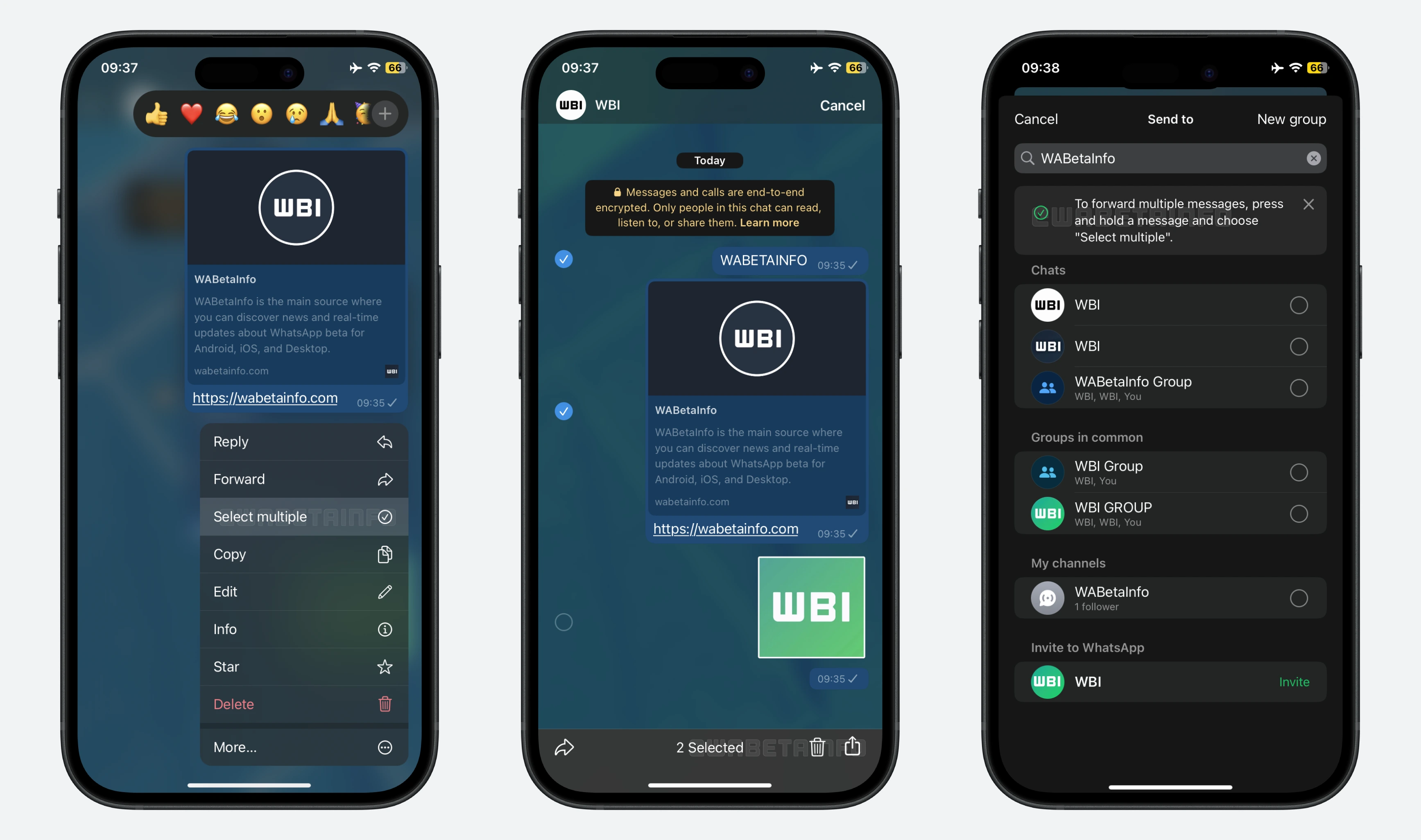
As you can see from the attached screenshot, some beta testers can explore a new behavior in the forwarding process, where forwarding actions are now separated to better distinguish the different options available when sharing messages. Previously, when a user tapped on a message and selected the "Forward" action from the context menu, they could continue selecting multiple messages before choosing a contact to forward to. Now, tapping the "Forward" action directly opens the list of contacts, making it faster when only a single message is intended to be forwarded.
The new design removes the extra step of confirming selection when it is unnecessary. This is useful when users want to quickly forward a single message without going through additional menus. Instead, users who want to forward multiple messages will notice a separate option called "Select multiple". This option brings back the previous capability to choose several messages before forwarding them. In addition to forwarding, the multiple selection mode allows users to delete messages in bulk, creating an additional shortcut for chat management. WhatsApp may also experiment with even more options for multiple message selection in future updates, making message management even more efficient.
When a user chooses the single-message forwarding option, a banner will appear at the top of the contact list to provide clear guidance. This banner explains that the forwarding process has been updated and highlights the difference from the previous workflow. It also informs users that if they want to forward multiple messages at once, they will need to use the new multi-selection option. By displaying this banner, WhatsApp helps educate users about the updated forwarding process and ensures they understand how to select and send multiple messages efficiently.
The distinction between single-message forwarding and multi-message selection provides a clearer user flow and helps improve convenience when managing messages. By separating these two actions, users can complete simple tasks quickly while still having the flexibility to perform more complex operations when needed. This design choice enhances overall efficiency, ensuring that common actions like forwarding a single message do not require unnecessary steps. At the same time, the feature respects the previous workflow for multi-message selection, allowing existing users to interact with the system in a way that feels familiar and intuitive.
A feature that separates single-message forwarding from multiple-message selection is available to some beta testers who install the latest version of WhatsApp beta for iOS from the TestFlight app, and it's rolling out to more people over the coming weeks.
Stay up-to-date on WhatsApp news by following WABetaInfo on X where you can also discover other new features for WhatsApp beta for Android, iOS, Web/Desktop, and Windows.
Do you like this news? Please, let us know on X: we love hearing your feedback! If you're curious to see where you can find WABetaInfo, there is a dedicated page where you can discover our services.
In addition, we have set up a Discord Server where you can chat with other people, get help and advice, and stay up to date with the latest announcements from WABetaInfo.