WhatsApp beta for iOS 25.22.10.75: what's new?
WhatsApp has released a new iOS update through the TestFlight beta Program, bringing the version up to 25.22.10.75.
What's new in this update? WhatsApp is rolling out a feature that improves the emoji reaction panel in chats, groups, and channels, and it's available to some beta testers!
| Common questions | Answers |
|---|---|
| Name of the feature? | New emoji reaction panel |
| Status? | Rolling out |
| Compatibility? | WhatsApp beta for iOS 25.22.10.75 has been designated as a compatible update. |
| I've installed this update but I don't have this feature. Why? | This feature is available to some beta testers and it's rolling out to more people over the coming weeks. |
| Thanks: | IsaacAndHisIsaac, for testing and reporting. |
| Previous news? | WhatsApp beta for Android 2.25.23.17: what's new? WhatsApp is rolling out a feature to react to status updates with recently used emojis! |
NEW EMOJI REACTION PANEL
In the article about the WhatsApp beta for Android 2.25.6.15 update, we announced that an improved sheet for emoji reactions in chats, groups, and channels was available. This feature introduces a cleaner and more organized interface, allowing users to review all reactions to a message at a glance, navigate through them more easily, and quickly see which emojis have been used the most. It appears that WhatsApp now intends to offer iOS users the same redesigned emoji reactions overview as it already does for the Android version, aiming to provide a consistent experience across both platforms. Following the release of the latest WhatsApp beta for iOS 25.22.10.75 update, which is available on the TestFlight app, we discovered that WhatsApp is rolling out a feature that improves the emoji reaction panel in chats, groups, and channels!
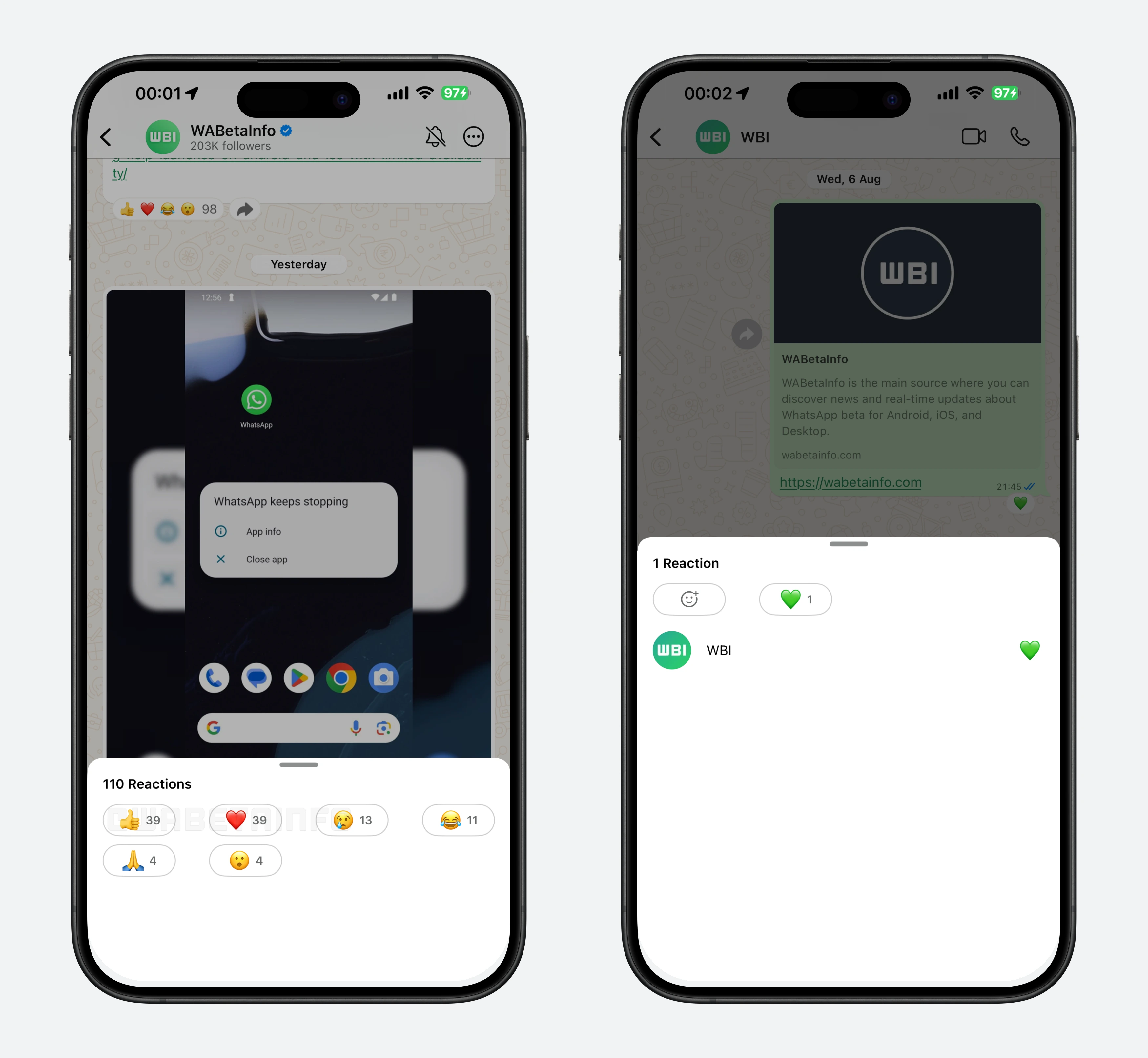
As you can see from the attached screenshot, some beta testers can explore a new feature that completely revamps how reaction panels are displayed. In channels, the new reaction panel now arranges emoji reactions in a grid layout, showing four reactions per row. This is a major change from the previous long vertical list, which often required excessive scrolling when many users reacted to a single update. Each emoji in the grid shows the total number of reactions, making it easier to see at a glance which emojis are the most popular. Users can also tap on an emoji to react to the channel update, adding their reaction in a single action.
This grid layout reduces vertical space usage and makes the interface look cleaner, even for channel updates with a high volume of reactions. The design also allows users to navigate between reactions more quickly, without the frustration of scrolling through a long list. Additionally, the grid provides a more visually appealing and compact presentation, which improves the overall reading experience in busy channels.
In chats and groups, the reaction panel maintains the vertical list format, but with notable enhancements. The tabs at the top of the page, which were already present, have been redesigned to match the style of the buttons in the channels' reaction panel. This gives the interface a more modern and cohesive appearance, as the refreshed tabs improve readability and help users navigate reactions more comfortably. Each row still shows the contact who reacted along with their emoji, preserving the context that is important in personal and group conversations.
Compared to the old design, where the vertical list could feel long and cluttered in channels, the new layout provides a more structured and user-friendly experience. As a result, users can view all reactions for a channel update with minimal scrolling. For individual conversations and group chats, the app now uses the same button style as the channels' reaction panel, creating a consistent and cohesive look throughout the app.
A feature that improves the emoji reaction panel in chats, groups, and channels is available to some beta testers who install the latest version of WhatsApp beta for iOS from the TestFlight app, and it's rolling out to more people over the coming weeks.
Stay up-to-date on WhatsApp news by following WABetaInfo on X where you can also discover other new features for WhatsApp beta for Android, iOS, Web/Desktop, and Windows.
Do you like this news? Please, let us know on X: we love hearing your feedback! If you're curious to see where you can find WABetaInfo, there is a dedicated page where you can discover our services.
In addition, we have set up a Discord Server where you can chat with other people, get help and advice, and stay up to date with the latest announcements from WABetaInfo.