WhatsApp beta for iOS 25.21.10.76: what's new?
WhatsApp has released a new iOS update through the TestFlight beta Program, bringing the version up to 25.21.10.76.
What's new in this update? WhatsApp is rolling out a feature to initiate real-time voice chats with Meta AI, and it's available to some beta testers!
| Common questions | Answers |
|---|---|
| Name of the feature? | Voice chat with Meta AI |
| Status? | Rolling out |
| Compatibility? | WhatsApp beta for iOS 25.21.10.76 has been designated as a compatible update, but some users may get the same feature by installing certain previous updates. |
| I've installed this update but I don't have this feature. Why? | This feature is available to some beta testers and it's rolling out to more people over the coming weeks. |
| Thanks: | Akan, for testing and reporting. |
| Previous news? | WhatsApp beta for Android 2.25.22.10: what's new? WhatsApp is working on a feature that notifies users when selected contacts share new status updates! |
VOICE CHAT WITH META AI
In the article about the WhatsApp beta for Android 2.25.21.21 update, we announced that a feature to start voice chats with Meta AI was available. This feature aims to provide Android users with a seamless, hands-free way to interact with Meta AI, enhancing both convenience and accessibility. Through natural voice conversations, it's possible to engage more effortlessly with the AI, whether for quick assistance or multitasking scenarios. It appears that WhatsApp now intends to offer iOS users the same voice interactions with Meta AI as it already does for the Android version, aiming to provide a consistent experience across both platforms. Following the release of the latest WhatsApp beta for iOS 25.21.10.76 update, which is available on the TestFlight app, we discovered that WhatsApp is rolling out a feature to initiate real-time voice chats with Meta AI!
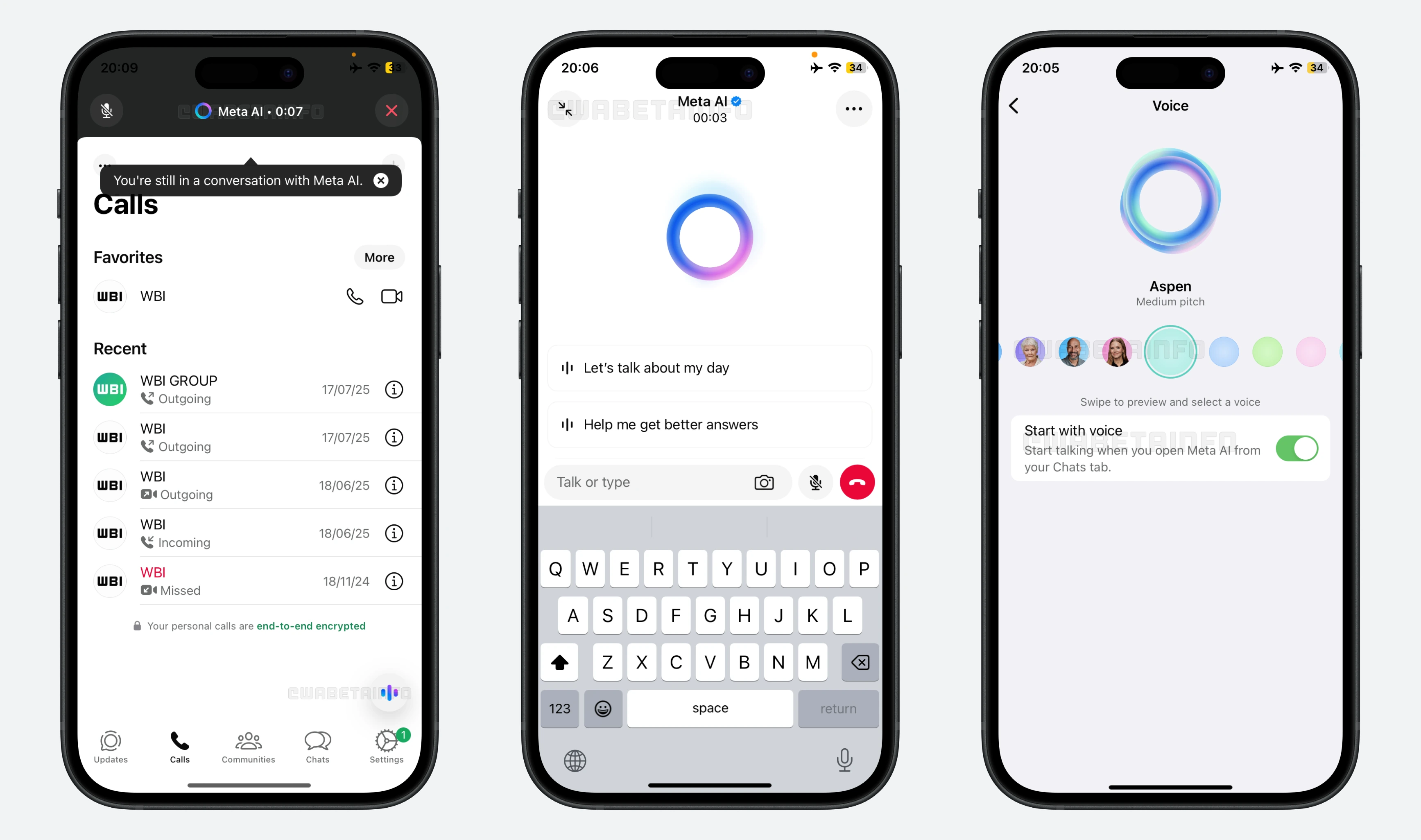
As you can see from the attached screenshot, some beta testers can explore a new feature that allows them to interact with Meta AI in a more accessible way. With this update, users opening Meta AI from the Chats tab can start a voice session by tapping the waveform icon. Additionally, they can choose in voice preferences to have WhatsApp start voice chats automatically when opening Meta AI from this tab, though this setting is off by default, ensuring users maintain full control over when voice interactions begin.
To enhance accessibility and speed of interaction, WhatsApp also allows some users to start voice chats with Meta AI directly from the Calls tab. Unlike the Chats tab, where users must tap a button or enable settings to begin speaking, opening Meta AI from the Calls tab launches a voice conversation instantly and automatically, without any additional action needed. This design choice aligns perfectly with the primary purpose of the Calls tab, which is centered around quick, immediate voice communication.
The updated interface features a set of pre-made prompt suggestions that act as helpful conversation starters for users who might not know what to ask or say to Meta AI. These prompts cover a variety of topics and make it easier for users to begin interacting with the AI without feeling overwhelmed or uncertain. Additionally, the interface allows users to quickly attach and share photos directly from their gallery or camera right within the text input area. This seamless integration enhances communication by letting users visually support their queries or messages.
Voice chats with Meta AI can continue running when users switch to other apps by tapping the "collapse" icon. This allows Meta AI to listen and provide feedback as users, for example, read notes aloud or browse websites, creating an experience similar to a natural phone call with uninterrupted assistance. It's important to note that privacy is emphasized throughout: users can mute the microphone anytime or end the voice session manually by tapping the close button or switching back to text chat.
On iOS devices, an orange dot appears in the top-right corner of the screen, near the signal and battery icons, whenever an app is actively using the microphone. This is part of Apple's built-in privacy protections designed to keep users fully informed about when their microphone is in use. This indicator is managed at the system level by iOS and cannot be controlled, hidden, or modified by any app, including WhatsApp. This means users can always trust that when they see the orange dot, the microphone is actively listening, providing a clear and transparent signal that voice interactions are ongoing. By relying on this native privacy feature, WhatsApp ensures that users have complete awareness and control over their audio privacy when using voice chats with Meta AI.
This new voice chat feature provides a more natural and intuitive way to interact with Meta AI by removing the need to type. It's especially useful for those who prefer speaking over typing, such as when multitasking, driving, or for people with mobility challenges. voice conversations often feel more conversational, enabling users to communicate more efficiently and receive quicker responses.
A feature to initiate real-time voice chats with Meta AI is available to some beta testers who install the latest version of WhatsApp beta for iOS from the TestFlight app, and it's rolling out to more people over the coming weeks.
Stay up-to-date on WhatsApp news by following WABetaInfo on X where you can also discover other new features for WhatsApp beta for Android, iOS, Web/Desktop, and Windows.
Do you like this news? Please, let us know on X: we love hearing your feedback! If you're curious to see where you can find WABetaInfo, there is a dedicated page where you can discover our services.
In addition, we have set up a Discord Server where you can chat with other people, get help and advice, and stay up to date with the latest announcements from WABetaInfo.