WhatsApp beta for iOS 25.20.10.78: what's new?
WhatsApp has released a new iOS update through the TestFlight beta Program, bringing the version up to 25.20.10.78.
What's new in this update? WhatsApp is rolling out Status Ads and Promoted Channels, bringing sponsored content directly into the Updates tab, and it's available to some beta testers!
| Common questions | Answers |
|---|---|
| Name of the feature? | Status Ads and Promoted Channels |
| Status? | Rolling out |
| Compatibility? | WhatsApp beta for iOS 25.20.10.78 has been designated as a compatible update. |
| I've installed this update but I don't have this feature. Why? | This feature is available to some beta testers and it's rolling out to more people over the coming months. |
| Previous news? | WhatsApp news of the week: feature to share questions in channels and status updates is under development! |
STATUS ADS AND PROMOTED CHANNELS
In the article about the WhatsApp beta for Android 2.25.21.11 update, we announced that sponsored content was available in the Updates tab. This feature introduces Status Ads and Promoted Channels, two new ways for businesses and creators to reach users directly within the familiar Status and Channels experience. Both features are carefully integrated into the Updates tab, separate from private chats, ensuring that personal messages and calls remain private. It appears that WhatsApp now intends to offer iOS users the same advertising functionality as it already does for the Android version, aiming to provide a consistent experience across both platforms. Following the release of the latest WhatsApp beta for iOS 25.20.10.78 update, which is available on the TestFlight app, we discovered that WhatsApp is rolling out Status Ads and Promoted Channels, bringing sponsored content directly into the Updates tab!
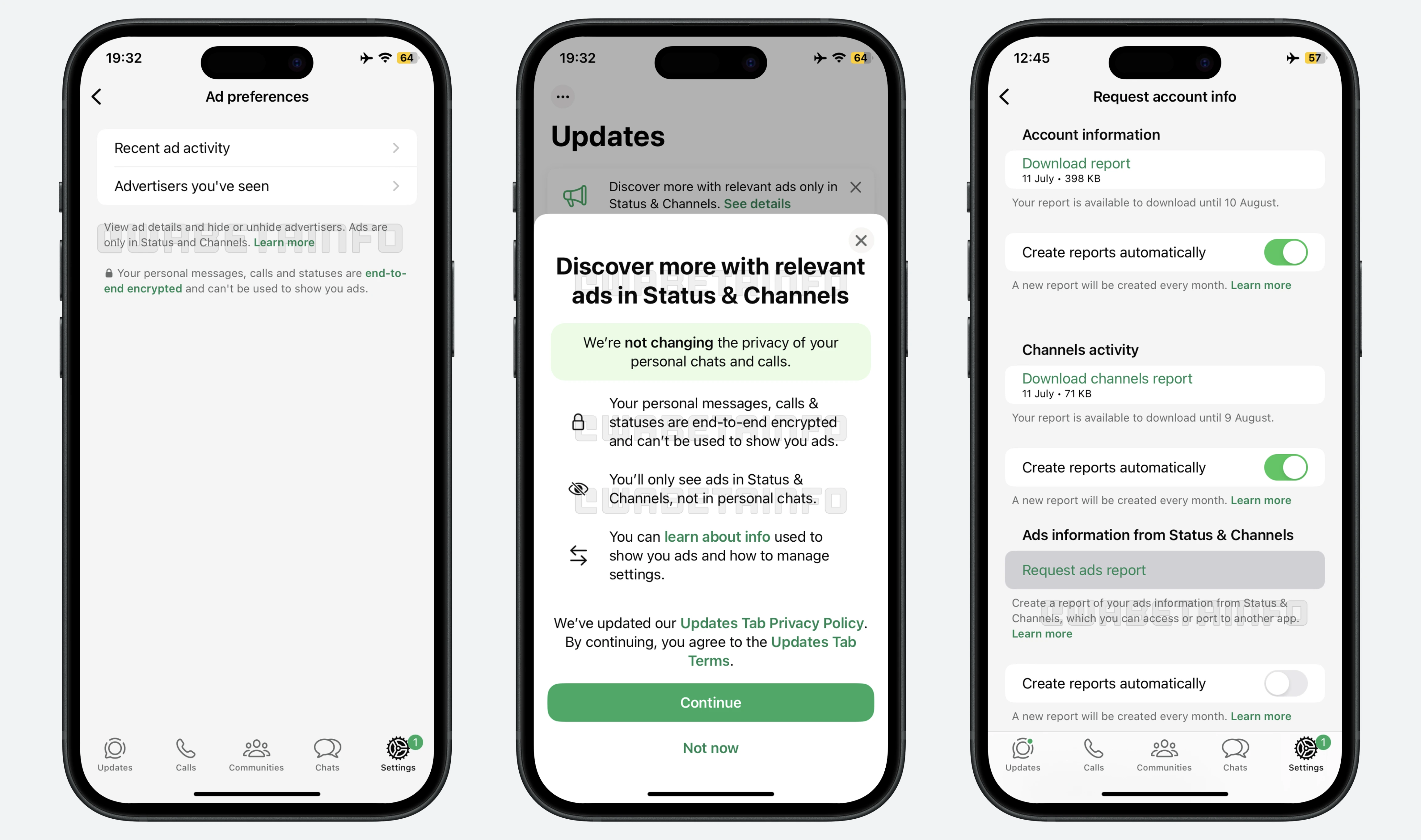
As you can see from the attached screenshot, some beta testers can explore a feature that introduces advertising services specifically for the Updates tab. Status Ads introduce a fresh method for businesses to share sponsored content within the Status section. They appear between regular statuses, fitting naturally into the familiar flow while still carrying a clear label that marks them as ads. People browse them just as they do ordinary statuses, swiping forward or backward at their own pace. Users can quickly dismiss an ad with a simple swipe, and if an advertiser's content becomes intrusive, they have the option to block that advertiser at any time to prevent their ads from appearing in the future.
Promoted Channels are another form of sponsored content, specifically designed to increase the visibility of public channels. They get special placement in the channel directory, helping attract new followers more effectively. For example, a local restaurant might promote its new recipe channel on WhatsApp, ensuring that people browsing the directory see it featured at the top of their search results. This approach allows creators, brands, and organizations to gain visibility directly within WhatsApp, rather than relying on external platforms like Instagram or Facebook for promotion. When a channel is promoted, it includes a subtle label that clearly indicates to viewers that the placement is a paid promotion. This ensures transparency, as users can immediately recognize sponsored content without confusing it with organically discovered channels.
Sponsored content appears exclusively in the Updates tab, keeping it separate from private chats and groups, communities, or calls. When advertising features are enabled for an account, a banner within the Updates tab notifies users that these options are now available. By interacting with this banner, users are guided through an explanation of how these advertising tools work. WhatsApp makes it clear during this process that sponsored content is entirely separate from private conversations and that private messages, calls, and personal status updates are never used to generate ads. They remain protected by end-to-end encryption, ensuring that only the participants in a conversation can access the content, and not even WhatsApp can view or listen to these private communications.
Advertising is based only on limited information, such as the general region a user is in, the language of the app, the public channels they follow, and their engagement with previous ads. Additionally, for users who choose to link their WhatsApp account with Meta's Accounts Center, ad preferences from other Meta apps may be used to further tailor the ads. This feature is disabled by default and can only be activated manually by the user, who can also turn it off at any time. WhatsApp also reinforces that these advertising elements will only appear in the Updates tab and nowhere else in the app. Through this approach of clearly presenting information upfront, users are kept well‑informed and can understand how promotional content is integrated without feeling misled.
Users can download an Activity Report focused on advertising, allowing them to review all the ads they have encountered in Status and Channels within a specified timeframe. Each listing includes the date the ad was shown and the advertiser's name, helping users recall their interactions. In addition, users can view their recent ad activity and see the advertisers they've encountered, all accessible directly from their account settings. From this screen, users have the option to block advertisers, but they can also block or report them directly while viewing an ad.
It is important to note that WhatsApp never shares or sells users' phone numbers with advertisers, and private information remains completely inaccessible to them. This strong privacy policy ensures that advertising remains separate from personal data. Through these protections, Status Ads and Promoted Channels can provide businesses with opportunities to expand their reach without compromising user privacy. As announced in the article about the Android update, these features are being introduced gradually to ensure stable performance and allow WhatsApp to monitor their integration before expanding availability to all users in the future.
A feature to bring Status Ads and Promoted Channels to the Updates tab is available to some beta testers who install the latest version of WhatsApp beta for iOS from the TestFlight app, and it's rolling out to more people over the coming months.
Stay up-to-date on WhatsApp news by following WABetaInfo on X where you can also discover other new features for WhatsApp beta for Android, iOS, Web/Desktop, and Windows.
Do you like this news? Please, let us know on X: we love hearing your feedback! If you're curious to see where you can find WABetaInfo, there is a dedicated page where you can discover our services.
In addition, we have set up a Discord Server where you can chat with other people, get help and advice, and stay up to date with the latest announcements from WABetaInfo.