WhatsApp beta for iOS 25.16.10.71: what's new?
WhatsApp has released a new iOS update through the TestFlight beta Program, bringing the version up to 25.16.10.71.
What's new in this update? WhatsApp is rolling out a feature that allows users to mark channel updates as starred, and it's available to some beta testers!
| Common questions | Answers |
|---|---|
| Name of the feature? | Starred channel updates |
| Status? | Rolling out |
| Compatibility? | WhatsApp beta for iOS 25.16.10.71 has been designated as a compatible update. |
| I have the same version but I don't have this feature, why? | This feature is available to some beta testers and it's rolling out to more people over the coming days. |
| Thanks: | IsaacAndHisIsaac, for testing and reporting. |
| Previous news? | WhatsApp beta for Android 2.25.17.7: what's new? WhatsApp is rolling out a feature to mark channel updates as starred! |
STARRED CHANNEL UPDATES
In the article about the WhatsApp beta for Android 2.25.17.7 update, we announced that a feature to mark channel updates as starred was available. This feature helps users manage important updates more efficiently by saving them in a dedicated section, making them easier for users to find later. It also enhances the overall user experience by providing quick access to valuable information without searching through entire channel histories. It appears that WhatsApp now intends to offer iOS users the same functionality for channel updates as it already does for the Android version, aiming to provide a consistent experience across both platforms. Following the release of the latest WhatsApp beta for iOS 25.16.10.71 update, which is available on the TestFlight app, we discovered that WhatsApp is rolling out a feature that allows users to mark channel updates as starred!
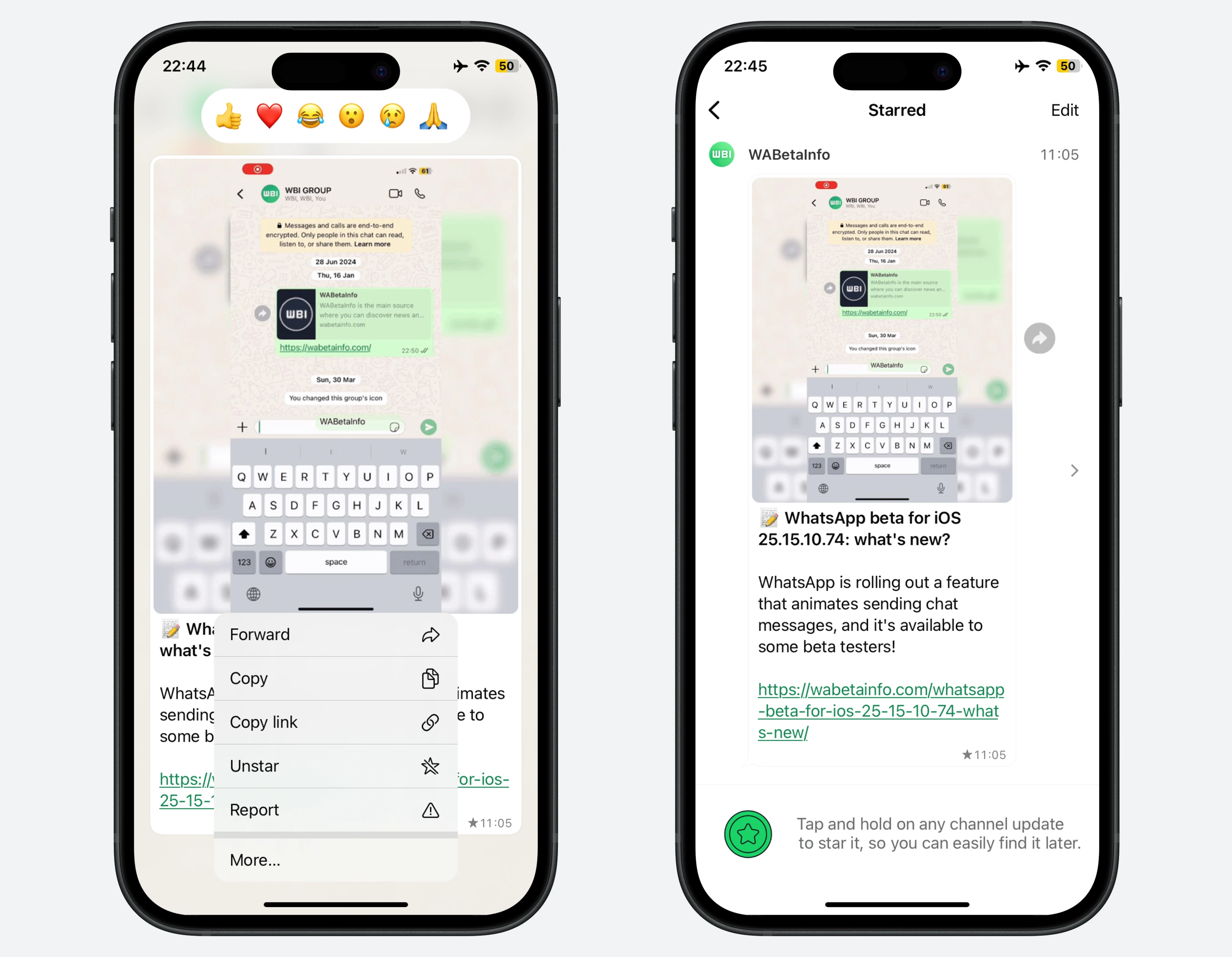
As you can see from the attached screenshot, some beta testers can explore a new feature that lets them easily highlight important channel updates. To set a channel update as starred, users simply need to tap and hold any update within a channel. This gesture opens the context menu, where a new option to star the selected update is now available. Once an update is starred, it is saved to a dedicated section, ensuring that important content is never lost in the channel history.
Users can revisit their saved updates at any time by opening the channel info screen, where a list of previously starred updates is provided for quick access. This section helps users keep track of relevant channel content they previously saved, making it easier to locate them later. For users who follow multiple channels, WhatsApp has also introduced a more global view. Instead of checking saved updates one channel at a time, users can now open the "Starred" section from the app settings. This section, formerly known as "Starred Messages", now includes starred channel updates, offering a centralized overview of all saved content across channels and chats.
It's worth noting that if a user chooses to unfollow a channel, all updates from that channel previously marked as starred will be automatically removed from their starred list. This behavior reflects the assumption that once a user unfollows a channel, they are no longer interested in keeping its content saved. As a result, the starred section stays clean and focused on active channels. This automatic cleanup helps avoid unnecessary clutter and ensures that starred content always reflects what the user currently follows.
A feature that allows users to mark channel updates as starred is available to some beta testers who install the latest version of WhatsApp beta for iOS from the TestFlight app, and it's rolling out to more people over the coming days.
Stay up-to-date on WhatsApp news by following WABetaInfo on X where you can also discover other new features for WhatsApp beta for Android, iOS, Web/Desktop, and Windows.
Do you like this news? Please, let us know on X: we love hearing your feedback! If you're curious to see where you can find WABetaInfo, there is a dedicated page where you can discover our services.
In addition, we have set up a Discord Server where you can chat with other people, get help and advice, and stay up to date with the latest announcements from WABetaInfo.