WhatsApp beta for iOS 25.13.10.71: what's new?
WhatsApp has released a new iOS update through the TestFlight beta Program, bringing the version up to 25.13.10.71.
What's new in this update? WhatsApp is rolling out a feature to improve accessibility to status creation tools, and it's available to some beta testers!
| Common questions | Answers |
|---|---|
| Name of the feature? | Status creation tools |
| Status? | Rolling out |
| Compatibility? | WhatsApp beta for iOS 25.13.10.71 has been designated as a compatible update, but some users with the stable release on the App Store may also be able to experiment with this feature. |
| I have the same version but I don't have this feature, why? | This feature is available to some beta testers and it's rolling out to more people over the coming days. |
| Thanks: | Akan, Thiago, and Radu Oncescu, for testing and reporting. |
| Previous news? | WhatsApp beta for Android 2.25.14.10: what's new? WhatsApp is rolling out a feature to open certain business website links! |
STATUS CREATION TOOLS
In the article about the WhatsApp beta for Android 2.25.3.22 update, we announced that some tweaks to the interface that allows users to create status updates were available. This feature introduces a more streamlined interface with dedicated shortcuts, enhancing the user experience by allowing quicker access to different types of status updates. These changes aim to encourage more engagement by making it easier for users to choose between text, photo, and voice update options directly from the status creation screen. It appears that WhatsApp now intends to offer iOS users the same sharing experience with status updates as it already does for the Android version, aiming to provide a consistent experience across both platforms. Following the release of the latest WhatsApp beta for iOS 25.13.10.71 update, which is available on the TestFlight app, we discovered that WhatsApp is rolling out a feature to improve accessibility to status creation tools!
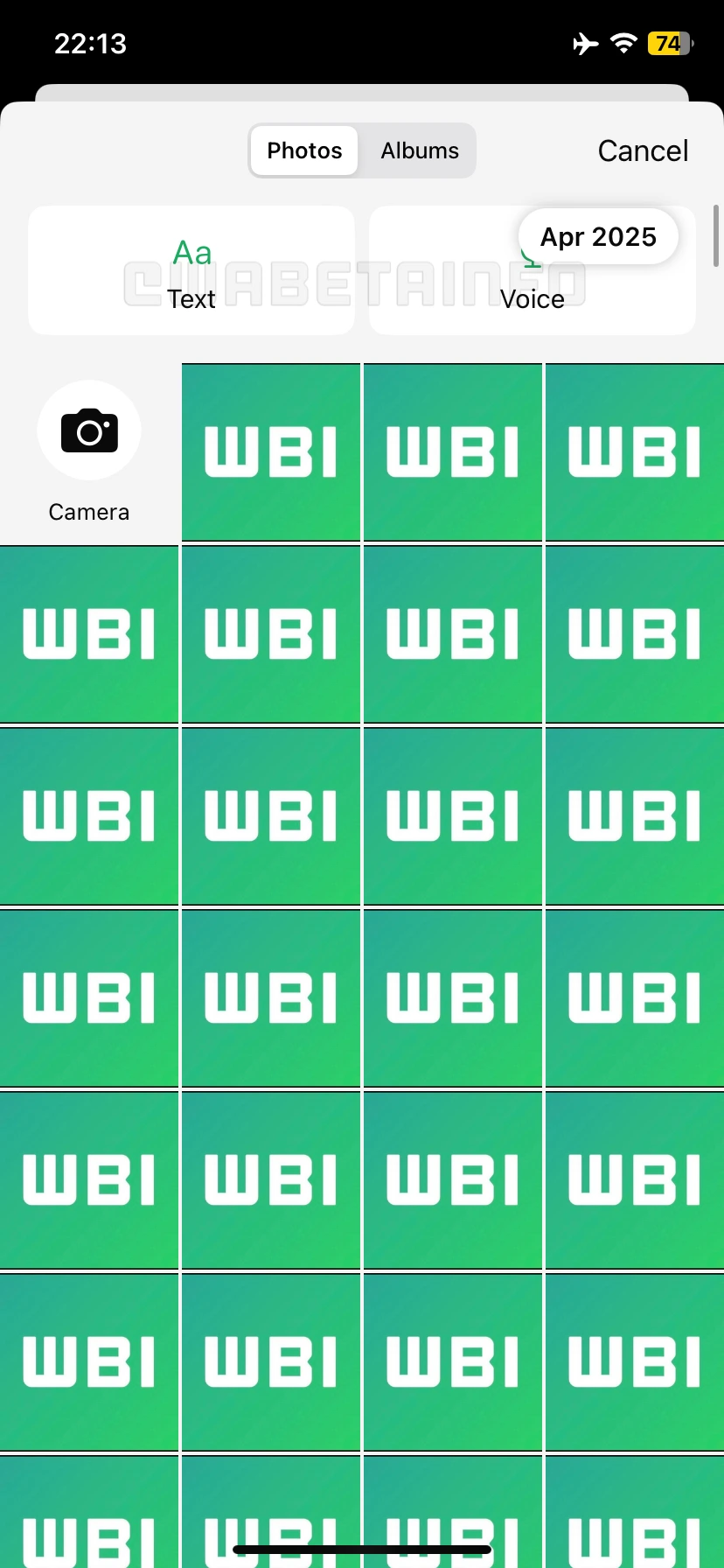
As you can see from the attached screenshot, some beta testers can explore a new feature that simplifies the process of sharing status updates and improves its accessibility. Specifically, when users attempt to share a new status update, they will notice the availability of two new shortcuts that appear directly within the gallery sheet. The first of these shortcuts provides a faster and more convenient way to create text-based status updates. By integrating this option into the gallery sheet, WhatsApp effectively places it within a familiar and frequently used context, making it more prominent and easier to find. As a result, the text update feature may benefit from increased visibility, which is likely to lead to higher engagement and encourage more users to incorporate it into their daily interactions.
The second shortcut is specifically designed to provide users with immediate access to the section for recording voice messages, directly from the status update creation screen. In the past, the ability to record and share voice status updates was implemented in the same interface used for creating text-based status updates, which made the feature less discoverable for many users. This integration often meant that users had to know exactly where to look in order to find and use the voice message option, and it caused lower visibility and usage. By clearly separating these options and introducing a dedicated shortcut within a frequently accessed area of the interface, WhatsApp ensures that the voice status update feature is now significantly more prominent. This is an intentional and strategic move aimed at increasing user awareness and encouraging broader adoption.
With this new design, WhatsApp aims to modernize the interface and make the sharing process more intuitive and user-friendly. This interface strongly resembles the one introduced earlier on Android, which includes shortcuts for quickly sharing text and voice notes. It also features a grid layout displaying recent photos from the device's library, making it easier for users to select and share their content. Users can also instantly take a new photo or record a video directly from this screen, as a dedicated entry point is placed within the grid.
It's very important to highlight that this interface update is not restricted to beta testers, as WhatsApp has released this new status creation experience to a broader audience, including some users who are running the stable version of the app currently available on the App Store. This means that even those who have not enrolled in the beta program can now start to access and benefit from the redesigned interface and its improved functionality.
A feature to improve accessibility to status creation tools is available to some beta testers who install the latest versions of WhatsApp beta for iOS from the TestFlight app, and it's rolling out to more people over the coming weeks.
Stay up-to-date on WhatsApp news by following WABetaInfo on X where you can also discover other new features for WhatsApp beta for Android, iOS, Web/Desktop, and Windows.
Do you like this news? Please, let us know on X: we love hearing your feedback! If you're curious to see where you can find WABetaInfo, there is a dedicated page where you can discover our services.
In addition, we have set up a Discord Server where you can chat with other people, get help and advice, and stay up to date with the latest announcements from WABetaInfo.