WhatsApp beta for iOS 25.1.10.72: what's new?
WhatsApp has released a new iOS update through the TestFlight beta Program, bringing the version up to 25.1.10.72.
What's new in this update? WhatsApp is rolling out a new default icon feature for contacts and group chats, and it's available to some beta testers!
| Common questions | Answers |
|---|---|
| Name of the feature? | New default icons for contacts and group chats |
| Status? | Rolling out |
| Compatibility? | WhatsApp beta for iOS 25.1.10.72 has been designated as a compatible update. |
| I have the same version but I don't have this feature, why? | This feature is available to some beta testers and it's rolling out to more people over the coming weeks. |
| Thanks: | shiabek, for testing and reporting. |
| Previous news? | WhatsApp beta for Android 2.25.2.3: what's new? WhatsApp is rolling out a new default icon feature for contacts and group chats! |
CONTACT AND GROUP CHAT ICONS
In the article about the WhatsApp beta for Android 2.25.2.3 update, we announced that a new default icon feature for contacts and group chats is available to some beta testers. This update introduces a refreshed look for chats without profile photos, replacing old grey icons with colorful and dynamic alternatives. It appears that WhatsApp now intends to offer iOS users the same opportunity to test new default icons as it already does for the Android version, aiming to provide a consistent experience across both platforms. Thanks to the latest WhatsApp beta for iOS 25.1.10.72 update, which is available on TestFlight, we discovered that WhatsApp is rolling out a new default icon feature for contacts and group chats!
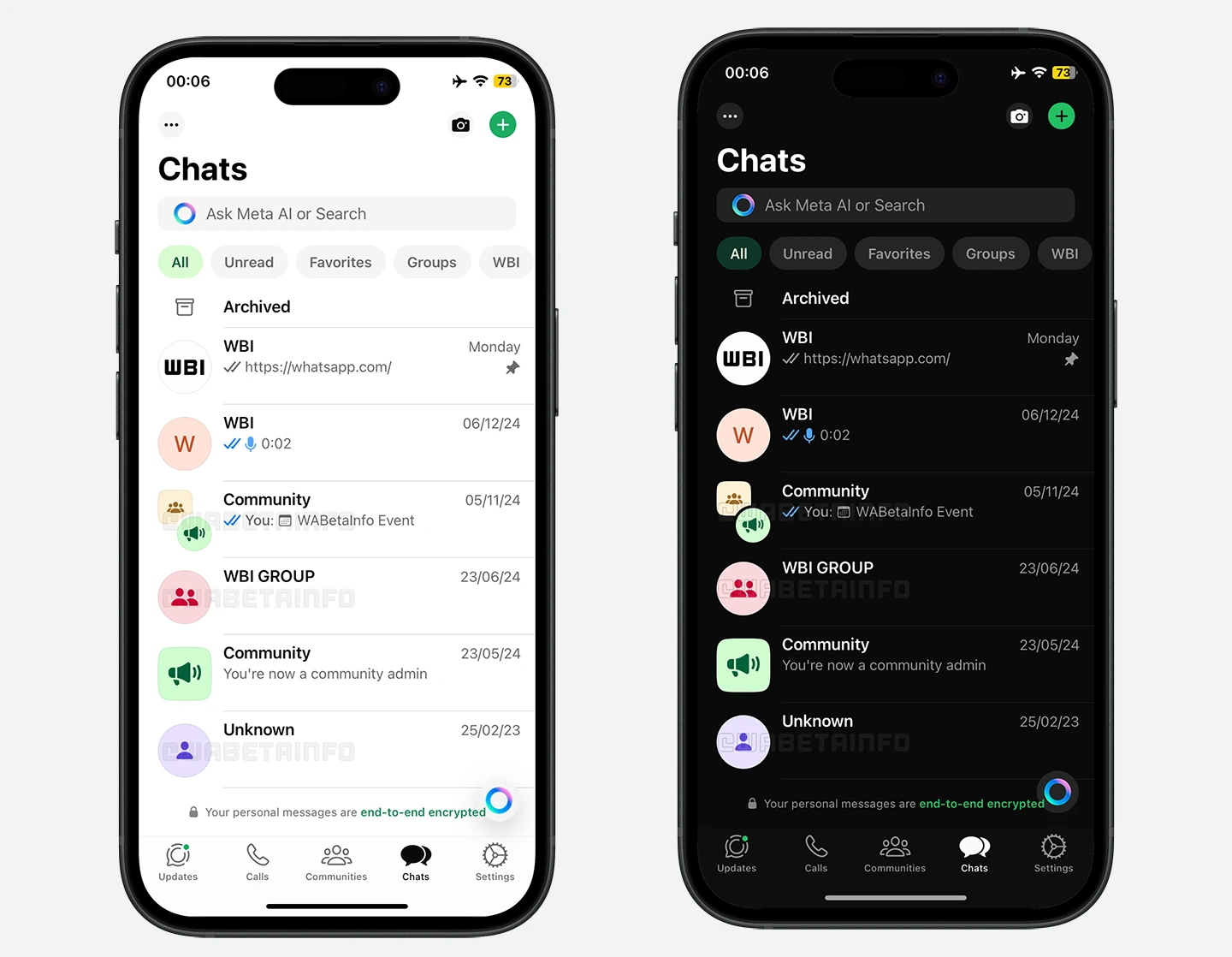
As you can see from the attached screenshot, some beta testers can explore a new feature that introduces colorful default icons for chats that don't have a profile photo. These icons are designed to improve the visual appeal of the app while also helping users easily identify their chats. For individual chats, WhatsApp generates an icon that includes the first letter of the contact name, displayed against a vibrant background color. This ensures that even if a contact does not set a profile photo, the user can still quickly recognize the chat based on its unique icon.
If the contact does not have a name set, WhatsApp will display a simple person-shaped figure in place of the letter. This is a helpful feature for users who may not have added a name to some of their contacts, but still want a distinct and recognizable icon for each chat. Additionally, the new default icon feature is fully compatible with group chats and communities. Group chats are represented by an icon showing two person-shaped figures with a vibrant background color, while communities are represented by an icon featuring three figures. These icons help users differentiate between individual chats, group chats, and community chats, all while maintaining a consistent and visually appealing interface.
This new update assists users in distinguishing between different chats, especially when there are no profile photos to help with identification. With the introduction of these revamped icons, users can easily tell one chat from another, even if they are dealing with multiple contacts or groups that have similar names. The color-coded nature of the icons also adds a layer of personalization, making it easier for users to visually organize their chats based on the colors they associate with certain contacts or groups. These new icons also offer a cleaner user interface, which is especially noticeable when users have many chats. The addition of color and unique shapes allows for quicker recognition and more efficient navigation, as users can easily distinguish between different chats at a glance.
A new default icon feature for contacts and group chats is available to some beta testers who install the latest version of WhatsApp beta for iOS from the TestFlight app, and it's rolling out to more people over the coming weeks.
Stay up-to-date on WhatsApp news by following WABetaInfo on X where you can also discover other new features for WhatsApp beta for Android, iOS, Web/Desktop, and Windows.
Do you like this news? Please, let us know on X: we love hearing your feedback! If you're curious to see where you can find WABetaInfo, there is a dedicated page where you can discover our services.
In addition, we have set up a Discord Server where you can chat with other people, get help and advice, and stay up to date with the latest announcements from WABetaInfo.