WhatsApp beta for iOS 25.1.10.70: what's new?
WhatsApp has released a new iOS update through the TestFlight beta Program, bringing the version up to 25.1.10.70.
What's new in this update? The first update of the year suggests that WhatsApp is working on a feature to manage chat message animations, and it will be available in a future update!
| Common questions | Answers |
|---|---|
| Name of the feature? | Chat message animations |
| Status? | Under development |
| Availability? | WhatsApp is currently working on bringing a feature to manage chat message animations to a future update of the app. |
| I have the same version but I don't have this feature, why? | This feature is under development so it's not ready for beta testers, but you can read this article to discover a preview. |
| Previous news? | WhatsApp beta for Android 2.25.1.26: what's new? WhatsApp is working on a feature to create personalized AI chatbots! |
CHAT MESSAGE ANIMATIONS
In the article about the WhatsApp beta for Android 2.25.1.10 update, we announced that a feature to manage chat message animations was under development. This feature aims to give users more control over their messaging experience by allowing them to enable or disable specific animations for emojis, stickers, and GIFs individually. Although this feature is still in development on WhatsApp beta for Android, it appears that WhatsApp intends to offer iOS users a similar experience in the future, ensuring a consistent experience across both platforms. Thanks to the latest WhatsApp beta for iOS 25.1.10.70 update, the first update of the year available on the TestFlight app, we discovered that WhatsApp is working on a feature to manage chat message animations!
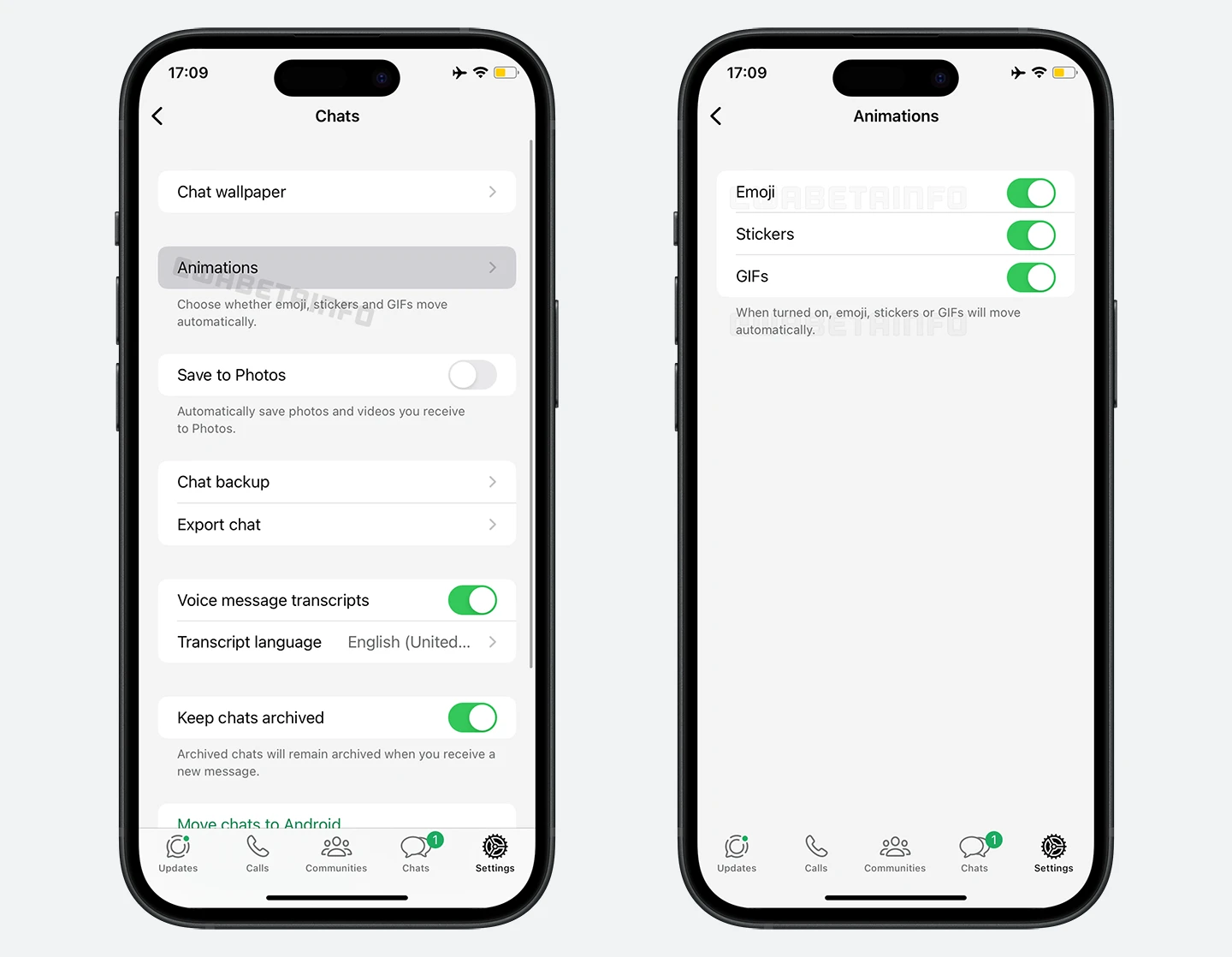
As you can see from the attached screenshot, WhatsApp is exploring the implementation of a feature that allows users to control certain chat message animations, scheduled for release in a future update. Similar to the Android update, this feature will provide users with complete control over the animations of specific messages in their conversations, making it easier to tailor their chat experience to suit individual preferences. Users will be able to customize their chat experience by choosing whether to keep animations active or disable them for GIFs, stickers, and emojis. This level of control ensures that users can personalize their experience according to their preferences and reduce potential distractions caused by animations.
With this feature, animated emojis will have the option to appear static if the autoplay setting is turned off. These animated emojis will display in their static form, ensuring that they do not catch attention unnecessarily. Similarly, GIFs will no longer autoplay if the user chooses to disable their animation, and they will remain static until the user manually interacts with them to initiate playback. For stickers, animated ones will also be affected, appearing only in their static version when the autoplay option is disabled. This control will even extend to animated avatar stickers created through the Meta customization tools, offering users further precision in managing their chat environment.
This granular control will allow users to tailor their chat experience with remarkable specificity. Users will be able to selectively enable or disable animations for emojis, stickers, or GIFs, based on their preferences. For example, some users might choose to keep emoji animations active for a touch of liveliness while disabling animated stickers, which some might find intrusive or overly stimulating. As animations are becoming increasingly prevalent in chats, some users may find them overwhelming, disruptive, or distracting. Excessive movement on the screen can detract from the conversational flow. For example, they can draw focus away from the content of the conversation, making it harder for users to follow the flow of the discussion. With this control, WhatsApp aims to balance keeping chats engaging while ensuring users can focus without distractions in the future.
A feature to manage chat message animations is under development and it will be available in a future update of the app. We will keep you updated on any further developments about this feature until it's officially released.
Stay up-to-date on WhatsApp news by following WABetaInfo on X where you can also discover other new features for WhatsApp beta for Android, iOS, Web/Desktop, and Windows.
Do you like this news? Please, let us know on X: we love hearing your feedback! If you're curious to see where you can find WABetaInfo, there is a dedicated page where you can discover our services.
In addition, we have set up a Discord Server where you can chat with other people, get help and advice, and stay up to date with the latest announcements from WABetaInfo.