WhatsApp beta for iOS 24.20.10.72: what's new?
WhatsApp has just submitted a new update through the TestFlight beta Program, bringing the version up to 24.20.10.71.
What's new in this update? WhatsApp is rolling out an improved feature to present media messages directly in the chat screen, and it's available to some beta testers!
| Common questions | Answers |
|---|---|
| Name of the feature? | View chat media messages |
| Status? | Rolling out |
| Compatibility? | WhatsApp beta for iOS 24.20.10.72 is marked as a compatible update. |
| I've installed this update but I don't have this feature. Why? | This feature is available to some beta testers, and it is rolling out to more users over the coming days. |
| Thanks: | Thiago, for testing and reporting. |
| Previous news? | WhatsApp beta for Android 2.24.21.15: what's new? WhatsApp is working on a feature to react to messages using recent emojis! |
VIEW CHAT MEDIA MESSAGES
In the article about the WhatsApp beta for iOS 24.12.10.12 update, we announced that WhatsApp was rolling out a feature to reply and react to images and videos through new shortcuts. This feature enhanced user interaction by introducing two convenient shortcuts in the media viewer screen. Users can now quickly access a reply bar to respond to messages without disrupting their viewing experience, as well as react to media with a single tap. It appears that WhatsApp is dedicated to offering new tools to enhance convenience when viewing media, with the focus of helping users quickly locate their messages. Thanks to the latest WhatsApp beta for iOS 24.20.10.71 update, which is available on the TestFlight app, we discovered that WhatsApp is rolling out a feature to present media messages directly in the chat screen!
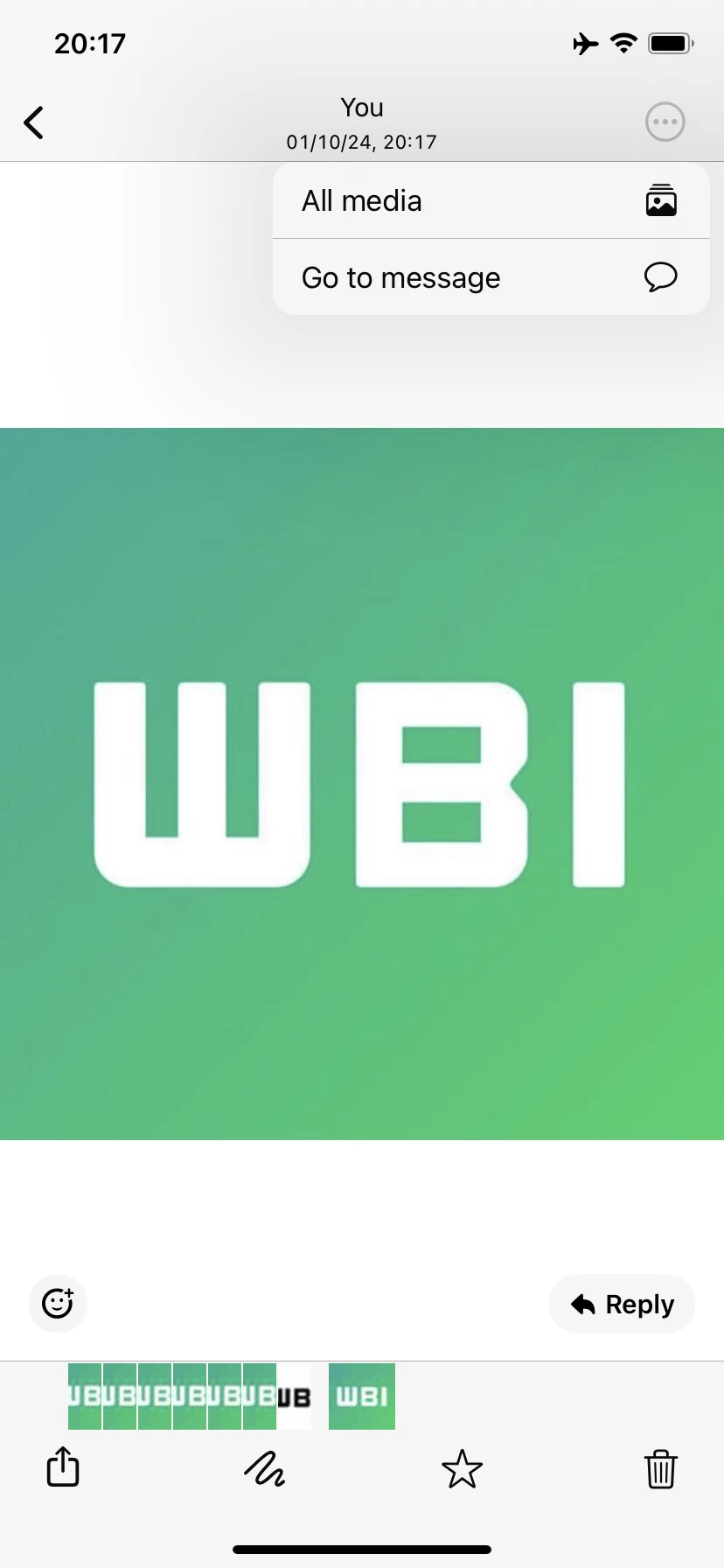
As you can see from the attached screenshot, some beta testers can experiment with a new button within the navigation bar when viewing media. This button includes two shortcuts: the ability to view all shared media in the current conversation and another shortcut to view the current media within the chat interface. This addition aims to improve the user experience by providing quick access to previously shared images and videos and enhancing overall navigation. With these shortcuts, users can easily see their media files without needing to scroll through the current chat to find them, making the process more efficient and time-saving.
It's important to note that the ability to view the current media directly within the conversation has been available for years, but it required users to tap and hold on the media item to access this option. This method may not be intuitive for everyone, resulting in a lack of awareness about this shortcut. By introducing a dedicated button within the navigation bar, WhatsApp significantly enhances the visibility of these options. This improvement allows users to access current media more easily and intuitively, and it also ensures that all users are finally aware of this feature.
A feature to present media messages directly in the chat screen is available to some beta testers who install the latest version of WhatsApp beta for iOS from the TestFlight app, and it's rolling out to more people over the coming days.
Stay up-to-date on WhatsApp news by following WABetaInfo on X where you can also discover other new features for WhatsApp beta for Android, iOS, Web/Desktop, and Windows.
Do you like this news? Please, let us know on X: we love hearing your feedback! If you're curious to see where you can find WABetaInfo, there is a dedicated page where you can discover our services.
In addition, we have set up a Discord Server where you can chat with other people, get help and advice, and stay up to date with the latest announcements from WABetaInfo.