WhatsApp Beta for Android Tests Username Key Feature for First-Time Chats
WhatsApp's latest beta for Android is exploring a new privacy feature that allows users to require a username key before someone can initiate a conversation for the first time. This addition builds on the existing username system, giving users more precise control over who can contact them without revealing phone numbers. While still under development, the feature demonstrates WhatsApp's approach to balancing discoverability and privacy. The new mechanism ensures that messages from unknown contacts are filtered through a voluntary access step.
Username Key Feature in WhatsApp Beta 2.26.2.2
The WhatsApp beta for Android 2.26.2.2 update is now available through the Google Play Beta Program, introducing behind-the-scenes improvements as the team tests a feature centered on username keys. This feature will require anyone initiating a first-time chat to enter a code linked to the recipient’s username. The system aims to make interactions with unknown users safer while maintaining the standard chat experience. By integrating usernames and optional keys, WhatsApp intends to provide a private layer for users who wish to limit incoming conversations. The update is not yet publicly functional but shows the direction of upcoming changes.
In previous beta announcements, WhatsApp outlined a plan to let users start chats using usernames rather than phone numbers. This change allows users to retain anonymity while interacting with unknown contacts or businesses. Usernames act as identifiers within the chat interface when the number is not saved, leaving message encryption and delivery intact. The username key will serve as an additional step, ensuring that first-time conversations are initiated only by those who have been granted access.
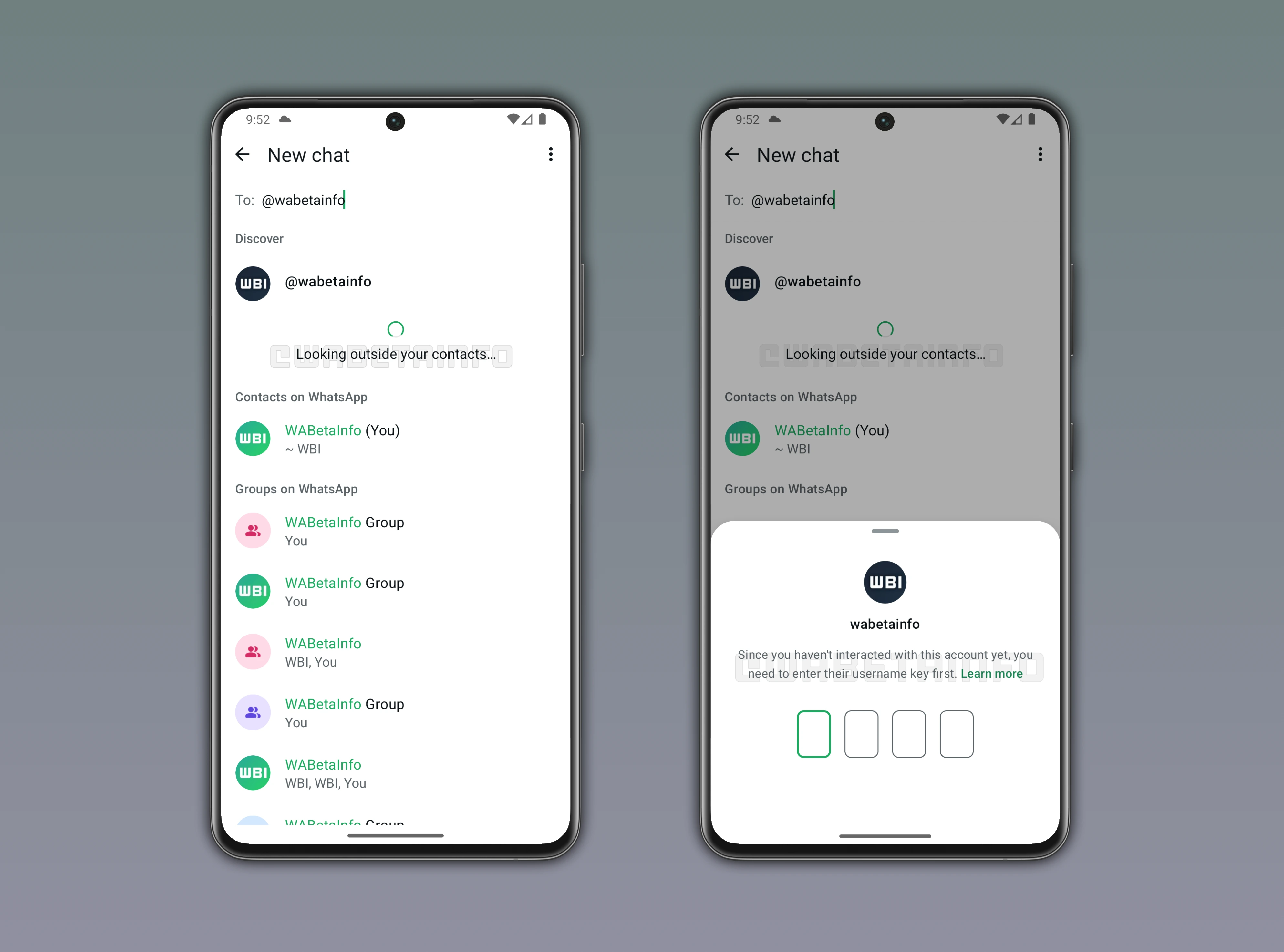
The attached screenshot shows how the username key feature is designed to work. When a chat is started with a username-based account for the first time, the sender must enter the correct key to proceed. This screen only appears if the recipient has chosen to restrict access, preventing unauthorized users from messaging or calling. By introducing this verification layer, WhatsApp allows public usernames while keeping direct messages controlled. Users who know the key can communicate freely, while random users cannot bypass the restriction.
This feature effectively separates visibility from reachability, providing a second layer of control over who can contact a user. It is particularly useful in public groups or online profiles, where usernames may be discoverable but not all users should be able to send messages. Legitimate contacts can receive the key directly, while others are blocked from initiating conversations. The system is designed to minimize spam and maintain user privacy without hindering discoverability.
Within the broader username framework, this new key ensures that even searchable usernames do not allow unrestricted messaging. All interactions remain end-to-end encrypted, and the key information is used solely for first-time verification. After successful validation, normal chat functionality resumes. This approach keeps the chat experience familiar while reinforcing user control over initial contact attempts.
WhatsApp is refining the interface for this feature to make the process clear and intuitive. The first-time sender will be informed why the key is required, reducing confusion and supporting informed privacy choices. The feature remains under development, but it indicates a focus on secure and selective communication. Once implemented, users will be able to start conversations using usernames while keeping phone numbers private, enhancing privacy and control over first-time interactions.
Stay Connected with WABetaInfo
Following WABetaInfo on X provides updates on new features being tested across WhatsApp beta for Android, iOS, Web, and Desktop. Feedback from users helps refine ongoing developments. Explore the dedicated page to learn more about WABetaInfo services or join the Discord Server to discuss, seek advice, and stay up to date with announcements.