WhatsApp beta for Android 2.26.7.10: what's new?
WhatsApp has released a new Android update through the Google Play Beta Program, bringing the version up to 2.26.7.10.
What's new in this update? WhatsApp is working on a feature that allows users to format messages as spoilers, and it will be available in a future update!
| Key Points | Details |
|---|---|
| Name of the feature: | Spoiler messages |
| Status: | Under development |
| Availability info: | This feature is currently in development and not yet available for beta testing. In the meantime, you can read this article for a sneak peek. |
| Previous news: | WhatsApp beta for Android 2.26.7.8: what's new? WhatsApp is working on a feature that allows users to secure their accounts with a password! |
WhatsApp is working on a spoiler formatting tool for messages
In the post about the WhatsApp beta for Android 2.24.2.9 update, we announced a feature to apply new text formatting tools to messages. This functionality lets users format their messages using three options: Code block, Quote block, and Lists. Code blocks are designed to make sharing and reading code easier. Quote blocks are used to reply to a specific part of a previous message. Finally, Lists allow users to organize information in their messages with structured formatting. These tools enhance message clarity and readability, making conversations more organized and easier to follow.
It seems that WhatsApp is picking up development of its text formatting tools again. The plan includes new options designed to further improve message structure. Following the release of the latest WhatsApp beta for Android 2.26.7.10 update, which is available on the Google Play Store, we discovered that WhatsApp is working on a feature that allows users to format messages as spoilers.
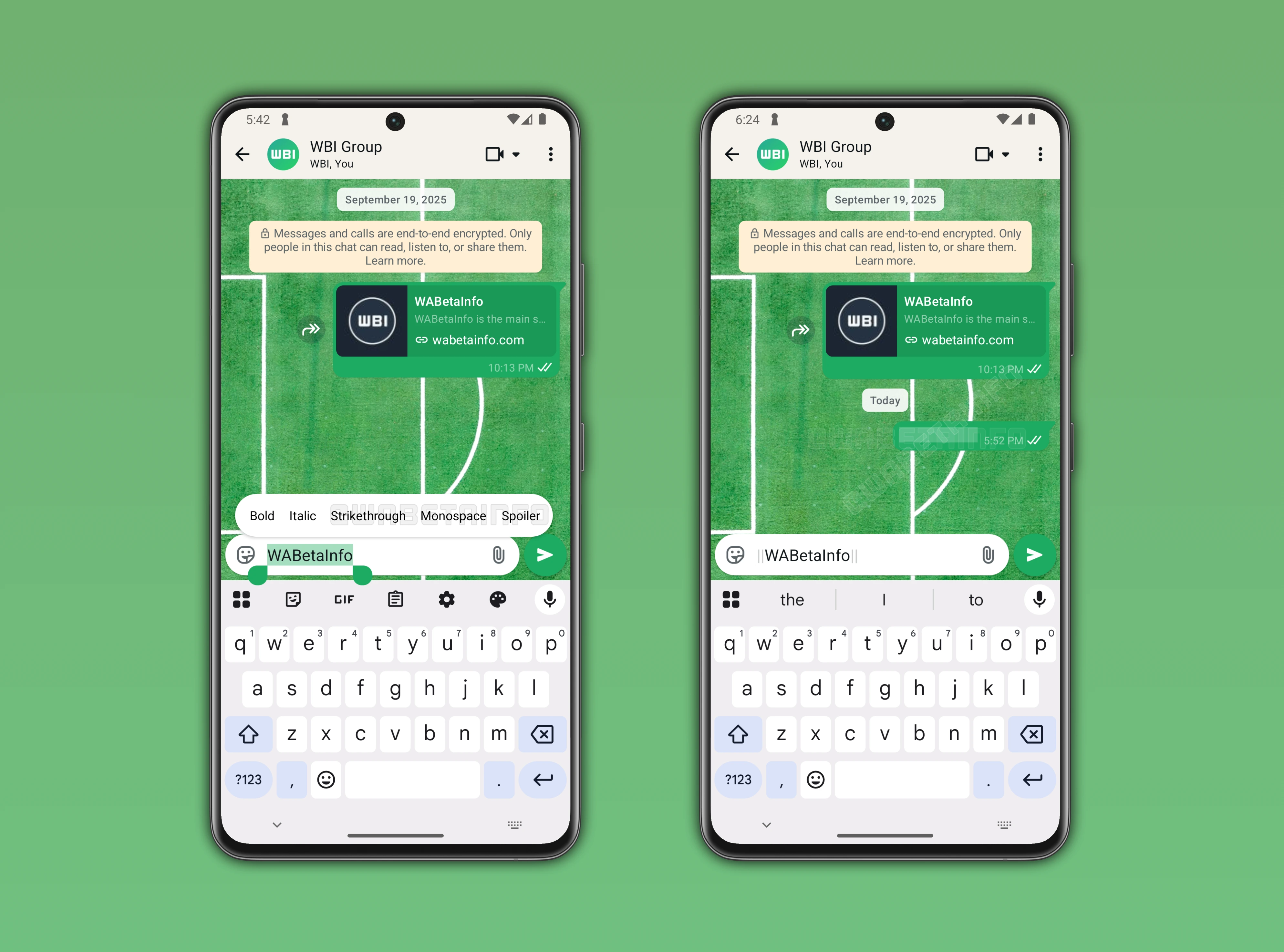
As you can see from the attached screenshot, WhatsApp is exploring the implementation of a feature that will introduce a spoiler formatting tool, scheduled for release in a future update. The spoiler tool is a special formatting option designed to hide content of a message. Users will also be able to use this tool to hide a substring of a message in case they want to mask only a specific part of the text. At the moment, development is limited to spoilers for text messages. However, support for other message types, including photos, may be considered for a future update.
Spoilers are a common problem in chats, especially in group conversations where many people discuss the same topic at different paces. Even a single message can unintentionally reveal information to those who are not caught up. A message shared with a group may also contain important details that others have not yet known, users cannot always predict when spoilers might appear in the conversation. As a result, participants in group chats ofter prefer avoid opening the conversation to see or read new messages.
Currently, some users send the content as a view once image instead of plain text to prevent accidental spoilers. This workaround helps users hide important information at first glance, but it doesn't fully address the issue. Once users open the view once image, it disappears from the conversation. This makes it difficult to reference the message later, as it's no longer available in the conversation.
Finally, users will be able to mark their messages as spoilers. To apply the spoiler formatting in a future update, users will have to highlight the message and open the text formatting menu. Here, they will find the Spoiler option, which automatically adds two pipes before and after the message. Once a spoiler message is sent, it will not immediately appear in the conversation, as the message content will be hidden. To reveal the text content, users will have to tap the message bubble to finally read the spoiler message.
The feature that allows users to format messages as spoilers is currently is under development, and it is planned for release in a future update. At the moment, WhatsApp is refining how spoiler messages can hide the text content. Once testing is complete, the feature will be gradually rolled out to users, giving them the ability to control how others can see their messages.
Stay Connected with WABetaInfo
Following WABetaInfo on X is the best way to stay informed about new features under development and those released to WhatsApp beta for Android, iOS, Web, and Desktop. We love hearing your feedback, so let us know what you think! You can also explore our dedicated page to discover all our services, or join our Discord Server to chat with others, get help and advice, and stay up to date with the latest WABetaInfo announcements.