WhatsApp beta for Android 2.26.6.4: what's new?
WhatsApp has released a new Android update through the Google Play Beta Program, bringing the version up to 2.26.6.4.
What's new in this update? WhatsApp is rolling out a feature that adds a settings tab to the interface, and it's available to some beta testers!
| Key Points | Details |
|---|---|
| Name of the feature: | Settings tab |
| Status: | Rolling out |
| Compatibility: | WhatsApp beta for Android 2.26.6.4 has been designated as a compatible update, but some users may experiment with the same feature by installing the previous update. |
| Availability info: | This feature is available to some beta testers, and it is rolling out to more users over the coming days. |
| Thanks: | Sc, Saadh Jawwadh, UnluckyTester, kingcyrious, Sniper, rubiokarim, ecowsco, Dmmui, flakoflow, lostliano, kamilliond, Federico Trevisani, shw_9876, Mustafa Sanaul, Muhammad Hammad, for testing and reporting. |
| Previous news: | WhatsApp beta for Android 2.26.6.1: what's new? WhatsApp is working on new premium features to customize the app theme, icon, and accent color! |
WhatsApp is rolling out a profile shortcut to open the app settings
In the post about the WhatsApp beta for Android 2.25.22.14 update, we announced a feature that allows users to open their profile settings from the Chats tab. This functionality gives users direct access to the settings page with a single tap. Because the shortcut is more visible, it encourages users to open their profile more frequently to keep their settings up to date. Even though this placement does not fully follow Material Design 3 guidelines, WhatsApp added this shortcut to the top app bar to give users quicker access to the settings interface.
WhatsApp has already experimented with the settings shortcut in the past, enabling and disabling the feature several times for testing purposes. Now, it appears WhatsApp wants to give users easy access to the settings page, making the shortcut more visible again. Following the release of the latest WhatsApp beta for Android 2.26.6.4 update, which is available on the Google Play Store, we discovered that WhatsApp is rolling out a feature that adds a settings tab to the interface.
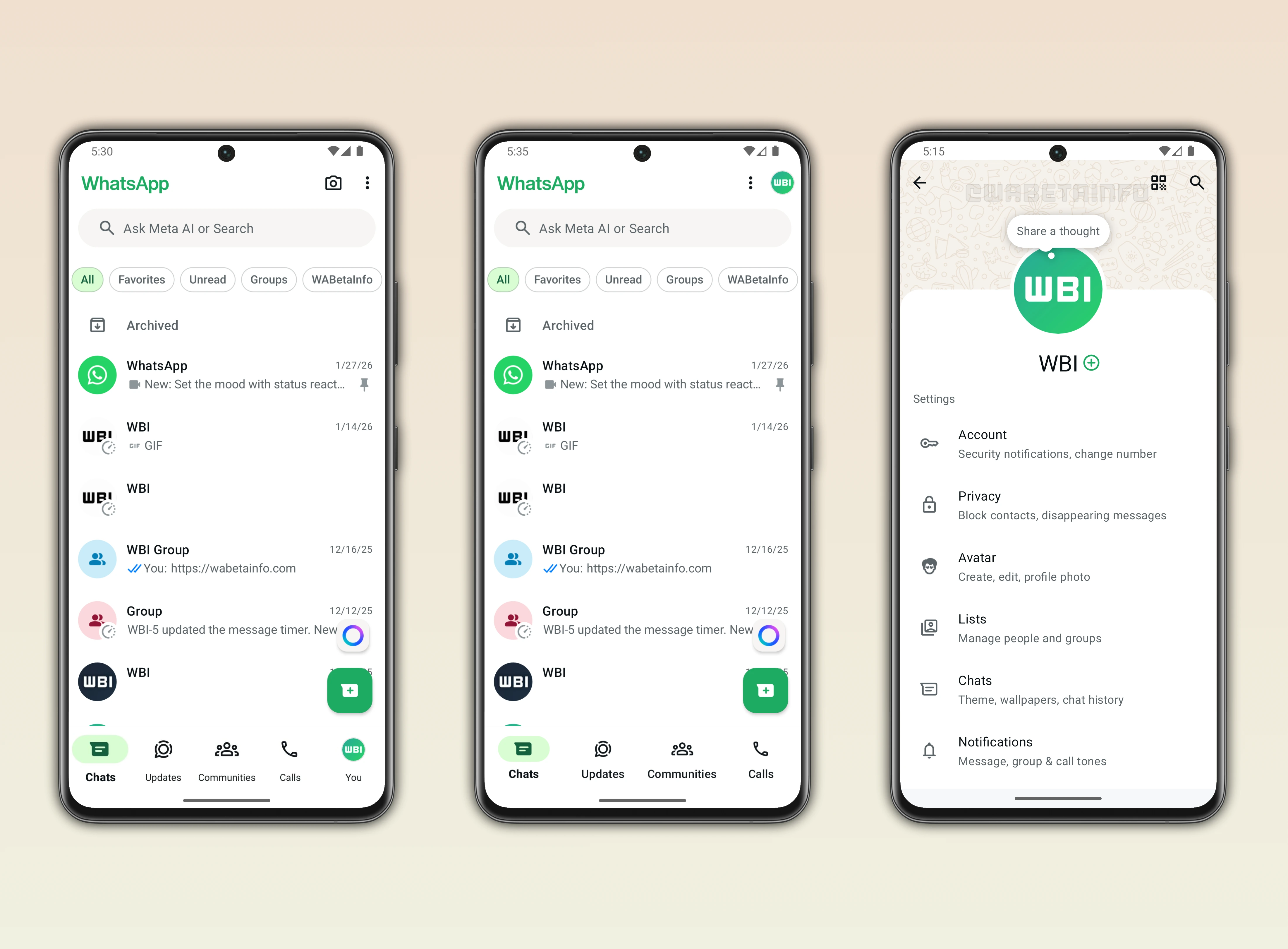
As you can see from the attached screenshot, some beta testers can access their settings through one of two new entry points. The first entry point is located in the top app bar. Here, a profile icon is displayed, making it simpler for users to understand that the shortcut opens the app settings. With this shortcut, the user can access the settings page and their profile without having to select the option from the overflow menu.
The second entry point is located in the bottom navigation bar as a tab, and it's called "You". Like the shortcut in the top app bar, the You tab also presents the Settings page. With this update, the bottom navigation bar now includes five tabs. To accommodate all five tabs, each tab has been scaled to prevent the tab names from overlapping. As a result, WhatsApp has adjusted the font size of the tab labels. However, it is possible that future updates will introduce further refinements to optimize the interface.
WhatsApp is currently experimenting with these two entry points with different users. This means that some users see the settings shortcut directly in the top app bar. Instead, others see a fifth tab in the bottom navigation bar to access the settings screen. It is still unclear which of the two options WhatsApp will choose as the final design, or whether both will be removed and replaced with a new approach in the future.
It's worth noting that this update also redesigned part of the settings interface, adding a cover photo at the top of the screen. A cover photo is an image that spans the width of the screen, placed above the profile area. At the moment, users cannot customize their cover photo, as WhatsApp only displays the default one. As reported in the post about the WhatsApp beta for Android 2.25.32.2 update, cover photos will allow users to personalize their profile with a visual element above their name and other information.
Adding a profile icon to the main interface is especially useful for users with a secondary account. When switching to a secondary account, the conversation list often appears different. In some cases, users may have the same conversations on both accounts. Displaying the profile icon of the currently active account helps users quickly identify which account they are using. This also reduces the risk of sending messages from the wrong account, as this visual cue makes it immediately clear which account is active before opening a conversation.
The feature that adds a settings tab to the interface is available to some beta testers who install the latest WhatsApp beta for Android update from the Google Play Store. This feature is currently rolling out to some beta testers. Meanwhile, WhatsApp continues to monitor its performance and ensure a bug-free experience. Once this testing is complete, WhatsApp will release this feature to a wider audience, allowing more users to access the settings page directly from the main interface.
Stay Connected with WABetaInfo
Following WABetaInfo on X is the best way to stay informed about new features under development and those released to WhatsApp beta for Android, iOS, Web, and Desktop. We love hearing your feedback, so let us know what you think! You can also explore our dedicated page to discover all our services, or join our Discord Server to chat with others, get help and advice, and stay up to date with the latest WABetaInfo announcements.