WhatsApp beta for Android 2.26.2.2: what's new?
WhatsApp has released a new Android update through the Google Play Beta Program, bringing the version up to 2.26.2.2.
What's new in this update? WhatsApp is working on a feature that requires entering a username key when starting a chat for the first time, and it will be available in a future update!
| Key Points | Details |
|---|---|
| Name of the feature: | Username key |
| Status: | Under development |
| Availability info: | This feature is currently in development and not yet available for beta testing. In the meantime, you can read this article for a sneak peek. |
| Previous news: | WhatsApp beta for iOS 26.1.10.72: what's new? WhatsApp is rolling out a feature that suggests stickers as users type their messages! |
WhatsApp is Developing Username Key Feature for First-Time Chats
In the article about the WhatsApp beta for Android 2.26.1.32, we announced that a feature that brings the username functionality to chats is under development. With this functionality, users will be able to initiate conversations by searching for a username instead of sharing their phone number. This change allows people to keep their phone number private when interacting with unknown contacts or businesses. Usernames will act as the main identifier within the chat interface whenever a contact is not saved in the address book. The feature is designed to integrate seamlessly with existing chats, without altering encryption or message delivery.
WhatsApp continues to refine this feature ahead of its official release planned for later this year. These latest improvements are focused on making communication between username-based accounts even more secure and reliable. Following the release of the latest WhatsApp beta for Android 2.26.2.2 update, which is available on the Google Play Store, we discovered that WhatsApp is working on a feature that requires entering a username key when starting a chat for the first time!
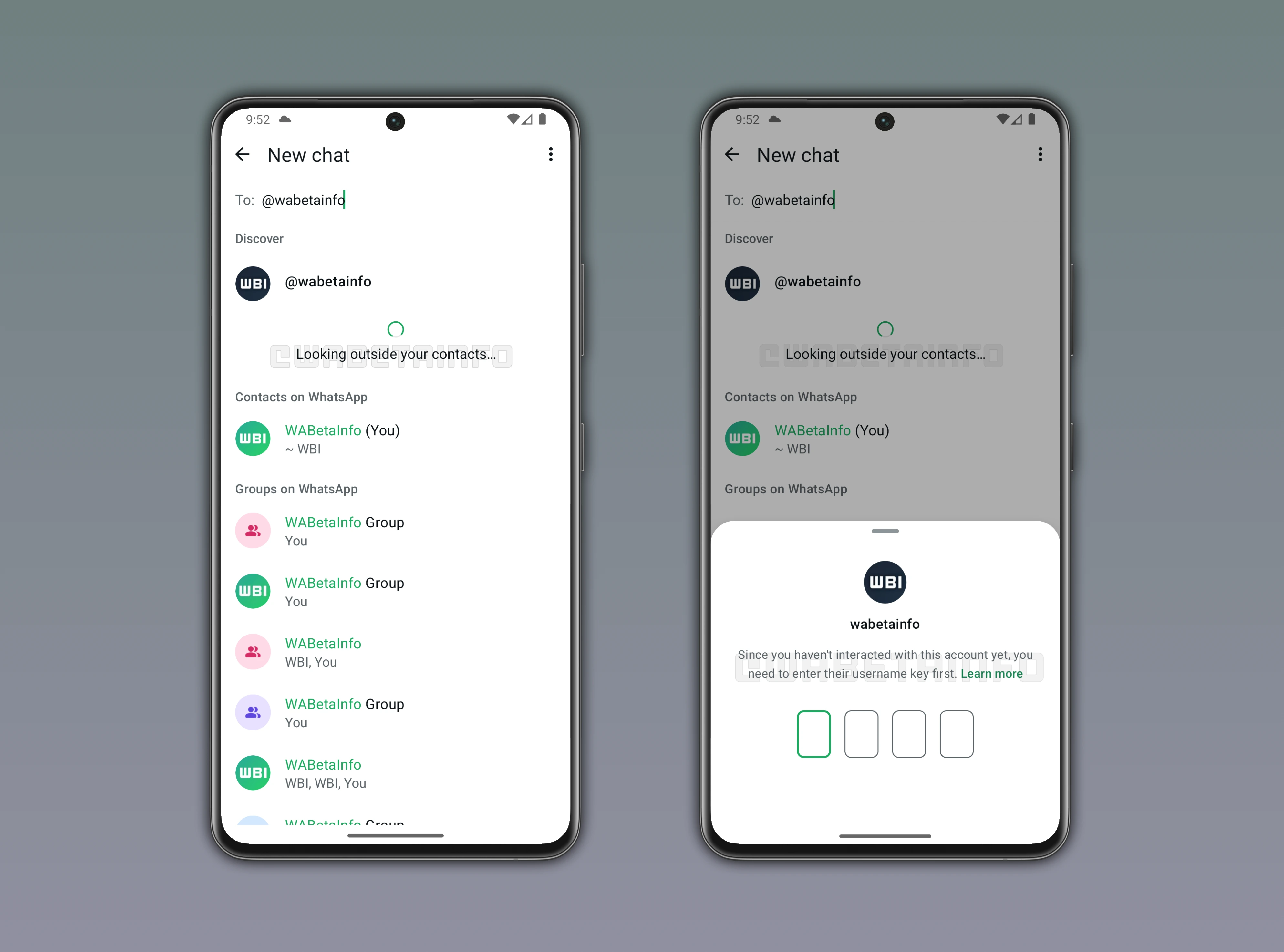
As you can see from the attached screenshot, WhatsApp is exploring the implementation of a feature that introduces an additional verification step before a conversation can start, scheduled for release in a future update. In the post covering the WhatsApp beta for Android 2.25.22.9 update, we revealed that WhatsApp has also been developing a username key that works alongside these new identifiers to control access to first-time chats. A username key can be described as an additional access code chosen by the user and linked to their username-based account. This key is not meant to replace usernames, but it's designed to add a selective barrier that controls who can start a conversation. By introducing this mechanism, WhatsApp provides users with more granular control over incoming chats without exposing personal details.
The focus of this new feature is a dedicated screen that appears when someone tries to start a chat for the first time with a username-based account. This screen will require the sender to enter the correct username key before any interaction with the account is allowed. It will only be shown in cases where the recipient has explicitly decided to restrict conversations to people who know this key. If the key is not entered or is incorrect, the chat cannot be initiated, and no messaging or calling interactions can take place with that account. This approach clearly signals that access to the conversation is intentionally limited by the account owner.
From a practical perspective, this means users can share their username publicly while keeping direct messages reserved for a smaller circle. The username key acts as a second layer that separates visibility from reachability, which is particularly useful in public groups or online profiles. People who legitimately need to get in touch can be provided with the key directly by the account owner. At the same time, random users who discover the username through search will not be able to send unsolicited messages. This balance helps reduce spam and unwanted contact without disabling discoverability.
The feature fits naturally within the broader username system that removes phone numbers from first interactions. Even when a username is visible and searchable, the presence of a key ensures that conversations start only under the conditions set by the recipient. All messages shared after the key is accepted will continue to benefit from end-to-end encryption, just like standard WhatsApp chats. No additional information about the key is shared beyond the initial verification step. This design reinforces user control while keeping the chat experience familiar and consistent.
As development progresses, WhatsApp is refining how this username key flow is presented in new chats to make it clearer and easier for users to understand. The interface is expected to explain why the key is required, reducing confusion for first-time senders. These refinements aim to ensure that users immediately recognize the feature as a privacy choice made by the recipient. By combining usernames with optional access keys, WhatsApp is shaping a system that supports safer first contacts. The feature is still under development, but its direction highlights a strong focus on controlled and respectful communication.
The feature that asks for the username key for first-time chats is currently under development, and it is planned for release in a future update. WhatsApp is testing how this system works alongside existing chat settings to ensure a seamless and intuitive experience for users. The interface is being refined to make it straightforward to start a conversation using a username while keeping phone numbers private. Once implemented, users will be able to initiate chats using usernames, giving them more control over who can contact them and enhancing privacy for interactions with unknown contacts.
Stay Connected with WABetaInfo
Following WABetaInfo on X is the best way to stay informed about new features under development and those released to WhatsApp beta for Android, iOS, Web, and Desktop. We love hearing your feedback, so let us know what you think! You can also explore our dedicated page to discover all our services, or join our Discord Server to chat with others, get help and advice, and stay up to date with the latest WABetaInfo announcements.