WhatsApp beta for Android 2.25.7.8: what's new?
WhatsApp has released a new Android update through the Google Play Beta Program, bringing the version up to 2.25.7.8.
What's new in this update? WhatsApp is rolling out a feature to save photos and videos from your own status updates, and it's available to some beta testers!
| Common questions | Answers |
|---|---|
| Name of the feature? | Save status updates |
| Status? | Rolling out |
| Compatibility? | WhatsApp beta for Android 2.25.7.8 has been designated as a compatible update, but some users may experiment with the same feature by installing certain previous updates. |
| I've installed this update but I don't have this feature. Why? | This feature is available to some beta testers, and it is rolling out to more users over the coming weeks. |
| Thanks: | Akan, Sc, kingcyrious, lostliano, Radu Oncescu, and flakoflow, for testing and reporting. |
| Previous news? | WhatsApp beta for Android 2.25.7.7: what's new? WhatsApp is working on a feature to organize message replies into threaded conversations! |
SAVE STATUS UPDATES
In the article about the WhatsApp beta for Android 2.25.5.20 update, we announced that a feature to add sticker photos to status updates was available. This update enhances user creativity by allowing them to overlay images onto their status content, making updates more engaging and visually dynamic. With this feature, users can choose from various predefined sticker shapes, including rectangles, squares, circles, hearts, and stars, to personalize their photos and videos. It seems that WhatsApp is currently working on introducing additional tools for status updates, aimed at streamlining how users interact with them and offering more convenient options for managing and sharing content. Thanks to the latest WhatsApp beta for Android 2.25.7.8 update, which is available on the Google Play Store, we discovered that WhatsApp is rolling out a feature to save photos and videos from your own status updates!
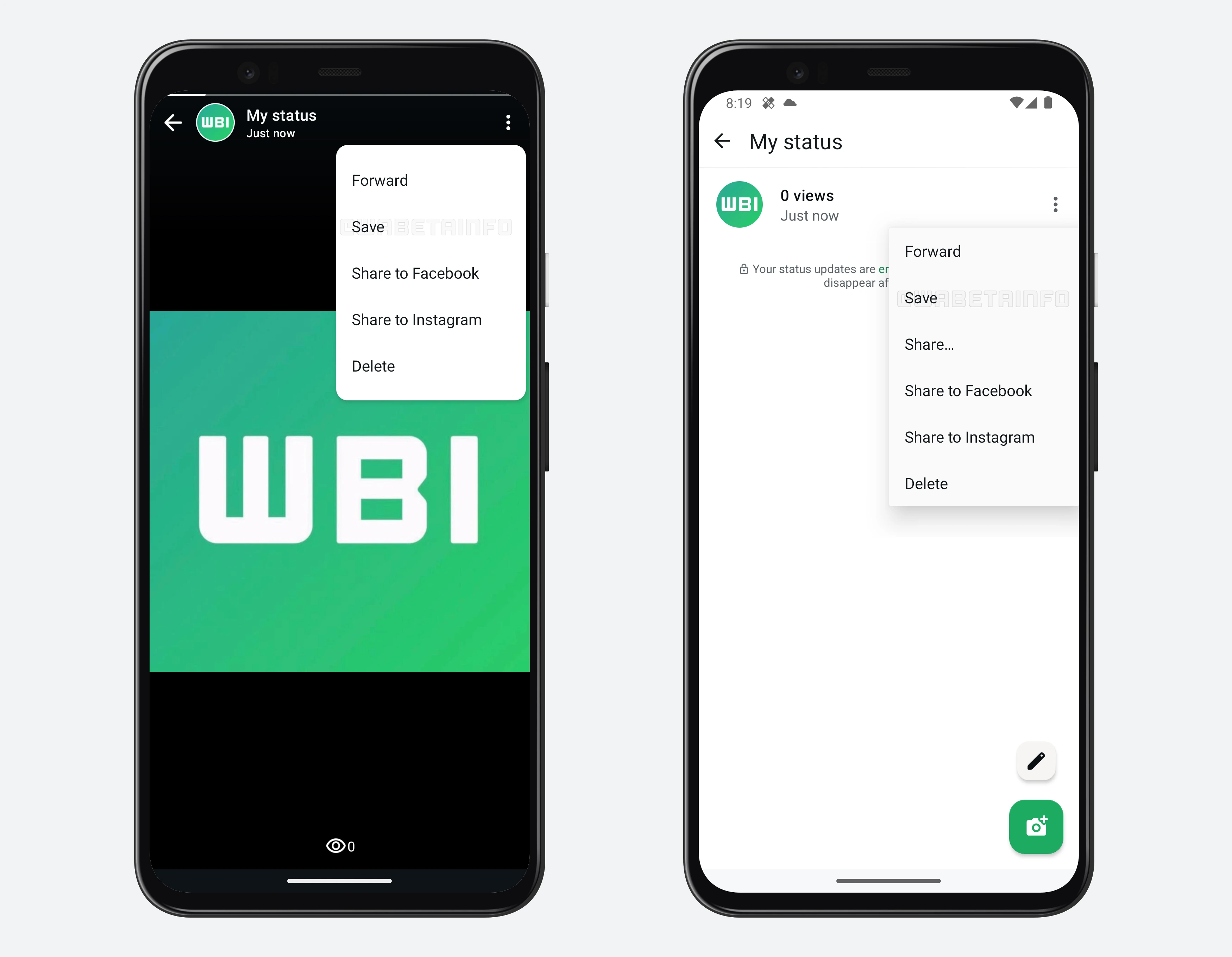
As you can see from the attached screenshot, some beta testers can explore a new feature that allows them to save their status updates directly to their phone gallery. This option is accessible from the overflow menu while viewing a status update, providing an easy and quick way to store media content. Additionally, users can find the save option in the list of shared status updates from the past 24 hours, making it convenient to retrieve previously posted updates.
This new functionality is particularly useful in cases where users have accidentally deleted a photo or video from their device after posting it as a status update. Before this update, retrieving such media required users to forward the status update to a chat or group and then save it from there, which was not an ideal solution. With this latest update, WhatsApp introduces a more convenient approach, eliminating the need for workarounds. Now, users can simply save their status updates directly without any extra steps, making it easier to store their shared media.
It is very important to highlight that this option is available exclusively for your own status updates. This means that the feature does not extend to status updates shared by other contacts. Users will not be able to save statuses posted by friends or family through this option, as this feature is designed specifically for managing and storing personal content.
A feature to save photos and videos from your own status updates is available to some beta testers who install the latest updates of WhatsApp beta for Android from the Google Play Store, and it is rolling out to even more people over the coming weeks.
Stay up-to-date on WhatsApp news by following WABetaInfo on X. You can also discover other new features for WhatsApp beta for Android, iOS, Web/Desktop, and Windows.
Do you like this news? Please, let us know on X: we love hearing your feedback! If you're curious to see where you can find WABetaInfo, there is a dedicated page where you can discover our services.
In addition, we have set up a Discord Server where you can chat with other people, get help and advice, and stay up to date with the latest announcements from WABetaInfo.