WhatsApp beta for Android 2.25.7.16: what's new?
WhatsApp has released a new Android update through the Google Play Beta Program, bringing the version up to 2.25.7.16.
What's new in this update? WhatsApp is rolling out an enhanced experience to chat and talk with the Meta AI chatbot, and it's available to some beta testers!
| Common questions | Answers |
|---|---|
| Name of the feature? | Chat and talk with Meta AI |
| Status? | Rolling out |
| Compatibility? | WhatsApp beta for Android 2.25.7.16 has been designated as a compatible update, but some users may experiment with the same feature by installing certain previous updates. |
| I've installed this update but I don't have this feature. Why? | This feature is available to some beta testers, and it is rolling out to more users over the coming weeks. |
| Thanks: | Akan and shw_9876, for testing and reporting. |
| Previous news? | WhatsApp beta for iOS 25.7.10.71: what's new? WhatsApp is rolling out a feature to filter status updates and channels! |
CHAT AND TALK WITH META AI
In the article about the WhatsApp beta for Android 2.25.5.22 update, we announced that a new feature to chat and talk with Meta AI was under development. This feature would introduce a dedicated Meta AI screen designed to enhance user interactions with the chatbot, providing a seamless way to engage with the AI, particularly through voice commands. It appears that WhatsApp is now testing this feature with the public, as some beta testers have reported seeing the new dedicated screen for Meta AI. Thanks to the latest WhatsApp beta for Android 2.25.7.16 update, which is available on the Google Play Store, we discovered that WhatsApp is rolling out an enhanced experience to chat and talk with the Meta AI chatbot!
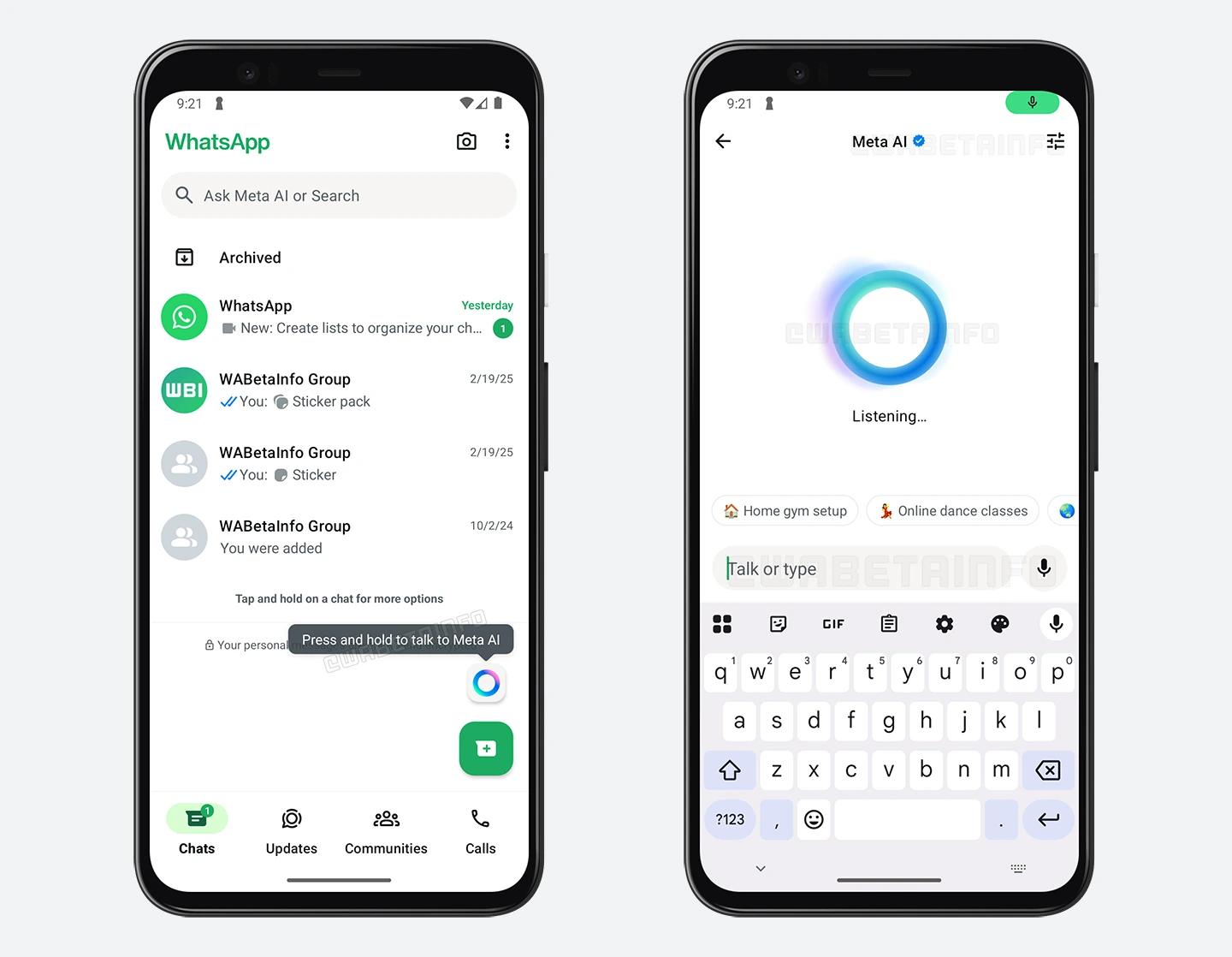
As you can see from the attached screenshot, some beta testers can explore a new feature that allows to access a dedicated Meta AI interface. This new screen is primarily focused on voice interactions, as Meta AI will automatically start a voice session as soon as the user opens it. Unlike the traditional chat interface, where users have to manually tap a button to start speaking, this new experience eliminates unnecessary steps and makes the interaction more fluid and efficient. This screen also includes the option to configure the chatbot's voice directly from the interface, removing the need to navigate to the chatbot info screen.
The voice session remains active as long as the user stays within this screen. If the user switches to another application or simply exits this screen, the voice session will automatically end. This ensures that voice interactions are always tied to the dedicated interface, preventing any unintended background activity. Additionally, users have even more control over their voice interactions with Meta AI. If they need a moment of privacy, they can mute the microphone directly from this screen. Doing so will immediately stop Meta AI from listening, allowing users to pause their voice interaction without closing the interface entirely.
Another way the voice session can be interrupted is by switching to text-based interactions. If a user starts typing in the input field, Meta AI will recognize this action and automatically stop listening, switching the current screen to the standard chat interface with Meta AI. This flexibility allows users to seamlessly transition between voice and text modes depending on their preferences and environment, as users can easily choose the most convenient way to interact with Meta AI.
It is important to note that users can always rely on the Android privacy indicator within the status bar to verify when the microphone is active. This system-level feature ensures that users are aware of when an app is accessing the microphone, adding an extra layer of security and control. Since the privacy indicator is managed directly by the Android operating system, no app can intercept or modify its behavior to hide or manipulate its activity. This means that users always have a clear and reliable way to check if Meta AI is listening, reinforcing trust in the privacy protections of the feature.
One major advantage of launching a voice session immediately upon opening Meta AI from the floating action button is the speed and convenience it provides. Instead of requiring users to manually initiate a conversation, Meta AI is instantly ready to assist, making the interaction more natural and efficient. This is particularly useful in hands-free scenarios, where users may need quick answers without the need to manually open the conversation with Meta AI and send a voice message. With these improvements, Meta AI is becoming a more accessible and user-friendly assistant, offering a streamlined experience for those who prefer voice interactions while maintaining strong privacy controls. WhatsApp will likely continue refining this feature based on user feedback before rolling it out more broadly in a future update.
An enhanced experience to chat and talk with the Meta AI chatbot is available to some beta testers who install the latest updates of WhatsApp beta for Android from the Google Play Store, and it is rolling out to even more people over the coming weeks.
Stay up-to-date on WhatsApp news by following WABetaInfo on X. You can also discover other new features for WhatsApp beta for Android, iOS, Web/Desktop, and Windows.
Do you like this news? Please, let us know on X: we love hearing your feedback! If you're curious to see where you can find WABetaInfo, there is a dedicated page where you can discover our services.
In addition, we have set up a Discord Server where you can chat with other people, get help and advice, and stay up to date with the latest announcements from WABetaInfo.