WhatsApp beta for Android 2.25.5.20: what's new?
WhatsApp is rolling out a new update through the Google Play Beta Program, bringing the version up to 2.25.5.20.
What's new in this update? WhatsApp is rolling out a feature to add sticker photos to status updates, and it's available to some beta testers!
| Common questions | Answers |
|---|---|
| Name of the feature? | Sticker photos |
| Status? | Rolling out |
| Compatibility? | WhatsApp beta for Android 2.25.5.20 has been designated as a compatible update, but some users might experiment with the same feature by installing certain previous updates. |
| I've installed this update but I don't have this feature. Why? | This feature is available to some beta testers, and it is rolling out to more users over the coming weeks. |
| Thanks: | Akan, kingcyrious, and DarkCrystal, for testing and reporting. |
| Previous news? | WhatsApp beta for Android 2.25.5.19: what's new? WhatsApp is working on a feature to manage privacy settings for profile links! |
STICKER PHOTOS
In the article about the WhatsApp beta for Android 2.25.3.10 update, we announced that a feature to edit sticker photos for status updates was under development. This new feature would enable users to add multiple photos in a single status update using the new content sticker, making it easier to share a collection of moments at once. Unlike the traditional way of posting separate status updates, this feature would allow users to overlay sticker-like images onto their status, including the ability to add sticker photos over videos shared via status updates. It appears that WhatsApp is now testing this feature with the public, as some beta testers have reported seeing a new content sticker in the drawing editor screen. Thanks to the latest WhatsApp beta for Android 2.25.5.20 update, which is available on the Google Play Store, we discovered that WhatsApp is rolling out a feature to add sticker photos to status updates!
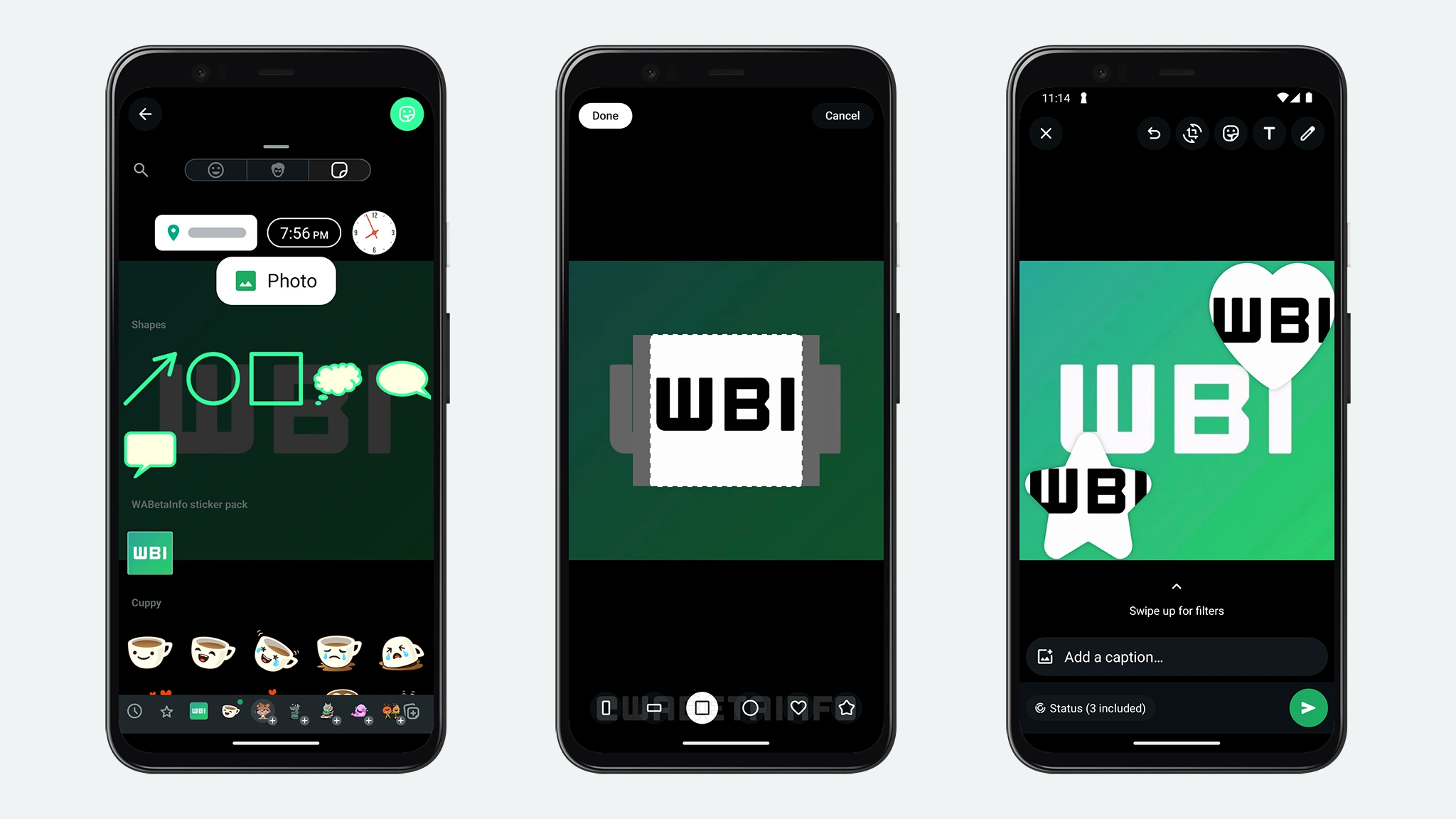
As you can see from the attached screenshot, some beta testers can explore a feature to add a sticker photo to the content shared via a status update. A sticker photo is an image that users can overlay onto their status updates, similar to how the same content sticker works on Instagram. This feature allows users to personalize their updates by adding additional images on top of photos or videos, as part of a more creative and engaging storytelling experience.
When users apply a sticker photo over their content, they can select from different predefined shapes to customize their sticker photos based on the context of their update, including two rectangular options, a square, a circle, a heart, and a star. The rectangular shapes (landscape and portrait) are useful for creating structured layouts, allowing users to arrange multiple images in an organized manner. A square shape offers a balanced option for displaying content without cropping too much of the original image. Instead, the circular shape is ideal for profile-like cutouts or highlighting a specific element in a photo. The heart shape is perfect for romantic moments or special occasions, adding an emotional touch to status updates. The star shape, on the other hand, can be used to emphasize standout moments, celebrations, or other important highlights in an image.
In addition to different shape options, it's worth noting that sticker photos are also resizable and movable, giving users creative freedom to arrange them as they see fit. Users can resize a sticker photo to make it more prominent or shrink it to fit within the overall composition of their status update. The ability to move the sticker anywhere on the screen ensures flexibility in positioning, making it easier to layer images when sharing multiple moments in a single update.
A feature to add sticker photos to status updates is available to some beta testers who install the latest updates of WhatsApp beta for Android from the Google Play Store, and it is rolling out to even more people over the coming weeks.
Stay up-to-date on WhatsApp news by following WABetaInfo on X. You can also discover other new features for WhatsApp beta for Android, iOS, Web/Desktop, and Windows.
Do you like this news? Please, let us know on X: we love hearing your feedback! If you're curious to see where you can find WABetaInfo, there is a dedicated page where you can discover our services.
In addition, we have set up a Discord Server where you can chat with other people, get help and advice, and stay up to date with the latest announcements from WABetaInfo.