WhatsApp beta for Android 2.25.4.20: what's new?
WhatsApp is rolling out a new update through the Google Play Beta Program, bringing the version up to 2.25.4.20.
What's new in this update? WhatsApp is working on a feature to better manage home screen chat notifications, and it will be available in a future update!
| Common questions | Answers |
|---|---|
| Name of the feature? | Home screen chat notifications |
| Status? | Under development |
| Availability? | WhatsApp is currently working on bringing a feature to better manage home screen chat notification to a future update of the app. |
| I've installed this update but I don't have this feature. Why? | This feature is under development, so it's not ready for beta testers. However, it's possible to discover a preview in this article. |
| Previous news? | WhatsApp for iOS 25.3.80: what's new? WhatsApp is widely rolling out a feature to choose a chat theme among 20 different colors! |
HOME SCREEN CHAT NOTIFICATIONS
In the article about the WhatsApp beta for Android 2.24.20.17 update, we announced that a feature to control the home screen badge count was available to some beta testers. This toggle allows users to choose between two different behaviors for how the badge clears, offering greater flexibility in managing their notifications. It appears that WhatsApp now aims to further clarify how users can have more control over the count of their notifications, helping them personalize their experience based on their individual preferences. Thanks to the latest WhatsApp beta for Android 2.25.4.20 update, which is available on the Google Play Store, we discovered that WhatsApp is working on a feature to better manage home screen chat notifications!
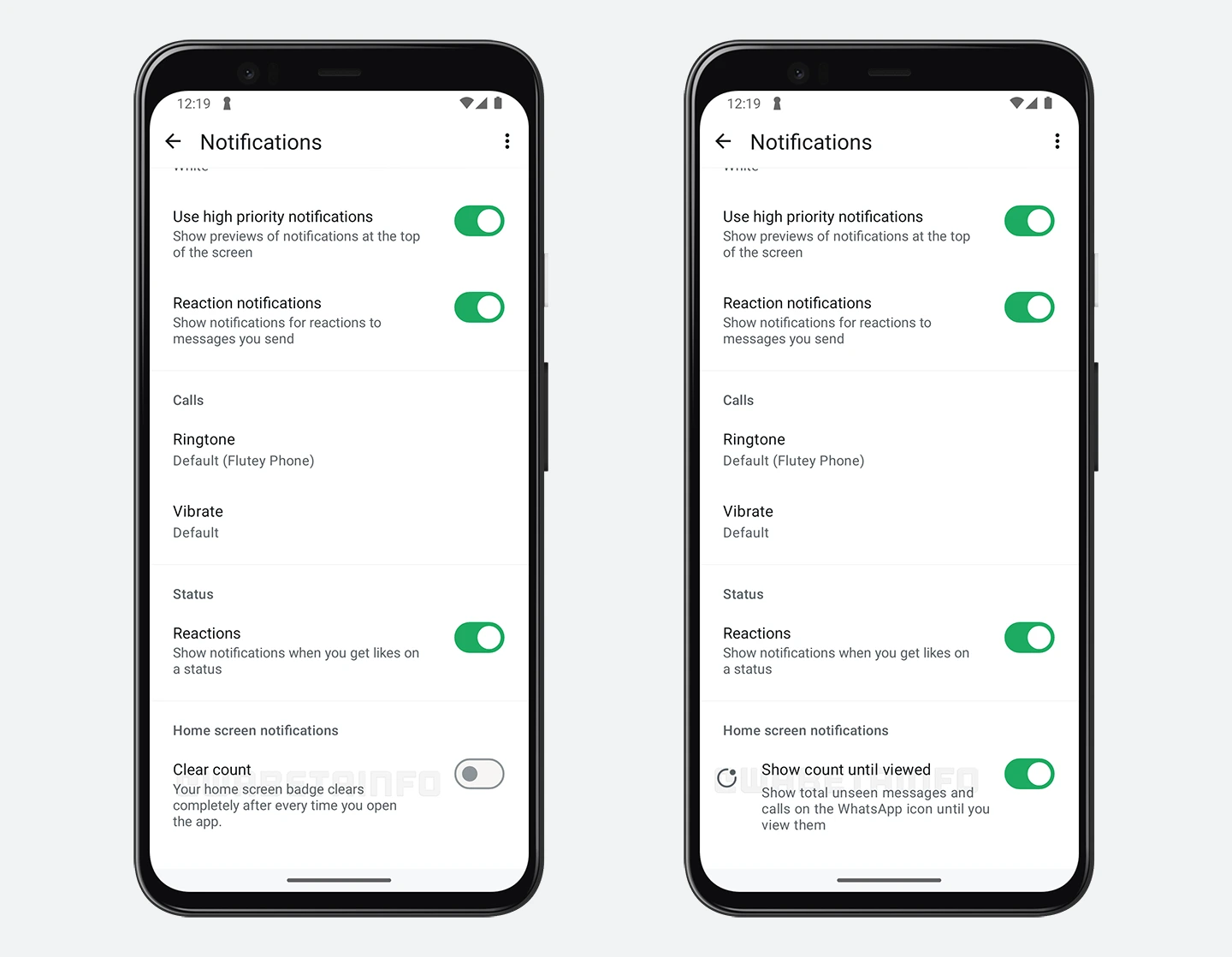
In the screenshot on the left, you can see the current feature that lets users clear the app icon's notification count completely when they open the app. On the right, you can see that WhatsApp is exploring the implementation of a feature that will allow home screen chat notifications to remain visible until they are manually viewed, scheduled for release in a future update. At the moment, WhatsApp offers a toggle to let users clear the Home Screen notification count completely after every time they open the app. This choice gives users a clutter-free experience by resetting the notification badge, ensuring that the count is always set to zero upon accessing the app, regardless of whether any messages have been read.
Through a future update, WhatsApp plans to clarify how the home screen notification count works and provide users with more control by further refining the feature. Specifically, WhatsApp intends to reverse the functionality of the toggle, so that when the toggle is active, home screen notifications will remain until all unseen messages and calls are viewed. When the toggle is disabled, WhatsApp will reset the home screen notifications each time users open the app, ensuring a fresh start with each session.
This change will provide more transparency and make it easier for users to understand how the badge count reflects unread messages and missed calls in the future. Previously, the current toggle may have left some confusion about when and why the badge would reset, especially when some notifications were still unread. With the new system, users will have a clearer idea of how their unread notifications are tracked and updated. It seems that WhatsApp aims to make this process more intuitive, responding to user requests for a clearer method of managing notification badges without confusion. As a result, this upcoming update is designed to help users better understand how their notifications are handled, as it simplifies the process and ensures more transparency in how notification counts are updated.
A feature to better manage home screen chat notifications is under development and it will be available in a future update. We will keep you updated with an additional article as soon as we have more details to share about this feature.
Stay up-to-date on WhatsApp news by following WABetaInfo on X. You can also discover other new features for WhatsApp beta for Android, iOS, Web/Desktop, and Windows.
Do you like this news? Please, let us know on X: we love hearing your feedback! If you're curious to see where you can find WABetaInfo, there is a dedicated page where you can discover our services.
In addition, we have set up a Discord Server where you can chat with other people, get help and advice, and stay up to date with the latest announcements from WABetaInfo.