WhatsApp beta for Android 2.25.36.15: what's new?
WhatsApp has released a new Android update through the Google Play Beta Program, bringing the version up to 2.25.36.15.
What's new in this update? WhatsApp is rolling out a feature that lets users apply strict security settings to their accounts, and it's available to some beta testers!
| Key Points | Details |
|---|---|
| Name of the feature: | Strict account security settings |
| Status: | Rolling out |
| Compatibility: | WhatsApp beta for Android 2.25.36.15 has been designated as a compatible update. |
| Availability info: | This feature is available to some beta testers, and it is rolling out to more users over the coming weeks. |
| Thanks: | FastenM, for testing and reporting. |
| Previous news: | WhatsApp beta for Android 2.25.36.12: what's new? WhatsApp is rolling out a feature that integrates AI-powered Imagine capabilities into status updates! |
WhatsApp Introduces Strict Account Security Settings For Added Protection
In the article about the WhatsApp beta for Android 2.25.33.4 update, we announced that a feature that enables strict security settings was under development. This functionality would allow users to activate a single toggle that enforces the platform's highest privacy and security measures. It also blocks attachments and media from unknown senders and disables link previews to limit exposure to potentially unsafe content. Additionally, the feature includes a simplified security review process, guiding users through their account protections to ensure nothing is overlooked.
It appears that WhatsApp is now testing this functionality with the public, as some beta testers can already activate the strict account security settings. This update is designed to make it easier for users to enable all features that enhance security and privacy on WhatsApp. Following the release of the latest WhatsApp beta for Android 2.25.36.15 update, which is available on the Google Play Store, we discovered that WhatsApp is rolling out a feature that lets users apply strict security settings to their accounts!
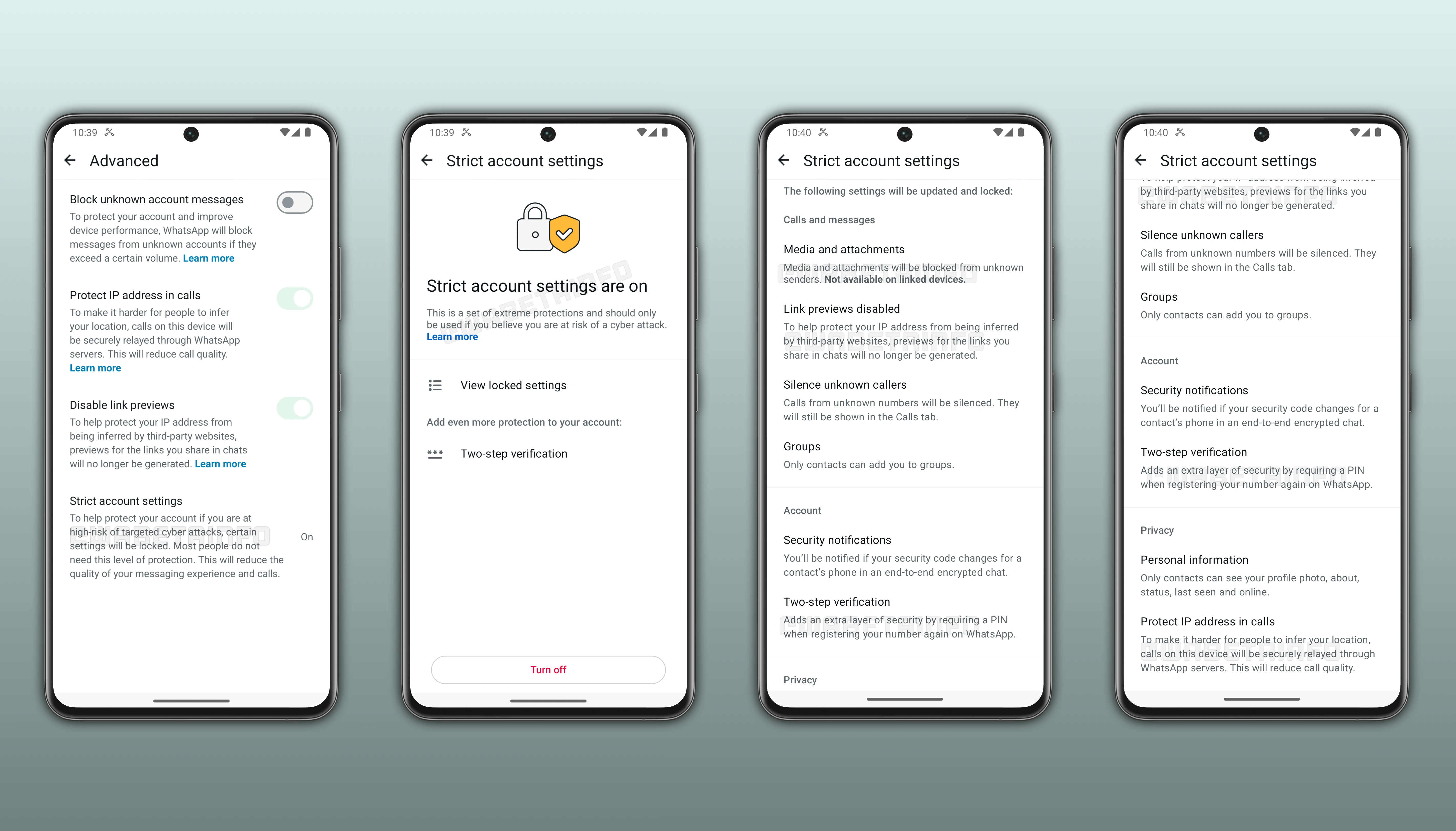
As you can see from the attached screenshot, some beta testers can access a new feature directly from their privacy settings. This option is designed for users who want stronger protection against potential cyber attacks. Strict security account settings bundle the app's most robust privacy and security measures into a single, easy-to-use toggle. Once activated, it immediately applies WhatsApp's highest security configurations, removing the need for users to adjust multiple settings manually. With this feature, WhatsApp aims to make advanced security accessible to all users, including those less familiar with technology, while providing a clear and consistent safety baseline for those who may be at higher risk.
At the core of the strict security settings is a set of protections designed to limit exposure to unknown or suspicious contacts. Media and attachments from unknown senders are automatically blocked, preventing photos, videos, documents, and voice notes from being downloaded. Link previews are also disabled, stopping potential leakage of device information when links are shared. Calls from unknown numbers are silenced by default, reducing interruptions and lowering the risk of exposure to spam, scams, or 0-click attacks that can exploit device vulnerabilities without user interaction.
Group invitations are restricted so that only people saved in a user's contacts can add them to new chats. This reduces the risk of being added to spam groups and helps users stay in control of their communication environment. When strict account settings are active, the app always alerts users whenever a contact's end-to-end encryption code changes in their chats, giving them a chance to confirm that the conversation is still secure. These alerts are designed to reassure users that they are communicating with the right person and not a compromised account.
With strict account settings, Two-step verification is enforced by default, adding another safeguard against unauthorized attempts to re-register the number or take over the account. The feature also limits the visibility of personal details such as profile photos, status updates, and last seen information so they are shown only to contacts. This prevents strangers from gathering personal clues that could be used for impersonation or harassment. In addition, calls are always relayed through WhatsApp servers, which helps mask IP addresses and reduces the possibility of location tracking.
To maintain consistent security, key settings are locked once strict security mode is enabled. This ensures all protections work together without conflict, although users can still deactivate the mode if they wish. This feature is optional, aimed at users who feel they might be targeted by sophisticated cyber attacks. It's very important to note that most people will not need to enable it, as WhatsApp's existing protections already offer strong privacy and security for everyday use.
Strict account settings can only be enabled or disabled from a user's primary device, ensuring full control remains with the account owner. Once the feature is active, users can review every option that has been automatically secured under this mode. To access the list, they can open More Options, then navigate to Settings, Privacy, Advanced, and finally Strict Account Settings. From there, selecting View locked settings displays all the protections currently enforced. This makes it easier for users to understand which privacy and security measures are being applied while strict mode is on.
The integration of these protections into a single toggle is intended to simplify account security while maintaining effectiveness. Strict security account settings represent a proactive approach to privacy, consolidating multiple layers of defense under one easily accessible control. By automatically applying the platform's strongest settings, WhatsApp helps users maintain a high level of security without the need to navigate multiple menus or manually enable each feature. Even for those less tech-savvy, the feature provides a clear, straightforward way to safeguard personal information, prevent account intrusion, and limit exposure to potentially harmful communications.
The feature that lets users apply strict security settings to their accounts is now available to some beta testers who install the latest update of WhatsApp beta for Android from the Google Play Store. During this testing phase, WhatsApp is actively refining the feature to ensure it works smoothly across different devices and configurations. This also allows WhatsApp to address any potential bug and polish the experience before expanding the rollout to a wider audience over the coming weeks.
Stay Connected with WABetaInfo
Following WABetaInfo on X is the best way to stay informed about new features under development and those released to WhatsApp beta for Android, iOS, Web, and Desktop. We love hearing your feedback, so let us know what you think! You can also explore our dedicated page to discover all our services, or join our Discord Server to chat with others, get help and advice, and stay up to date with the latest WABetaInfo announcements.