WhatsApp beta for Android 2.25.35.6: what's new?
WhatsApp has released a new Android update through the Google Play Beta Program, bringing the version up to 2.25.35.6.
What's new in this update? WhatsApp is rolling out a feature that allows users to display a custom tag in group chats, and it's available to some beta testers!
| Key Points | Details |
|---|---|
| Name of the feature: | Member tag in group chats |
| Status: | Rolling out |
| Compatibility: | WhatsApp beta for Android 2.25.35.6 has been designated as a compatible update, but some users may experiment with the same feature by installing certain previous updates. |
| Availability info: | This feature is available to some beta testers, and it is rolling out to more users over the coming weeks. |
| Thanks: | UnluckyTester, FastenM, Sc, Kingcyrious, and shw_9876, for testing and reporting. |
| Previous news: | WhatsApp is Rolling Out a Smarter About Feature with Auto Expiring Status Updates! |
WhatsApp Explores New Group Chat Customization Option
In the article about the WhatsApp beta for Android 2.25.17.42 update, we announced that a feature to let users have a tag in group chats was under development. This feature will allow users to assign custom tags to themselves within specific groups, helping other members quickly identify their roles or responsibilities. Users will be able to set a tag directly from the group info screen by selecting their name and adding a tag, which is visible only within that group. The feature is designed to improve organization and communication in structured groups such as workplaces, schools, or volunteer communities, while preserving privacy and contextual relevance.
It appears that WhatsApp is finally testing this feature with the public, as some beta testers reported that the option to enter a tag is available in their group chats. Following the release of the latest WhatsApp beta for Android 2.25.35.6 update, which is available on the Google Play Store, we discovered that WhatsApp is rolling out a feature that allows users to display a custom tag in group chats!
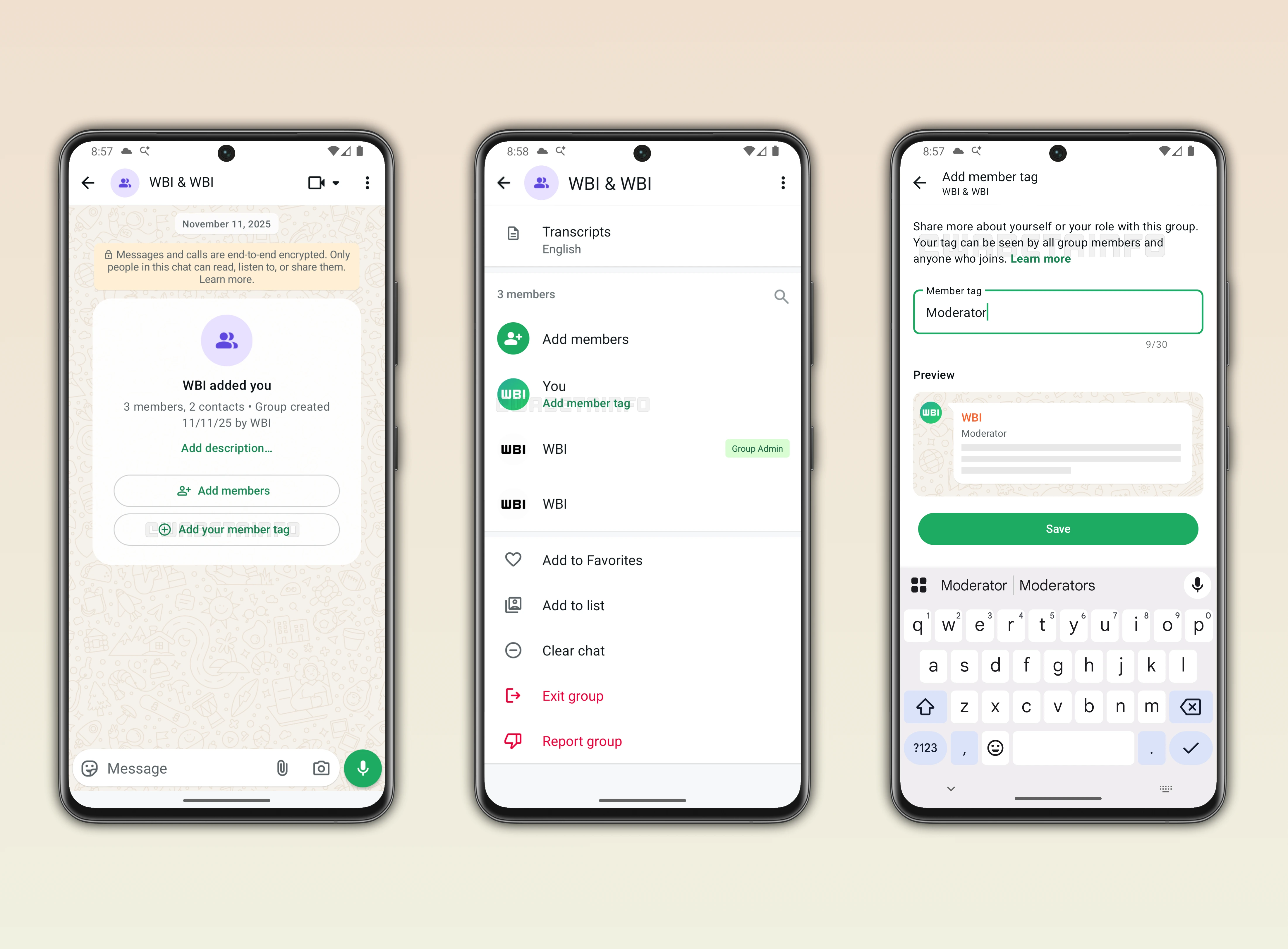
Introducing WhatsApp Group Member Tags
With the latest update, some beta testers can now add a personalized label that reflects their role within a group, making it easier for everyone to understand each member's responsibilities. This feature can be used to describe professional roles, hobbies, or specific functions, such as "Project Manager" or "Event Coordinator". In community or sports groups, a member might choose a tag like "Coach" to highlight their position in the team. In larger groups, someone responsible for keeping discussions organized could select "Moderator" as their tag.
Each user has full control over their own tag and can choose whatever best represents their role in that particular group. This flexibility allows members to highlight their expertise, interests, or authority without requiring administrative input. By assigning a role-specific tag, users can make it immediately clear to others who to contact for specific matters. As a result, this feature provides a way to self-identify in a group, creating context and clarity for all participants.
How to Add Your Group Member Tag
When creating a new group in WhatsApp, members are prompted to add a tag that best describes their role right from the start, streamlining identification from the first message. If a user is already part of an existing group, they can add or update their tag by accessing the chat info screen and selecting their name from the members list. The interface allows users to freely enter a tag that reflects their position, responsibility, or expertise within the group. This tag is visible to all current members, ensuring everyone knows each participant's role, and it can be up to 30 characters long, without the use of special characters, checkmarks, or links.
Even members who join the group later will see the existing tags, helping them quickly understand group dynamics. The feature emphasizes clarity and context, giving new and old members the same reference points. It simplifies interactions by allowing members to know who is handling moderation, project coordination, or specific discussion topics. Choosing the right tag ensures that the role is communicated effectively to everyone in the group.
Editing Your Group Member Tag Anytime
Every member has the option to edit their group member tag at any time, providing full control over how they are identified. A simple typo or mistake in the original tag can be corrected quickly through the chat info screen. Changes in responsibilities or new roles within the group can also be reflected by updating the tag. This flexibility ensures that the tag always accurately represents the member's current role and contribution to the group.
Visibility of Group Member Tags in Chats
Group member tags are prominently displayed within the message bubbles, allowing anyone in the chat to immediately see each participant's role as they send messages. This visibility ensures that members can quickly identify who is responsible for specific tasks or who to contact for particular topics without having to search through the group details. In addition to appearing in message bubbles, tags are also shown in the group participants list, providing a clear overview of everyone's role at a glance. This dual visibility reinforces the context of each member's contribution and helps maintain organization within the group.
Tags Are Specific to Each Group
When a user sets a tag in a group, it applies only to that specific group, ensuring context remains relevant. Each member can have a different tag for each group they participate in, reflecting distinct roles or interests. This allows for clear communication even if a person holds multiple responsibilities across various groups. Users can manage their identity in each group independently, without affecting tags in other chats.
Benefits of Using Group Member Tags
Group member tags provide clear identification of each user's role, making it easier to navigate large or structured chats. For example, a tag like "Moderator" or "Helper" immediately informs others who is responsible for managing discussions or assisting new members. In a group chat dedicated to sharing news about updates about WhatsApp, administrators could request all members to tag themselves with the platform they use, such as "Android" or "iOS". This ensures that questions or instructions are directed appropriately, saving time and reducing confusion.
Members can quickly identify who to contact for specific topics, whether technical support, event coordination, or information sharing. The visibility of these tags improves organization and allows members to prioritize interactions based on roles. Tags also encourage participation by clarifying responsibilities and areas of expertise. By making roles and responsibilities immediately visible, the feature helps groups run more smoothly and keeps conversations focused and organized.
Group Member Tag Feature is Rolling out on Android Beta
The feature that allows users to display a custom tag in group chats is available to some beta testers who install the latest updates of WhatsApp beta for Android from the Google Play Store. Initially, this functionality is available only to selected beta users who install the latest update, giving them early access to explore its features. This gradual rollout allows WhatsApp to closely monitor performance, ensure stability, and address any potential issues before releasing it to all users. In the coming weeks, more Android testers will gradually gain the ability to add a tag in their group chats, allowing for a smooth and controlled rollout to all eligible users.
Stay Connected with WABetaInfo
Following WABetaInfo on X is the best way to stay informed about new features under development and those released to WhatsApp beta for Android, iOS, Web, and Desktop. We love hearing your feedback, so let us know what you think! You can also explore our dedicated page to discover all our services, or join our Discord Server to chat with others, get help and advice, and stay up to date with the latest WABetaInfo announcements.