WhatsApp beta for Android 2.25.35.3: what's new?
WhatsApp has released a new Android update through the Google Play Beta Program, bringing the version up to 2.25.35.3.
What's new in this update? WhatsApp is rolling out a feature that allows channel admins to manage activity notification settings, and it's available to some beta testers!
| Key Points | Details |
|---|---|
| Name of the feature: | Channel activity notification settings |
| Status: | Rolling out |
| Compatibility: | WhatsApp beta for Android 2.25.35.3 has been designated as a compatible update, but some users may experiment with the same feature by installing certain previous updates. |
| Availability info: | This feature is available to some beta testers, and it is rolling out to more users over the coming weeks. |
| Previous news: | WhatsApp beta for iOS 25.34.10.72: what's new? WhatsApp is rolling out a feature that allows users to manage and use multiple accounts on the same device! |
WhatsApp Makes it Easier To Track Channel Activity
In the article about the WhatsApp beta for iOS 25.34.10.71 update, we announced that a feature to manage activity notification settings was available. This feature allows channel owners and their co-admins to control alerts for both follower and admin activity, customize notification tones, and receive smart notifications based on channel size. Admins can monitor audience engagement, track contributions from other administrators, and maintain efficient collaboration, while also having the option to disable notifications at any time.
It appears that WhatsApp now intends to give Android users the same channel activity notification functionality already available on iOS, aiming to provide a consistent experience across both platforms. This update allows channel owners on Android to manage follower and admin activity alerts, customize notification preferences, and stay informed about key interactions within their channels. Following the release of the latest WhatsApp beta for Android 2.25.35.3 update, which is available on the Google Play Store, we discovered that WhatsApp is rolling out a feature that allows channel admins to manage activity notification settings!
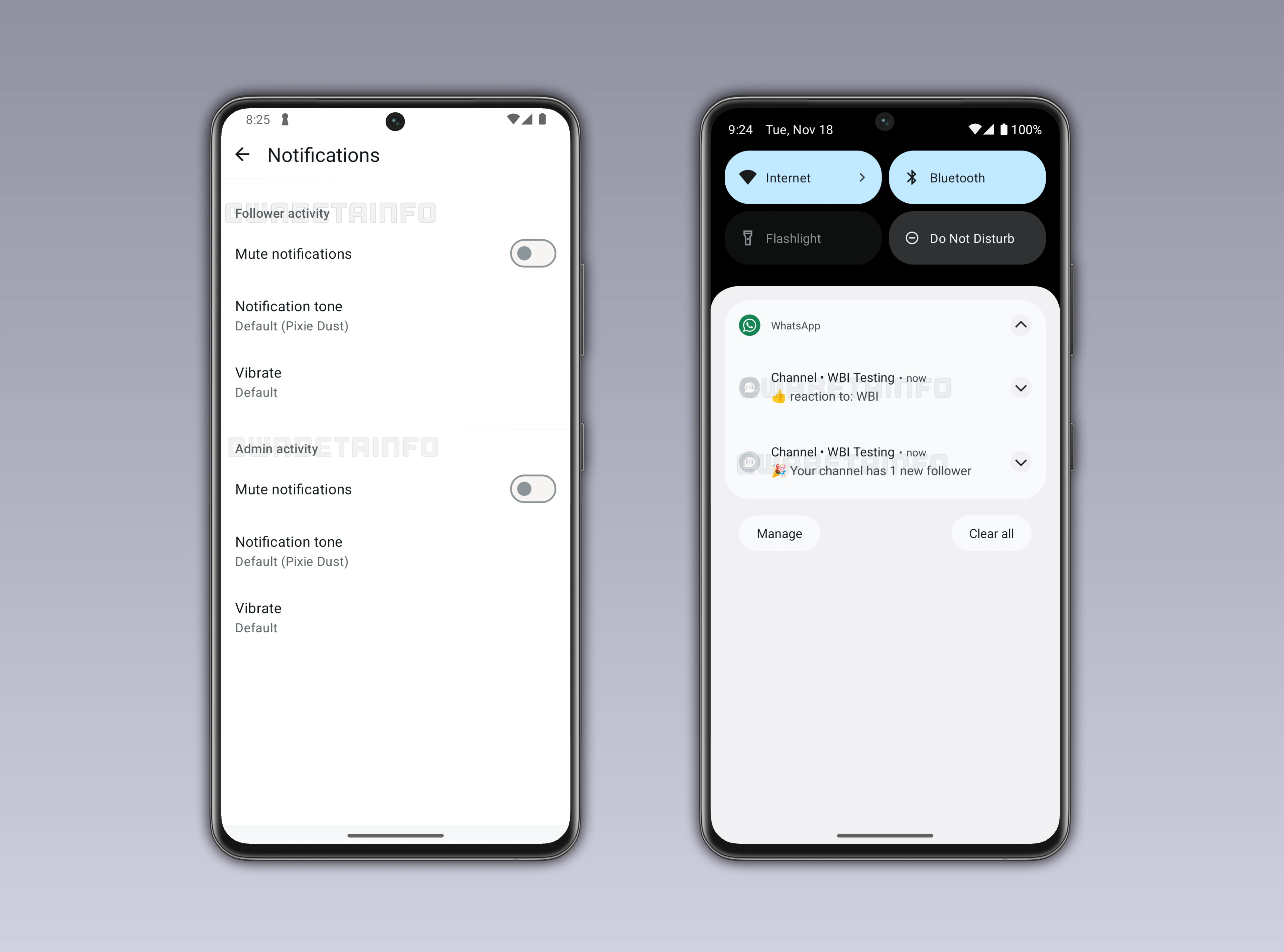
Introducing Activity Notification Management for Channel Owners on Android
Some beta testers can now access a new dedicated section for channel admins to manage notifications related to their channels. This section lets admins control two distinct types of alerts: follower interactions and admin actions. Each alert type can be enabled or disabled based on the admin's preferences, giving full control over what notifications are received. Additionally, notifications can be customized in tone and style, allowing admins to tailor alerts to their personal workflow and channel management needs.
Understanding Follower Activity Notifications
Follower activity alerts provide channel admins with immediate updates whenever new users start following their channel, giving them a clear picture of how their audience is growing over time. These notifications are also triggered whenever reactions are added to posts or when a series of reactions occurs in quick succession, highlighting moments of high engagement. By receiving these alerts, admins can monitor audience interactions in real time and understand which content resonates most with their followers. They make it easier to identify peaks of interest or particularly supportive reactions, allowing admins to respond or adjust strategies promptly.
This tool enables admins to track the overall growth and activity of their community right after publishing new updates, offering a continuous feedback loop. It also emphasizes which posts generate the most attention, as WhatsApp specifically notifies admins when updates reach notable levels of engagement through reactions. Access to these follower activity notifications gives admins valuable insights that can inform the planning of future content, ensuring updates align with audience preferences. As a result, this feature helps channel owners strengthen their connection with followers by keeping them closely informed about audience behavior and engagement trends.
Understanding Admin Activity Notifications
Admin activity alerts provide channel owners with detailed information about every action carried out by other administrators, allowing them to maintain a comprehensive overview of ongoing activities within the channel. When these notifications are enabled, the channel owner receives immediate updates whenever a co-admin posts new content, ensuring that no important contribution goes unnoticed. Additionally, the system alerts the owner whenever another admin reacts to one of their posts, providing insight into engagement patterns among the team. These notifications make it easier to track collaborative interactions and understand the dynamics between different admins.
By keeping a constant record of each admin's actions, channel owners can monitor the overall workflow and identify areas where additional support or coordination may be needed. This functionality supports more effective planning, allowing admins to align their schedules and content strategies to maintain a consistent posting rhythm. Awareness of all admin activity also enables channel owners to quickly resolve potential overlaps or conflicts, ensuring that updates are published smoothly and without redundancy. This system strengthens teamwork by promoting transparency, accountability, and better communication among all administrators involved in managing the channel.
WhatsApp Sends Smart Notifications Based on Channel Size
WhatsApp now tailors notifications based on the size of each channel, ensuring that admins receive alerts that are relevant and manageable. For larger channels, the system does not generate a notification for every individual reaction, which helps prevent an overwhelming flood of updates. Instead, alerts are triggered only when a post receives a substantial number of reactions or achieves specific reaction streaks, such as 20, 50, or 100 responses. This approach allows channel owners to focus on meaningful patterns of engagement rather than being distracted by minor interactions.
By delivering notifications in this way, admins can maintain a clear overview of audience behavior without feeling overloaded. Smart alerts ensure that important signals reach the admins while preserving a smooth and uninterrupted user experience. They also make it easier to identify which posts truly capture audience attention and drive engagement. This system enhances usability and keeps notifications purposeful, allowing admins to manage their channels more effectively.
Activity Notifications Are Exclusive to Channel Admins
Only channel owners and their co-admins have access to these detailed activity notifications, giving them full oversight of all interactions within the channel. Regular followers continue to receive updates only when new posts are published, without any visibility into the underlying engagement or administrative actions. They do not receive alerts about reactions, streaks, or other activity metrics, keeping advanced data exclusively in the hands of admins. By limiting these insights to administrators, WhatsApp ensures that channel management remains controlled and that strategic decisions are informed by accurate activity tracking.
Admins Can Disable Notifications at Any Time
Admins have the ability to disable these notifications at any time by accessing the notifications section within the channel info page, giving them full control over their alert settings. Although WhatsApp's system is designed to minimize unnecessary interruptions, some admins may still find certain notifications distracting or intrusive. In specific cases, the volume or frequency of alerts could feel overwhelming or not particularly relevant to the admin's workflow. Providing the option to turn notifications off ensures flexibility and allows channel owners to manage their experience according to their preferences.
Channel Activity Notification Feature is Rolling out on Android Beta
The feature that allows channel admins to manage activity notification settings is available to some beta testers who install the latest updates of WhatsApp beta for Android from the Google Play Store. Initially, only selected beta users who install the latest update can access the functionality, giving them early insight into its capabilities. The gradual rollout helps WhatsApp carefully monitor performance, stability, and potential issues before making the feature widely available. Over the coming weeks, more Android testers will gradually see the option appear in their settings, ensuring a smooth and controlled expansion to all eligible users.
Stay Connected with WABetaInfo
Following WABetaInfo on X is the best way to stay informed about new features under development and those released to WhatsApp beta for Android, iOS, Web, and Desktop. We love hearing your feedback, so let us know what you think! You can also explore our dedicated page to discover all our services, or join our Discord Server to chat with others, get help and advice, and stay up to date with the latest WABetaInfo announcements.