WhatsApp beta for Android 2.25.35.2: what's new?
WhatsApp has released a new Android update through the Google Play Beta Program, bringing the version up to 2.25.35.2.
What's new in this update? WhatsApp is rolling out a feature that allows users to disable VIPs on their Google Pixel devices, and it's available to some beta testers!
| Key Points | Details |
|---|---|
| Name of the feature: | VIPs - Google Pixel |
| Status: | Rolling out |
| Compatibility: | WhatsApp beta for Android 2.25.35.2 has been designated as a compatible update, but some users may experiment with the same feature by installing certain previous updates. |
| Availability info: | This feature is available to some beta testers, and it is rolling out to more users over the coming weeks. |
| Thanks: | Saadh Jawwadh, Sc, UnluckyTester, A7mad, and luismcgarcia, for testing and reporting. |
| Previous news: | WhatsApp beta for iOS 25.34.10.71: what's new? WhatsApp is rolling out a feature that allows channel admins to manage activity notification settings! |
WhatsApp Beta Introduces New Widget Management Features
In the article about the WhatsApp beta for Android 2.24.6.14 update, we announced that a feature for accessing the Meta AI chatbot through a widget was available. This widget lets users open a chat with Meta AI instantly, share photos for analysis or edits, and start voice-based interactions directly from their Home Screen. It is resizable, allowing users to adjust its size for a detailed or minimal view, making it easier to interact with Meta AI through multiple input methods without opening the app. The widget provides quick access to essential AI features with just a single tap, streamlining tasks and saving time for users.
It appears that WhatsApp is now experimenting with letting users manage certain widgets on supported devices. This gives users more control over which information is displayed outside the app. Following the release of the latest WhatsApp beta for Android 2.25.35.2 update, which is available on the Google Play Store, we discovered that WhatsApp is rolling out a feature that allows users to disable VIPs on their Google Pixel devices!
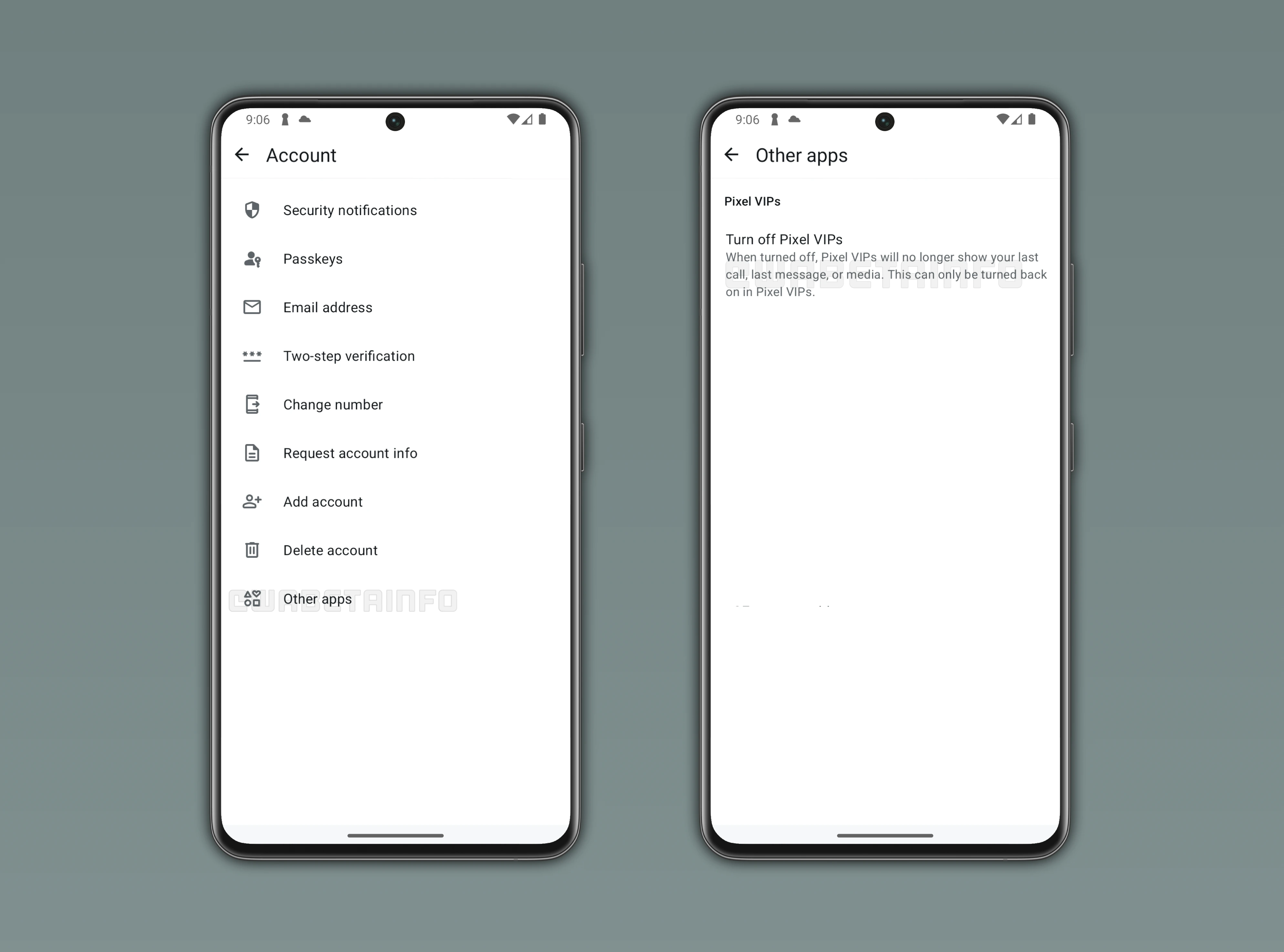
Pixel VIPs on Google Pixel Devices Help Centralize Important Updates
Pixel VIPs is a widget that lets users mark up to eight contacts as VIPs on their Pixel devices. It can show recent messages, calls, and location updates if shared, all in one convenient place. Users can also add personal notes, reminders, and track important dates such as birthdays or anniversaries. The widget provides quick access to important relationships without opening multiple apps.
VIPs are visually highlighted, making it easier to prioritize communication and quickly identify the contacts that matter most throughout your day. The feature integrates with other Google services, like Maps, to show location information when shared. It can also suggest activities or events based on mutual interests and past interactions. Pixel VIPs is designed to make staying connected more organized and intentional for users of all experience levels.
WhatsApp Introduces Option to Disable Pixel VIPs Integration
With the latest updates, WhatsApp is introducing a new feature that allows some beta testers to control Pixel VIPs on their Google Pixel devices. The functionality lets users disable the VIPs integration directly from WhatsApp. This gives users more control over which data Pixel VIPs can access, ensuring that their messages and personal information remain private while still allowing the widget to function for other contacts if desired. With this option, WhatsApp aims to ensure privacy while still letting Pixel devices highlight important contacts if desired.
How to Turn Off Pixel VIPs in WhatsApp
To disable Pixel VIPs, open WhatsApp, navigate to Settings, then tap Account followed by Other Apps, where all connected features are listed. In this section, users can select Turn off Pixel VIPs and confirm their choice. This action will stop the widget from accessing any WhatsApp data. Once disabled, Pixel VIPs will no longer show last messages, recent calls, or shared media, ensuring that all sensitive conversations remain private and visible only within the app. This process is straightforward and provides users with immediate control over which information is visible outside of WhatsApp.
Why WhatsApp Users May Want to Disable Pixel VIPs
Pixel VIPs can display last WhatsApp messages in the widget if enabled on Pixel devices. Some users may prefer to keep their message history private or avoid notifications outside the app. WhatsApp's new option gives users the ability to turn off this feature entirely. This ensures that conversations stay under the user's control and are not displayed outside the app.
When turned off, Pixel VIPs will no longer show your last call, last message, or media. Users who disable the feature will have to go back into Pixel VIPs to re-enable it if desired. This gives full control over what information is visible outside WhatsApp. By managing this setting, users can enjoy the benefits of VIPs for other data while keeping their messaging private.
WhatsApp's Pixel VIPs Feature Is Rolling Out on Android Beta
The option to disable Pixel VIPs is available to some beta testers who install the latest updates of WhatsApp beta for Android from the Google Play Store. Beta users can test the feature before it reaches the general public. The rollout ensures feedback is collected for a smooth public release. However, some users who have installed earlier versions of the app may already have access to this functionality.
Stay Connected with WABetaInfo
Following WABetaInfo on X is the best way to stay informed about new features under development and those released to WhatsApp beta for Android, iOS, Web, and Desktop. We love hearing your feedback, so let us know what you think! You can also explore our dedicated page to discover all our services, or join our Discord Server to chat with others, get help and advice, and stay up to date with the latest WABetaInfo announcements.