WhatsApp beta for Android 2.25.34.5: what's new?
WhatsApp has released a new Android update through the Google Play Beta Program, bringing the version up to 2.25.34.5.
What's new in this update? WhatsApp is rolling out a chat clearing feature with options for deleting messages or specific media categories, and it's available to some beta testers!
| Key Points | Details |
|---|---|
| Name of the feature: | Advanced chat clearing tool |
| Status: | Rolling out |
| Compatibility: | WhatsApp beta for Android 2.25.34.5 has been designated as a compatible update, but some users may experiment with the same feature by installing certain previous updates. |
| Availability info: | This feature is available to some beta testers, and it is rolling out to more users over the coming weeks. |
| Thanks: | Sc, FastenM, kingcyrious, flakoflow, and Muhammad Hammad, for testing and reporting. |
| Previous news: | WhatsApp beta for Android 2.25.34.3: what's new? WhatsApp is working on a feature that lets users reserve the same usernames they use on Facebook and Instagram! |
WhatsApp Enhances Chat Cleanup with New Storage Management Tools
In the article about the WhatsApp beta for Android 2.25.31.13 update, we announced that a feature to manage storage directly within the chat info screen was available. This option allows users to view all shared media from a specific conversation, sorted by file size, and quickly delete large items without navigating to the main storage settings. By placing this tool inside the chat info screen, WhatsApp gives users immediate control over the space used by each chat, making it easier to identify and remove unnecessary files. The feature also streamlines chat maintenance and helps users keep their storage optimized with just a few taps.
It appears WhatsApp continues to enhance its storage management tools, making it simpler for users to maintain their chats and prevent storage overload. The new tools also enhance visibility, as seen with the integration of the "Manage Storage" shortcut within the chat info screen. Following the release of the latest WhatsApp beta for Android 2.25.34.5 update, which is available on the Google Play Store, we discovered that WhatsApp is rolling out a chat clearing feature with options for deleting messages or specific media categories!
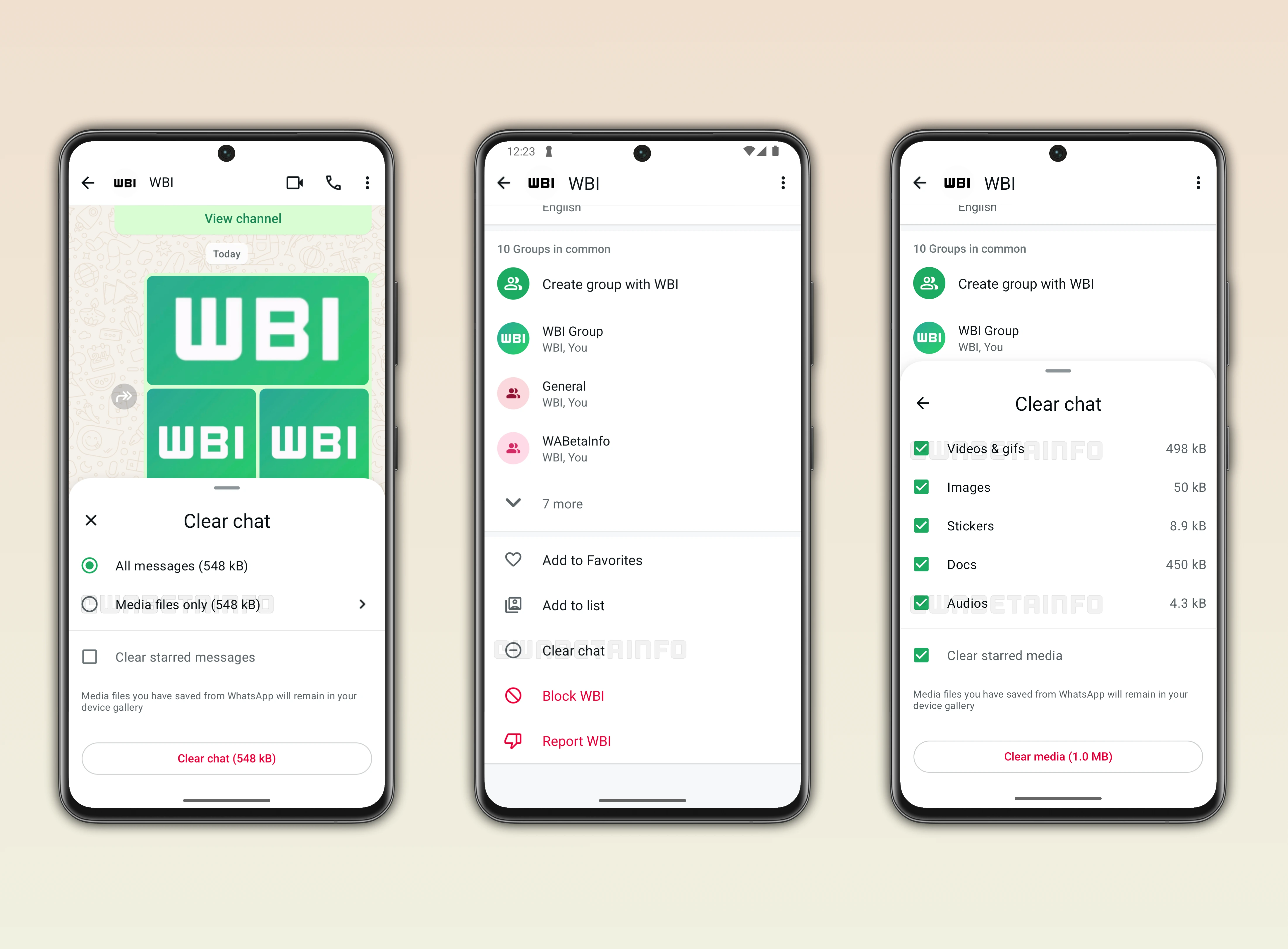
WhatsApp Launches an Advanced Chat Clearing Feature
After installing the latest update, some beta testers have more control over managing their conversations. Specifically, WhatsApp is refining the feature that allows users to delete all messages from their chats. In previous updates, users could select the "Clear chat" option directly from the overflow menu, which then displayed a confirmation alert. This alert also included an option to remove media files from the device's gallery. With the latest update, WhatsApp introduces a new bottom sheet that confirms the action and asks whether to delete starred messages from the conversation.
New Option to Confirm Deletion of Starred Messages
The new confirmation screen adds an extra layer of control for users who rely on starred messages to save important content. When choosing to clear a chat, WhatsApp now displays a bottom sheet asking if starred messages should also be removed. This helps prevent accidental loss of important information or attachments marked as important. By making this distinction, WhatsApp ensures users can manage their chat cleanup more precisely without compromising valuable data.
More Control Over What to Delete in WhatsApp Chats
WhatsApp gives users greater control over which media files to delete during the cleanup process. Instead of a single "clear all" option, users can now decide whether to remove all messages while keeping their media or delete only the media files from the chat. This flexibility helps users manage space more precisely according to their needs. Before confirming the action, WhatsApp also displays how much storage will be freed once the selected data is deleted.
When choosing to delete media, users can review different categories and select what to remove. Available options include videos and GIFs, images, stickers, documents, and audio files. This level of detail allows users to clean their chats strategically, targeting the types of media that take up the most space. By providing real-time storage information and customizable selection options, WhatsApp makes it easier than ever to manage chat data efficiently.
More Flexible Control Over Media Deletion
The new granular control over media deletion brings clear advantages for users who want to manage their chats more effectively. Some people prefer to remove all stickers from their conversations, especially when they accumulate over time and take up unnecessary space. Others may choose to delete voice messages, which many users consider unnecessary to keep since they rarely listen to them again. This is particularly common in group chats, where media and audio messages can build up quickly.
With this new system, users can focus on removing only what they no longer need without affecting the rest of their conversation. It helps maintain a cleaner chat history while still keeping important media or messages intact. This flexibility also prevents accidental data loss, as users can review and confirm each category before deletion. This feature finally provides a more personalized and efficient way to manage storage within WhatsApp chats.
Clear Chat Option Added to the Chat Info Screen
WhatsApp is also integrating the same chat-clearing option at the bottom of the chat info screen. This addition makes it easier for users to find the feature, especially when it's not immediately visible in the overflow menu. It also benefits users migrating from iOS to Android, since on WhatsApp for iOS the "Clear Chat" option is only available within the chat info screen. With this feature, WhatsApp aligns the experience across platforms, improving consistency and accessibility.
Improvements That Simplify Chat Management
These changes are part of WhatsApp's ongoing efforts to enhance chat maintenance tools and streamline the cleanup process. The new bottom sheet confirmation and additional placement of the feature make it easier to clear chats safely and efficiently. This update gives users flexible options to delete all messages or only specific types of media. Combined with the redesigned bottom sheet and improved placement within the chat info screen, the process is now faster and more intuitive. As a result, the update focuses on providing a smoother and more user-friendly management experience across devices.
New Feature to Clear Chats is Rolling out on Android Beta
The feature that improves the chat-clearing process is currently rolling out to some beta testers through the latest WhatsApp beta for Android updates. Users included in this rollout can explore the redesigned interface and experience the new confirmation flow firsthand. As with most WhatsApp beta features, the wider rollout will take place gradually over the coming weeks. Once the testing phase concludes successfully, all Android users will be able to enjoy the enhanced chat-clearing experience.
Stay Connected with WABetaInfo
Following WABetaInfo on X is the best way to stay informed about new features under development and those released to WhatsApp beta for Android, iOS, Web, and Desktop. We love hearing your feedback, so let us know what you think! You can also explore our dedicated page to discover all our services, or join our Discord Server to chat with others, get help and advice, and stay up to date with the latest WABetaInfo announcements.