WhatsApp beta for Android 2.25.3.22: what's new?
WhatsApp is rolling out a new update through the Google Play Beta Program, bringing the version up to 2.25.3.22.
What's new in this update? WhatsApp is rolling out a feature to improve accessibility to status creation tools, and it's available to some beta testers!
| Common questions | Answers |
|---|---|
| Name of the feature? | Status creation tools |
| Status? | Rolling out |
| Compatibility? | WhatsApp beta for Android 2.25.3.22 has been designated as a compatible update, but some users might experiment with the same feature by installing certain previous updates. |
| I've installed this update but I don't have this feature. Why? | This feature is available to some beta testers, and it is rolling out to more users over the coming weeks. |
| Thanks: | Sniper, kingcyrious, shw_9876, Radu Oncescu, and DarkCrystal, for testing and reporting. |
| Previous news? | WhatsApp news of the week: Android update to edit the album caption is under development! |
STATUS CREATION TOOLS
In the article about the WhatsApp beta for Android 2.24.26.13 update, we announced that a feature to unify channel and status creation options was available. This update introduced a redesigned interface that integrates quick shortcuts for selecting media, creating text-based status updates, and recording voice status updates directly within the Updates tab. Additionally, WhatsApp enhanced the floating action button, enabling users to quickly share content within channels, start new channels, or create various types of status updates. It seems that WhatsApp continues to improve accessibility to status update sharing features, aiming to enhance the visibility of these tools. Thanks to the latest WhatsApp beta for Android 2.25.3.22 update, which is available on the Google Play Store, we discovered that WhatsApp is rolling out a feature to improve accessibility to status creation tools!
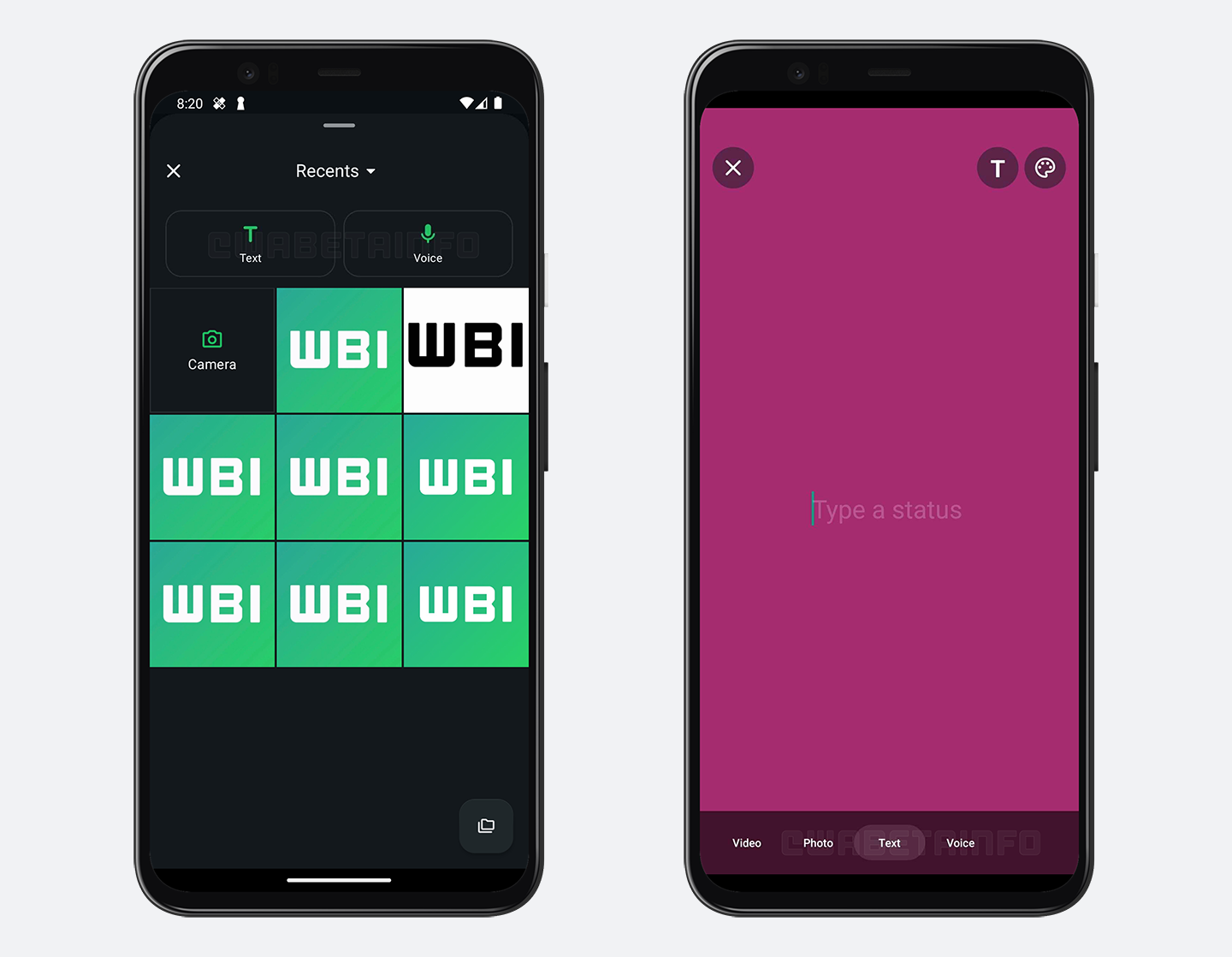
As you can see from the attached screenshot, some beta testers can explore a new feature that simplifies the process of sharing status updates and improves its accessibility. Specifically, when tapping the floating action button within the Updates tab, users will now see two additional shortcuts inside the gallery sheet. These shortcuts allow users to quickly create text-based updates or share voice messages as status updates. Through these two new entry points, WhatsApp makes it even more intuitive to share different types of updates beyond just photos and videos.
In addition, WhatsApp has introduced a dedicated shortcut for recording voice messages directly within the status update creation screen. Previously, the option to record voice status updates was unified with the feature for creating text-based status updates. By separating these options, WhatsApp is making voice status updates even more visible and accessible, as users can now easily identify and access this feature without the need to select the tab to create text status updates.
This change is particularly beneficial for users who may not have been aware that they could already share voice messages as status updates. By highlighting this feature separately, WhatsApp encourages more users to experiment with voice status updates and discover new ways to communicate with their contacts. It is worth noting that some users may have a different interface configuration compared to the one shown in the screenshot. However, the layout we have shared is the most recent and updated version that WhatsApp is currently rolling out to a limited number of users.
A feature to improve accessibility to status creation tools is available to some beta testers who install the latest updates of WhatsApp beta for Android from the Google Play Store, and it is rolling out to even more people over the coming weeks.
Stay up-to-date on WhatsApp news by following WABetaInfo on X. You can also discover other new features for WhatsApp beta for Android, iOS, Web/Desktop, and Windows.
Do you like this news? Please, let us know on X: we love hearing your feedback! If you're curious to see where you can find WABetaInfo, there is a dedicated page where you can discover our services.
In addition, we have set up a Discord Server where you can chat with other people, get help and advice, and stay up to date with the latest announcements from WABetaInfo.