WhatsApp beta for Android 2.25.25.11: what's new?
WhatsApp has released a new Android update through the Google Play Beta Program, bringing the version up to 2.25.25.11.
What's new in this update? WhatsApp is rolling out a feature that allows users to quickly manage status privacy settings through a new interface, and it's available to some beta testers!
| Key Points | Details |
|---|---|
| Name of the feature: | Manage status privacy settings |
| Status: | Rolling out |
| Compatibility: | WhatsApp beta for Android 2.25.25.11 has been designated as a compatible update, but some users may experiment with the same feature by installing certain previous updates. |
| Availability info: | This feature is available to some beta testers, and it is rolling out to more users over the coming weeks. |
| Thanks: | Saadh Jawwadh, shw_9876, Muhammad Hammad, and kingcyrious, for testing and reporting. |
| Previous news: | WhatsApp Introduces Threaded Message Replies for More Organized Conversations! |
MANAGE STATUS PRIVACY SETTINGS
In the article about the WhatsApp beta for Android 2.25.25.2 update, we announced that a feature that lets users share status updates with their close friends was under development. This functionality will allow users to publish updates visible only to a small, curated group, instead of their entire contact list. The feature aims to offe a sense of exclusivity, as recipients will be able to identify when a status has been shared only with close friends thanks to a subtle visual indicator. It appears that WhatsApp is now working to improve the procedure for selecting the recipients of a status update, making the process faster and more intuitive. Following the release of the latest WhatsApp beta for Android 2.25.25.11 update, which is available on the Google Play Store, we discovered that WhatsApp is rolling out a feature that allows users to quickly manage status privacy settings through a new interface!
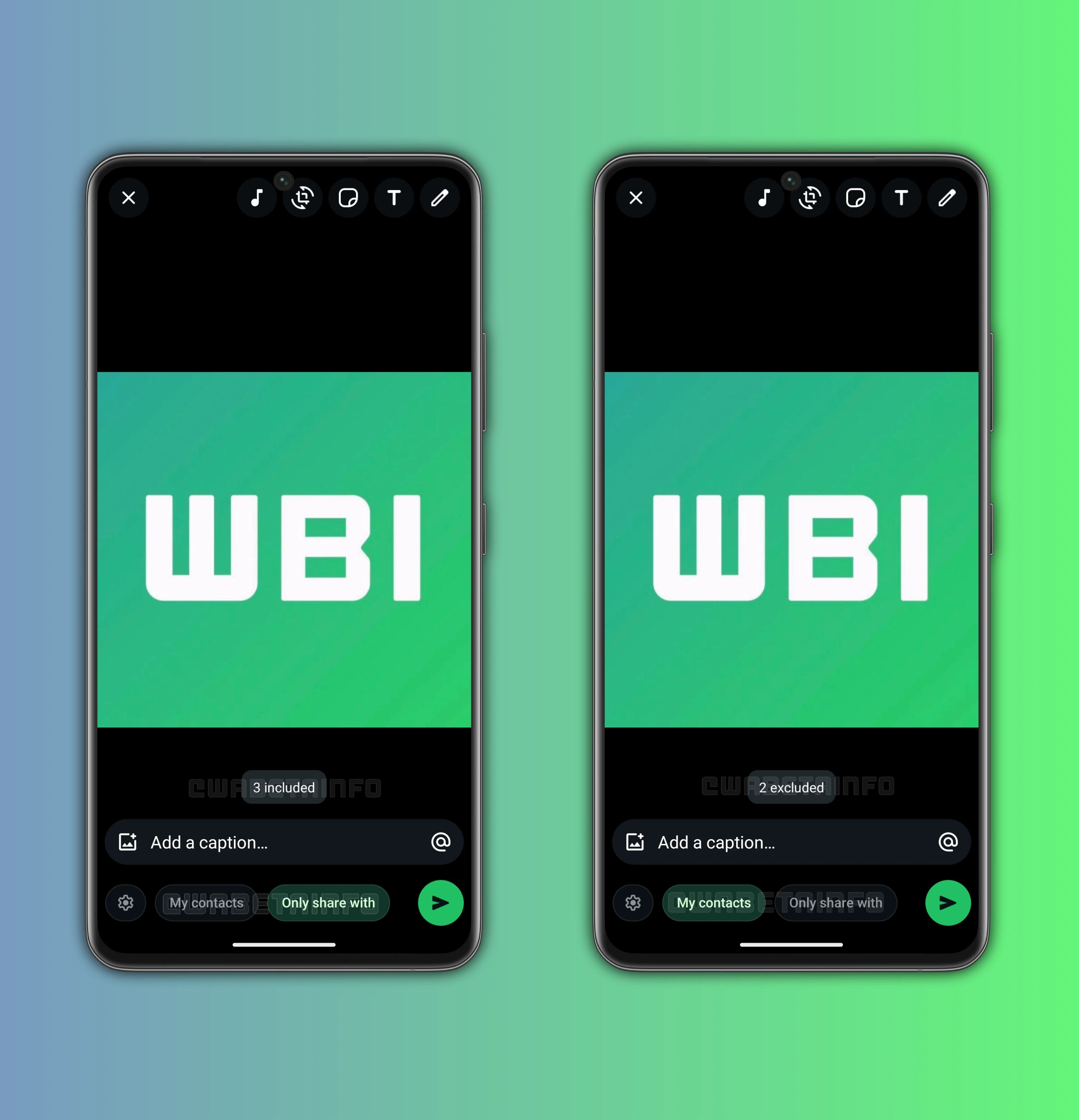
As you can see from the attached screenshot, some beta testers can explore a new feature designed to enhance the way users share their status updates with their contacts. Specifically, WhatsApp is currently redesigning the interface in the drawing editor screen to make audience selection more streamlined for status updates. At the bottom of the screen, it's possible to find new audience chips that resemble the filters available in the Chats tab. These chips let users instantly switch between different their privacy settings, such as "My Contacts" and "Only Share With". By tapping on one of these chips, users can define who will be able to view their status update before posting it, without having to leave the drawing editor screen or adjust settings separately in the privacy menu.
When the "Only Share With" option is selected, the update will only be delivered to a specific list of contacts. This list is defined by the user in the privacy settings screen, ensuring that the chosen audience is carefully selected. As always, this gives users greater control over their content and allows them to share updates only with the people they trust. It also reduces the risk of oversharing by ensuring that more sensitive updates remain restricted to a smaller circle.
On the other hand, when the "My Contacts" option is selected, two different scenarios may occur. If the user has previously excluded some contacts from viewing their status updates, then the update will be delivered to all contacts except those exclusions. This means the system respects existing privacy configurations while still allowing for quick changes through the button to open privacy settings directly from the drawing editor. If the user has never excluded any contacts, then the update will be delivered to the entire contact list without exceptions. This approach guarantees that users can easily broadcast updates to everyone in their network without additional steps.
This system allows users to experiment with a more flexible way to manage visibility based on the context of the update. Each time a user taps on one of one of the privacy options, a toast appears showing either the number of excluded contacts or the number of people who will receive the status update, depending on the chosen privacy setting. This also saves time, as users no longer need to navigate deep into the app settings or open the menu from the drawing editor interface to make quick adjustments.
In the past, users could already choose a different privacy setting before sharing a status update, but this required opening a separate menu. While that menu is still available for making quick changes to the list of contacts to exclude or include, the privacy settings are now placed prominently at the bottom of the interface, making them easier to access. By bringing the ability to quickly select the privacy setting directly into the drawing editor screen, WhatsApp is making audience management a more seamless part of the sharing process.
The introduction of this redesigned interface can also be seen as a preview of how audience selection will work once the close friends feature is fully available. In fact, the new chips hint at how WhatsApp plans to integrate different layers of privacy settings into a single, accessible place. By using the same mechanism, WhatsApp could easily add a third chip dedicated to close friends in a future update.
A feature that allows users to quickly manage status privacy settings through a new interface is available to some beta testers who install the latest updates of WhatsApp beta for Android from the Google Play Store, and it is rolling out to even more people over the coming weeks.
Following WABetaInfo on X is the best way to stay informed about new features under development and those released to WhatsApp beta for Android, iOS, Web, and Desktop. We love hearing your feedback, so let us know what you think! You can also explore our dedicated page to discover all our services, or join our Discord Server to chat with others, get help and advice, and stay up to date with the latest WABetaInfo announcements.