WhatsApp beta for Android 2.25.22.22: what's new?
WhatsApp has released a new Android update through the Google Play Beta Program, bringing the version up to 2.25.22.22.
What's new in this update? WhatsApp is rolling out a feature that lets users personalize their status with disappearing settings, and it's available to some beta testers!
| Common questions | Answers |
|---|---|
| Name of the feature? | Status with disappearing settings |
| Status? | Rolling out |
| Compatibility? | WhatsApp beta for Android 2.25.22.22 has been designated as a compatible update, but some users may get the same feature by installing the previous update. |
| I've installed this update but I don't have this feature. Why? | This feature is available to some beta testers, and it is rolling out to more users over the coming weeks. |
| Thanks: | Sniper, shw_9876, UnluckyTester, Kingcyrious, Lukkkas, Nicky, techworldaleant, Technical MJ TV, and Shahzer khan, for testing and reporting. |
| Previous news? | WhatsApp Launches New Safety Tools for Group Chats to Enhance User Security! |
STATUS WITH DISAPPEARING SETTINGS
In the article about the WhatsApp beta for Android 2.25.21.17 update, we announced that a feature to add disappearing options to status was under development. This feature will allow users to set expiration times for the "About" section on their profiles, so the information automatically disappears after a chosen duration. It aims to give users greater control over their shared profile details by reducing outdated or irrelevant content. It seems that WhatsApp is now testing this feature with the public, as some beta testers have started seeing signs of the new functionality appear in their app. Following the release of the latest WhatsApp beta for Android 2.25.22.22 update, which is available on the Google Play Store, we discovered that WhatsApp is rolling out a feature that lets users personalize their status with disappearing settings!
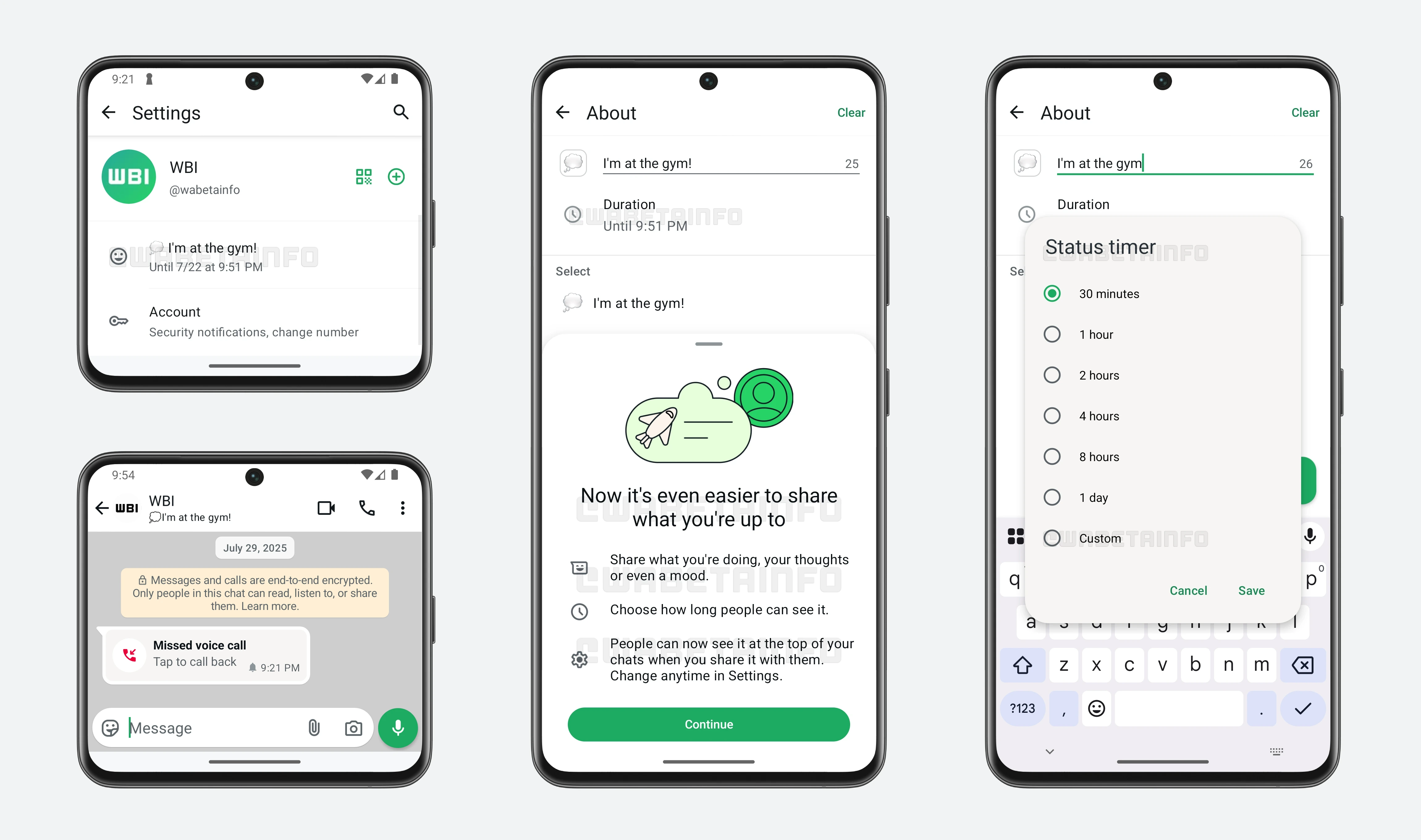
As you can see from the attached screenshot, some beta testers can now explore new disappearing options for the "About" section, allowing them to set a timer for their status that automatically removes it after a chosen duration. The "About" section is a short note or status that users add to their profiles to share a phrase, mood, or current activity with their contacts. Traditionally, if a user did not update their status, the information would remain permanent and visible on their profile indefinitely. This sometimes caused profiles to display outdated or irrelevant details. Now, with the introduction of disappearing options for the "About" section, users gain more control over what information is visible and for how long.
When users update their status with an expiring option, the information will automatically vanish after the selected time period, reducing the chance of unnecessary or outdated status remaining visible. The first updated status shared by the user will be displayed prominently at the top of their conversation, making it easier for contacts to notice the latest updates without having to visit the profile page. This ensures that the user's current mood or activity is communicated clearly during chats.
Users can choose from a set of preset timers for their status expiration, ranging from as short as 30 minutes up to 1 day. To offer even greater flexibility, WhatsApp has also introduced a custom timer option, allowing users to select any specific duration up to 1 month that fits their unique needs. This added control allows the status to suit a wide range of situations, such as a quick outing, a weekend trip, or attending a special event. When a user shares a particular status that appears in the conversation header, it can also help others understand whether it's a good time to reach out or not, based on the message conveyed by the status. The temporary status will alternate with the last seen information in the conversation header, allowing contacts to easily view both updates without missing context.
Once the status timer is set, the status will be visible to those contacts permitted by the user's privacy settings, both within conversations and on the profile page. Additionally, the expiration time will be clearly indicated within the app's settings, where users can review when their status is set to disappear. This transparency helps users keep track of their profile updates easily, as they can see exactly how long their status will remain active and manage or change it before it expires if needed.
When setting a status, users can also associate an emoji to better express or symbolize their current activity or mood. For example, if a user is on vacation, they might choose the palm tree emoji or the suitcase emoji to visually represent their status. This adds a personal touch and makes the status more engaging to viewers. After the timer expires, the status will automatically disappear from the user's profile, but it will still be saved in the status history within the settings. This history is accessible only to the user who posted the status, allowing them to revisit previous updates if needed. This way, users have a private record of their past statuses without cluttering their current profile.
Users also retain full control to update or remove their status at any time before it expires, so they don't have to wait for the timer to run out if they want to change their message or clear it immediately. The new disappearing status feature is designed to keep the profile information relevant and under the user's control. It reduces the chances of outdated messages staying visible and cluttering the profile, ensuring that contacts always see the most up-to-date status.
A feature that lets users personalize their status with disappearing settings is available to some beta testers who install the latest updates of WhatsApp beta for Android from the Google Play Store, and it is rolling out to even more people over the coming weeks.
Stay up-to-date on WhatsApp news by following WABetaInfo on X. You can also discover other new features for WhatsApp beta for Android, iOS, Web/Desktop, and Windows.
Do you like this news? Please, let us know on X: we love hearing your feedback! If you're curious to see where you can find WABetaInfo, there is a dedicated page where you can discover our services.
In addition, we have set up a Discord Server where you can chat with other people, get help and advice, and stay up to date with the latest announcements from WABetaInfo.