WhatsApp beta for Android 2.25.22.14: what's new?
WhatsApp has released a new Android update through the Google Play Beta Program, bringing the version up to 2.25.22.14.
What's new in this update? WhatsApp is rolling out a feature that allows users to open their profile settings from the Chats tab, and it's available to some beta testers!
| Common questions | Answers |
|---|---|
| Name of the feature? | Open profile from the Chats tab |
| Status? | Rolling out |
| Compatibility? | WhatsApp beta for Android 2.25.22.14 has been designated as a compatible update. |
| I've installed this update but I don't have this feature. Why? | This feature is available to some beta testers, and it is rolling out to more users over the coming weeks. |
| Thanks: | Sniper, Akan, and Shahzer khan, for testing and reporting. |
| Previous news? | WhatsApp beta for Android 2.25.22.13: what's new? WhatsApp is working on a feature that lets users communicate with people who don't have an account! |
OPEN PROFILE FROM THE CHATS TAB
In the article about the WhatsApp beta for Android 2.25.10.14 update, we announced that an advanced chat privacy feature to limit message sharing was under development. With the same update, WhatsApp was also developing redesigned chat filters to improve the user interface, along with a new shortcut in the top app bar to quickly access the profile screen. This would have allowed users to view and manage their profile details more efficiently, without needing to navigate through the settings menu. It appears that WhatsApp is now testing this feature with the public, as some beta testers have started seeing signs of the new functionality appear in their app. Following the release of the latest WhatsApp beta for Android 2.25.22.14 update, which is available on the Google Play Store, we discovered that WhatsApp is rolling out a feature that allows users to open their profile settings from the Chats tab!
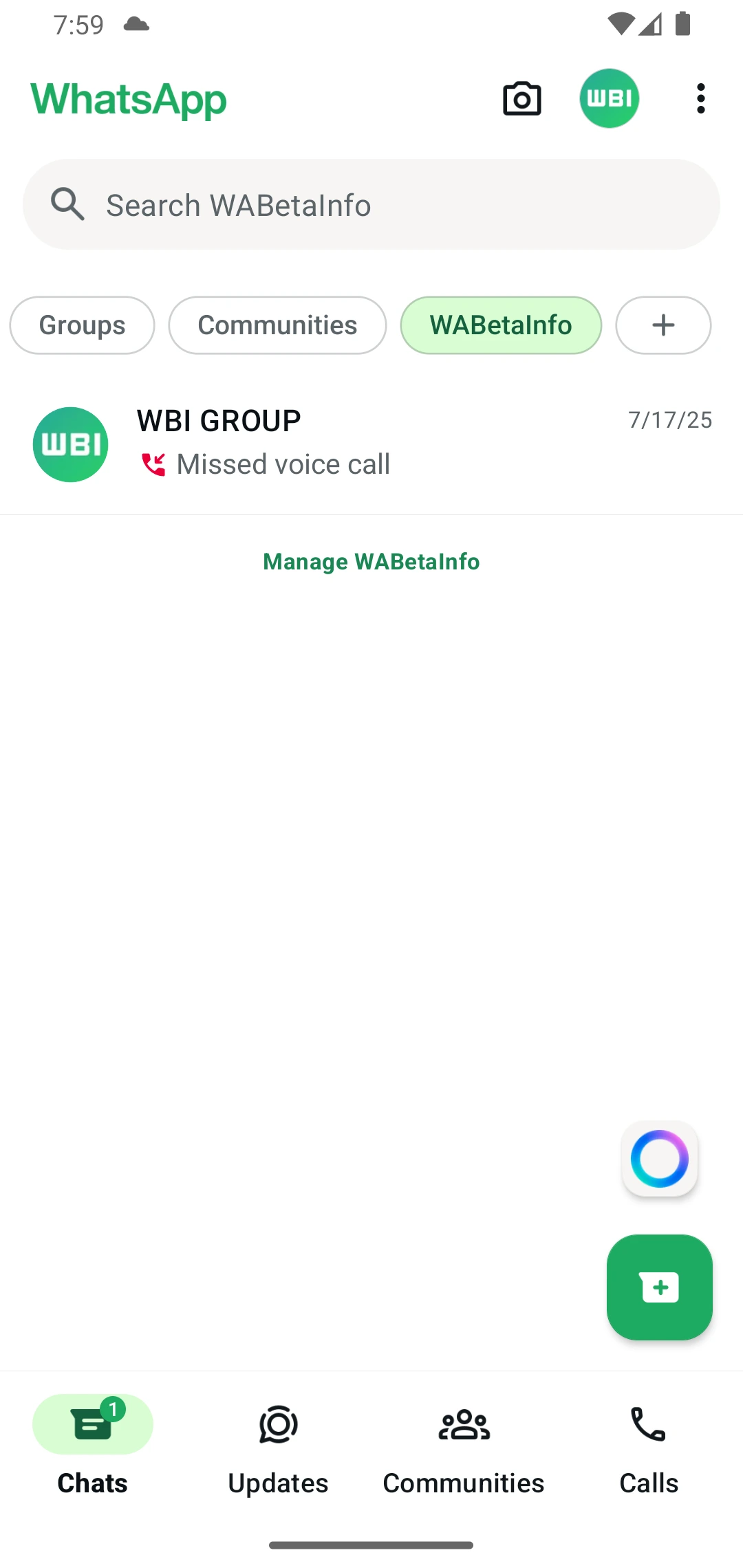
As you can see from the attached screenshot, some beta testers can now explore a new entry point by tapping their profile photo, conveniently located in the top app bar. This shortcut is designed to streamline navigation by giving users direct access to their profile settings with a single tap. Placing the shortcut in the top app bar ensures it is easily reachable and visible across the main screens of the app, especially in the Chats tab where users spend most of their time. It also aligns with modern design principles, keeping frequently accessed actions within immediate reach.
It's worth noting that this isn't the first time WhatsApp has experimented with such a shortcut. With the WhatsApp beta for Android 2.23.18.7 update, WhatsApp briefly tested a similar entry point that allowed users to open the settings menu directly from the top app bar. However, that shortcut was later removed following various user interface adjustments aimed at decluttering the app's top-level navigation. Now, WhatsApp seems to be reintroducing a similar concept, but with a more focused purpose: giving users quick access specifically to their profile screen.
The new shortcut may also encourage users to update their profile details more often, as the section is now more visible and accessible. In addition, placing the profile icon directly in the top app bar may help users immediately recognize which account they are currently using. This is particularly useful for those who manage multiple WhatsApp accounts, as it provides a quick visual confirmation of their active profile. Displaying the profile photo in such a prominent position helps reduce the chances of mistakenly sending messages from the wrong account, especially in environments where users frequently switch between personal and work profiles.
A feature that allows users to open their profile settings from the Chats tab is available to some beta testers who install the latest updates of WhatsApp beta for Android from the Google Play Store, and it is rolling out to even more people over the coming weeks.
Stay up-to-date on WhatsApp news by following WABetaInfo on X. You can also discover other new features for WhatsApp beta for Android, iOS, Web/Desktop, and Windows.
Do you like this news? Please, let us know on X: we love hearing your feedback! If you're curious to see where you can find WABetaInfo, there is a dedicated page where you can discover our services.
In addition, we have set up a Discord Server where you can chat with other people, get help and advice, and stay up to date with the latest announcements from WABetaInfo.