WhatsApp beta for Android 2.25.21.23: what's new?
WhatsApp has released a new Android update through the Google Play Beta Program, bringing the version up to 2.25.21.23.
What's new in this update? WhatsApp is rolling out a feature to import profile photos directly from Facebook or Instagram, and it's available to some beta testers!
| Common questions | Answers |
|---|---|
| Name of the feature? | Profile photo from Facebook or Instagram |
| Status? | Rolling out |
| Compatibility? | WhatsApp beta for Android 2.25.21.23 has been designated as a compatible update. |
| I've installed this update but I don't have this feature. Why? | This feature is available to some beta testers, and it is rolling out to more users over the coming weeks. |
| Thanks: | Muhammad Hammad, for testing and reporting. |
| Previous news? | WhatsApp beta for iOS 25.21.10.71: what's new? WhatsApp is rolling out a feature that shows how many people are typing a message in a group chat! |
PROFILE PHOTO - FACEBOOK AND INSTAGRAM
In the article about the WhatsApp beta for Android 2.25.18.14 update, we announced that a feature that allows users to add an avatar to their profile was available. This feature lets users display both their personal profile photo and a customized avatar side by side, offering a dual visual identity on their profile. It includes options for background color selection and animation effects, and introduces a coin flip animation that creatively alternates between the avatar and profile photo on the chat info screen. It seems that WhatsApp aims to provide users with more tools to personalize their profile image, making the experience more convenient and user-friendly. Following the release of the latest WhatsApp beta for Android 2.25.21.23 update, which is available on the Google Play Store, we discovered that WhatsApp is rolling out a feature to import profile photos directly from Facebook or Instagram!
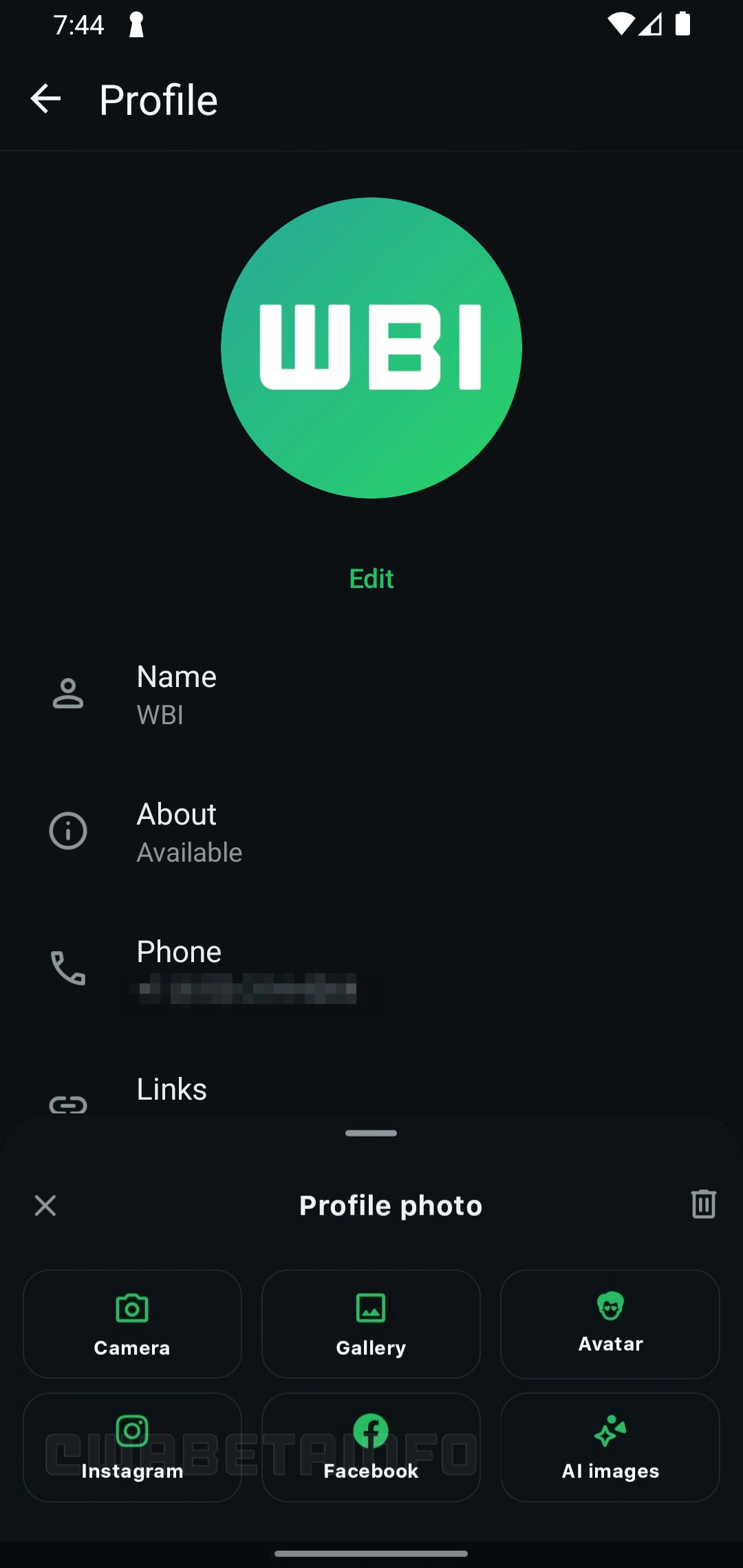
As you can see from the attached screenshot, some beta testers can explore a new option that allows them to choose a photo from Facebook or Instagram. Users can import a photo by opening the profile section in their WhatsApp settings, where they typically change their profile picture. Alongside the existing options, such as selecting an image from the gallery, taking a new photo with the camera, creating an AI-generated profile picture, or setting an avatar, users can now also import their profile photo from Facebook or Instagram.
Previously, users who wanted to use their Instagram or Facebook profile photo on WhatsApp had to manually download it or take a screenshot, especially if the original image was no longer saved locally on their device. This new update streamlines the process significantly by allowing WhatsApp to automatically fetch the selected image from the linked Meta account and apply it directly as a profile picture.
To enable this integration, users may need to link their WhatsApp account to the Meta Accounts Center. Accounts Center is a centralized hub designed to manage how WhatsApp connects with other Meta platforms like Facebook and Instagram. It gives users more control over how their data is used across services, and offers convenient features such as single sign-on, content cross-posting, and centralized avatar management.
This integration is still optional and turned off by default, so users retain full control over their experience. It's important to note that linking WhatsApp to Accounts Center does not affect the app's core privacy protections. End-to-end encryption will continue to protect personal messages and calls, and the integration remains limited to optional features, such as importing profile photos from Facebook or Instagram, and these do not compromise the privacy of user conversations.
A feature to import profile photos directly from Facebook or Instagram is available to some beta testers who install the latest updates of WhatsApp beta for Android from the Google Play Store, and it is rolling out to even more people over the coming weeks.
Stay up-to-date on WhatsApp news by following WABetaInfo on X. You can also discover other new features for WhatsApp beta for Android, iOS, Web/Desktop, and Windows.
Do you like this news? Please, let us know on X: we love hearing your feedback! If you're curious to see where you can find WABetaInfo, there is a dedicated page where you can discover our services.
In addition, we have set up a Discord Server where you can chat with other people, get help and advice, and stay up to date with the latest announcements from WABetaInfo.